A security operations center that runs itself: Cortex AI writes and repairs the detections, maps log sources it has never seen, triages and investigates, writes the reports, opens the tickets and requests the response. Everything runs inside one Snowflake account, and a human steps in only where a wrong decision would be expensive.
Code: github.com/sfc-gh-kkeller/snowflake-xdr. One command deploys the whole platform, with synthetic attack data, to a Snowflake account.
Not meant for production, and not endorsed by Snowflake. This is a personal project to inspire people about what’s possible on Snowflake. It is not an official Snowflake product, it has not been reviewed or endorsed by Snowflake, and it is not supported.
It was built fast with AI coding agents (yes, vibe coded) and has not been tested in production. The response connectors run in demo mode, and the Jira and ServiceNow connectors have not been run against live sites. Treat it as inspiration, not as a security product.
In 2024 I wrote about letting Snowflake raise incidents in your SIEM: one alert task, one failed-login check, one webhook. Snowflake as a well-behaved log source.
This project asks the opposite question. Security teams already land years of telemetry in Snowflake because a SIEM can’t afford to keep it (the hybrid security data lake pattern). Snowflake already has scheduled tasks, dynamic tables, Python and JavaScript procedures, containers, a web app runtime, and Cortex AI right next to that data. So how much of an XDR can you build out of those parts, and how much of the work can Cortex AI do on its own?
The answer to the first question is: most of one. The answer to the second surprised me more: nearly all of the routine work. A SOC normally needs people to write detection rules, fix them when log formats change, sift through false positives, investigate, write up incidents and file tickets. Here, Cortex AI does those jobs around the clock. The humans decide how much it’s allowed to do, approve the actions that could hurt, and can stop everything with one button.
Executive summary#
The problem. SIEM pricing is based on how much you ingest, so teams decide what not to log. Detection engineering is the real bottleneck: rules are slow to write, they break silently when a log format changes, and noisy ones get switched off. Analysts drown in triage. AI could help with all of it, but in a SOC an AI that dismisses alerts can also learn to hide an attack.
The approach. Keep the data in Snowflake, bring the security platform to it, and let Cortex AI run it. Logs arrive over standard OpenTelemetry. Detections are SQL. Cortex drafts rules, log mappings, triage opinions, investigation notes, reports and briefings, and a Cortex Agent can operate the whole platform in plain English. The automation is fenced in deliberately: every AI change goes through a per-change-type policy, new and repaired rules through a backtest and a shadow period, all of it lands in a ledger with one-click undo, and a single switch stops all automation.
What it shows.
- A fully automated loop, from a new log source connecting to a closed case, where Cortex AI does the work and humans approve the risky steps.
- Detection engineering that maintains itself: Cortex writes, repairs and tunes rules, and each type of change earns its autonomy from a measured track record.
- Verified coverage, not claimed coverage: every packaged rule proves daily that it fires on an attack fixture and stays quiet on a benign one.
- False-positive reduction that can’t silently hide attacks, because only humans train the suppression model and corroborated findings re-open themselves.
What it isn’t. A product. It runs on synthetic data, it hasn’t seen production volumes, and several of the outbound integrations are built but untested against real systems. The last section lists the gaps I’d close first.
From first log line to closed case, on autopilot#
Here’s what happens when a company connects a new system, with no analyst involved until the very end. Each step says who does the work.
- A new source starts sending logs over OpenTelemetry. The platform registers it as unknown. Cortex reads sample records and writes the mapping into the standard tables every detection reads, then deterministic checks validate it. By default a human approves the mapping with one click; like every change type, it can earn more autonomy over time.
- Detections switch themselves on. The vendor rule pack for that system installs in shadow mode as soon as its data arrives, and canaries inject attack and benign test events through the new mapping to prove each rule fires.
- Coverage gaps get filled. Cortex turns a one-line description of the business (“EU fintech, ransomware and insider theft”) into the ATT&CK techniques that matter, and ranks the gaps against the data that’s actually available. The Detection Autopilot, Cortex with a Claude model, writes rules for the top gaps, backtests them against labelled attacks, rewrites them when they miss, runs them in shadow and promotes them when they meet the policy.
- Something fires. A finding arrives within minutes, or in 12–22 seconds on the fast lane for EDR alerts. It gets a calibrated confidence score, a Cortex AI_CLASSIFY second opinion on whether it’s a false positive, and behaviour context from 30-day baselines. Known noise is suppressed, but only if it’s uncorroborated.
- Findings become an incident. Correlation groups them by entity and kill-chain stage, and Cortex writes the campaign story.
- The case investigates itself. P1 and P2 cases are investigated automatically: pivots, blast radius, Trust Center, threat intel, database activity. Cortex writes the investigation note and drafts the incident report, from facts computed in SQL only.
- A ticket opens in Jira or ServiceNow and stays in sync both ways.
- Response is requested. Low-risk actions (block the IOC, raise severity, open a ticket, start a hunt) run on their own. Containment (suspend the user in Okta or Entra, isolate the host in the EDR, strip a Snowflake user’s roles) waits for one human click, and each action can be undone.
- Next morning, Cortex writes the briefing, and Mission Control shows everything the AI did overnight, with an undo button on each action.
That’s the design principle: fully automated by default, human-gated where a mistake is expensive, and one button to stop it all.
Cortex AI does the thinking#
Cortex isn’t a chatbot bolted onto the side. It does a job at almost every stage, and every one of those jobs is a SQL function call inside a stored procedure or a scheduled task. In Snowflake, “automate it” just means “put it on a task schedule”. The data never leaves the account, and every model call runs under Snowflake roles and is logged like any other query.
| Job in the SOC | Cortex feature |
|---|---|
| Write, repair and tune detection rules | COMPLETE with claude-sonnet-4-5 (Detection Autopilot) |
| Map log sources it has never seen into the standard tables | COMPLETE (Autopilot new_parser changes) |
| Turn a business description into the ATT&CK techniques that matter | COMPLETE (threat profile) |
| Second opinion: is this finding a false positive? | AI_CLASSIFY |
| “Have we seen something like this before?” | AI_SIMILARITY over finding descriptions |
| Hunt across all telemetry, or re-check one entity for what rules missed | COMPLETE with MITRE ATT&CK context (hunting and detection agents) |
| Investigation notes, campaign stories, incident reports, daily briefings, executive reports | COMPLETE, writing only around figures computed in SQL |
| Behaviour anomalies per user and host | Cortex ML ANOMALY_DETECTION |
| Operate the platform in plain English | Ask XDR, a Cortex Agent: Cortex Analyst over a semantic view, Cortex Search over findings, and 25 custom tools (27 tools in total) |
Ask XDR is where it gets fun, because its tools don’t just read, they act. It can create and enable detection rules, add IOCs, update findings, work cases, approve or reject Autopilot changes, change the autonomy policy, request a response, undo an AI action, and chart its answers. Things you can type:
- “What did the Detection Autopilot change this week?”
- “Approve the T1005 rule” or “Require approval for new rules”
- “Is automation hiding any real attacks?”
- “Comment on this incident, open a ticket and give me the key”
- “What’s waiting for me?”, and “Undo that”
Every action the agent takes goes through the same procedures, guards and ledger as a click in the console. The agent gets no extra powers just because it can talk.
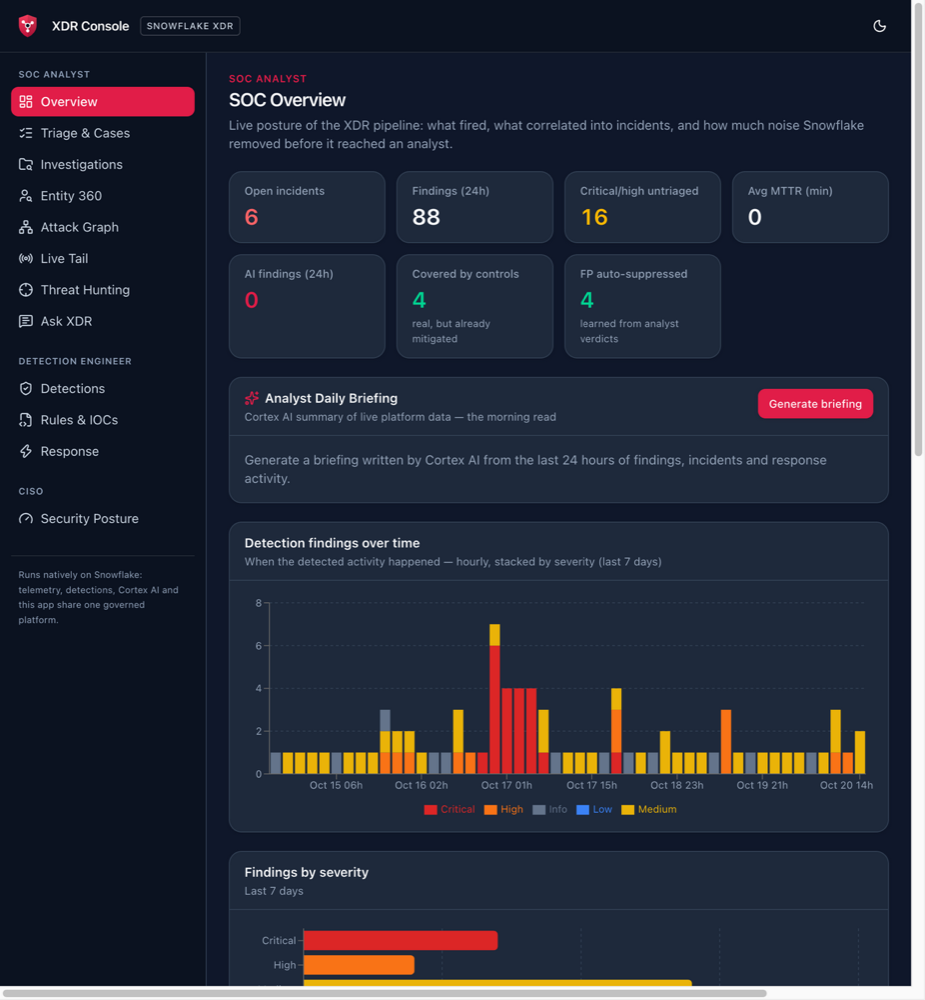
The analyst’s home view shows how much of the work never reaches a person. Findings already mitigated by an existing control are marked as covered, repeat false positives are suppressed by the model analysts trained, and Cortex writes the morning read from the last 24 hours:
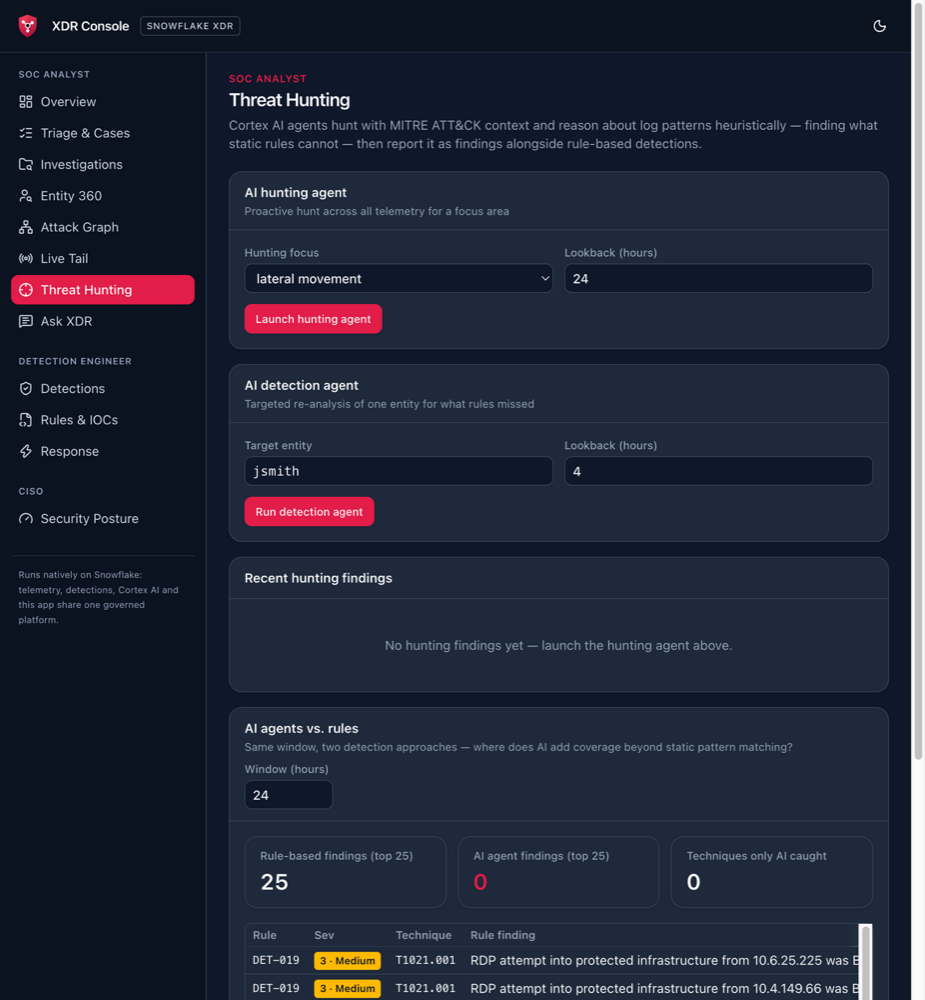
Cortex also hunts. The hunting agent sweeps all telemetry for a focus area such as lateral movement, the detection agent re-analyses one entity for what the rules missed, and a side-by-side view compares what AI agents find with what the rules find in the same time window. In this fresh demo build no hunt had run yet, so the AI side of the comparison is still empty:
By the numbers#
| Setup | 48 SQL scripts (about 19,000 lines), deployed by one idempotent command; a fresh build takes about 18 minutes |
| Built-in detections | 30 rules mapped to MITRE ATT&CK, plus ML anomaly detection, door rattling and protected-asset rules |
| Rule packs | 119 rules in 12 packs: Snowflake, AWS, Entra ID / Azure, Okta, Databricks, PostgreSQL, ClickHouse, Salesforce, CrowdStrike, Defender, SentinelOne, email |
| Sigma | 1,089 SigmaHQ community rules compiled to SQL without AI; all 3,802 condition branches verified to fire |
| Fast lane | 12–22 seconds from an EDR alert arriving to a finding, against a 120-second target |
| Analyst UI | Next.js app on Snowflake App Runtime, about 11,600 lines of TypeScript, with views for SOC analysts, detection engineers and the CISO |
| Cortex Agent | Ask XDR: 27 tools, including 25 custom actions over detections, cases, autonomy and response |
The architecture#
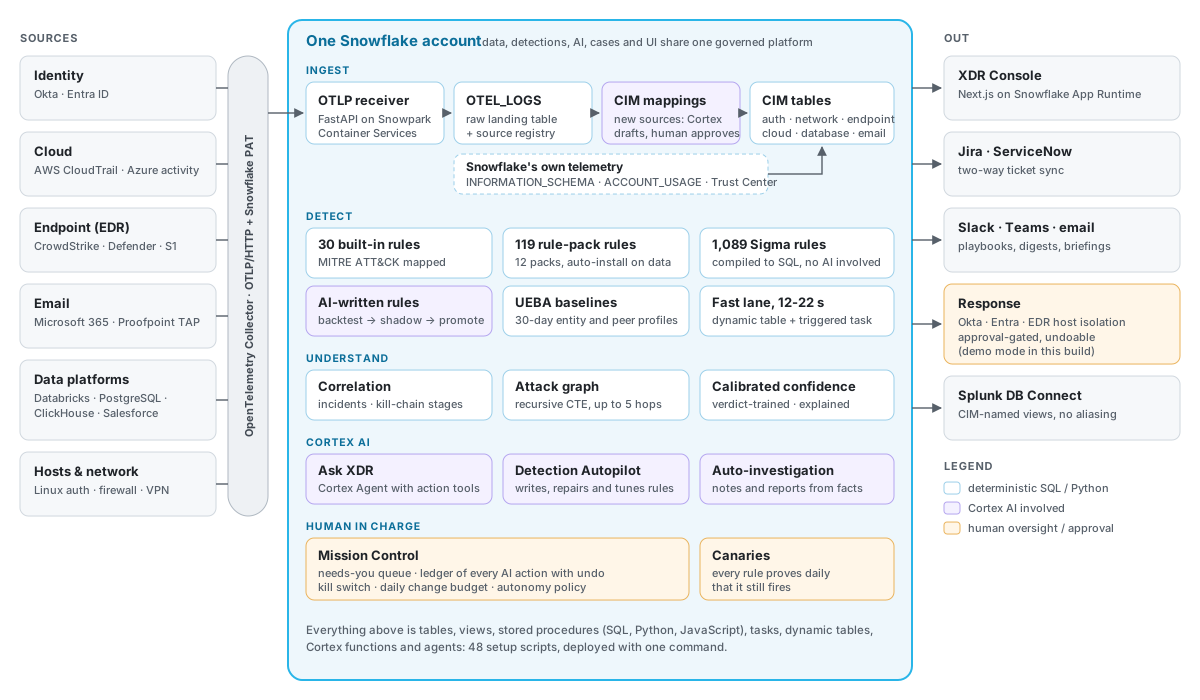
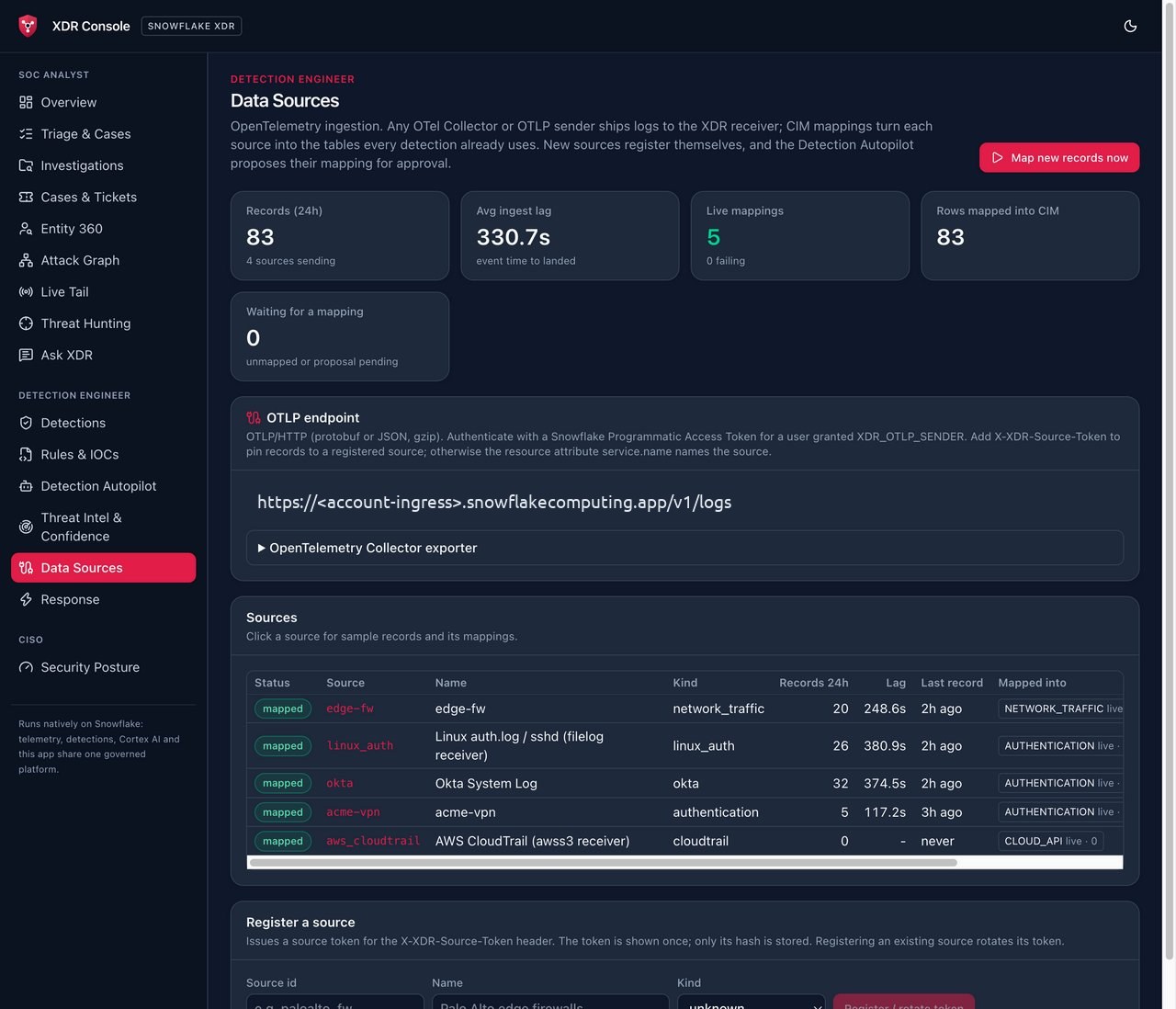
There’s no agent to install and no vendor SDK. Anything an OpenTelemetry Collector can read goes to a small OTLP/HTTP receiver running on Snowpark Container Services, which authenticates each request with a Snowflake programmatic access token. Records land in one table, RAW_LOGS.OTEL_LOGS. A mapping step turns each source into Splunk CIM-shaped tables (AUTHENTICATION, NETWORK_TRAFFIC, ENDPOINT, CLOUD_API, DATABASE_ACTIVITY, EMAIL_ACTIVITY and others), and every detection reads those tables. That one decision is what makes everything else portable: a CrowdStrike, Defender or SentinelOne process event becomes the same row, so the same rule works on any EDR.
Snowflake watches itself too. A fast lane reads INFORMATION_SCHEMA login and query history every five minutes, a history lane reads ACCOUNT_USAGE hourly, and open Trust Center findings become XDR findings.
Getting data in: new sources map themselves#
A collector only needs an exporter block:
exporters:
  otlphttp/xdr:
    logs_endpoint: https://<ingress>.snowflakecomputing.app/v1/logs
    compression: gzip
    headers:
      Authorization: Snowflake Token="${env:XDR_PAT}"
      X-XDR-Source-Token: ${env:XDR_SOURCE_TOKEN}   # optional, pins records to a registered source
The sending identity is a Snowflake service user whose PAT is restricted to a role that can call exactly one ingest procedure.
The interesting part is what happens with a source the platform has never seen. It registers as unmapped. On the next cycle, the Detection Autopilot reads sample records and has Cortex write the mapping: a SELECT from OTEL_LOGS into the right CIM table. The mapping is then validated before anyone sees it. It may only read OTEL_LOGS, every column must exist in the target table, and the required fields (time, action, user, source, destination) must be at least 95% filled. Mappings default to propose_only, so a human approves them. Approval backfills everything already received, and rollback deletes exactly the rows that mapping produced.
In the demo, an unknown key=value VPN log and a JSON firewall log were each mapped correctly on the first attempt, and the existing brute-force rule then fired on the new sources without any rule changes.
Detections: four ways in, one contract#
Every rule, wherever it comes from, follows the same contract: one read-only SELECT over SNOWFLAKE_XDR.RAW_LOGS that returns _time, user_name, src, dest, description. Thresholds and windows are applied by the engine. Here’s a rule from the Snowflake pack, a classic exfiltration path:
- id: SF-005
  name: Data unloaded to an external location
  severity: 4
  tactic: TA0010
  technique: T1537
  false_positives: Scheduled data-sharing exports; reverse ETL.
  sql: |
    SELECT _time, user_name, src, dest,
           'Unload by ' || user_name || ' (' || COALESCE(rows_affected, 0) || ' rows): '
             || LEFT(query_text, 250) AS description
    FROM SNOWFLAKE_XDR.RAW_LOGS.DATABASE_ACTIVITY
    WHERE vendor_product = 'snowflake' AND result = 'success' AND query_type = 'UNLOAD'
      AND (REGEXP_LIKE(query_text, '.*(s3|s3gov|azure|gcs)://.*', 'is')
           OR COALESCE(_raw:outbound_bytes::NUMBER, 0) > 0)
Each pack rule also ships fixtures: an attack row it must match (COPY INTO 's3://exfil-bucket/dump/') and a benign row it must not match (COPY INTO @db.s.internal_stage/out). Those fixtures matter a lot, as you’ll see below.
The four sources of rules:
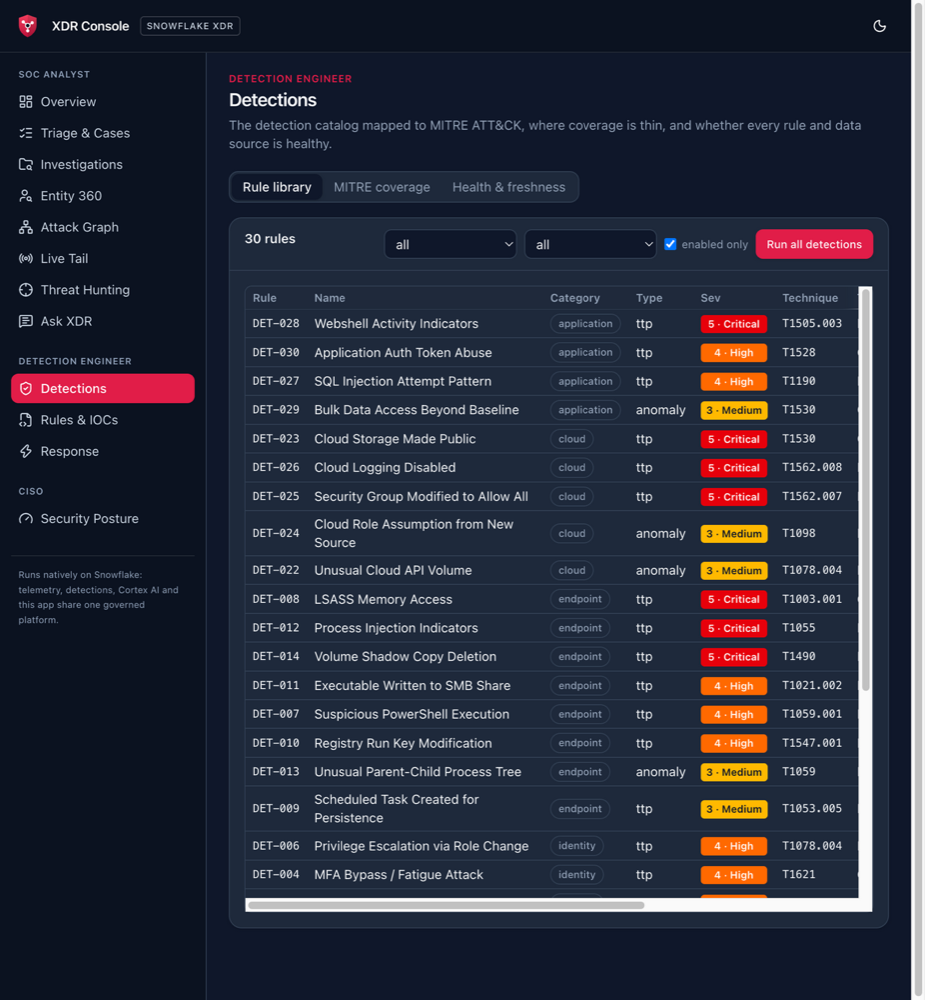
- Built-in rules: 30 stored procedures covering identity, endpoint, network, cloud and application attacks.
- Rule packs: 119 vendor-specific rules. They install themselves, in shadow mode first, as soon as data from that system arrives. Connect Databricks, and the Databricks pack switches on without anyone doing anything.
- Sigma: the SigmaHQ community library, compiled deterministically (more on that next).
- AI-written rules: drafted by Cortex for techniques nothing covers yet, then put through the gauntlet described in the Autopilot section.
Sigma, compiled and proven, without AI#
Sigma is the closest thing detection engineering has to a shared language, with thousands of community rules. Translating them is usually where things quietly go wrong: a rule with three alternative conditions gets converted, two of them work, and nobody notices the third never fires.
sigma/sigma_compiler.py is a deterministic compiler with no AI involved. It maps each Sigma logsource to a CIM table and field modifiers to ILIKE, REGEXP_LIKE and ARRAY_CONTAINS. Then it rewrites the rule’s condition into disjunctive normal form, an OR of ANDs, where each AND clause is one way the rule can fire. For each of those branches it synthesises a positive fixture, plus a negative that breaks one clause:
# simplified from sigma/sigma_compiler.py
def synthesise(src, tree):
    branches = dnf(nnf(tree))          # every way this rule can match
    positives = []
    for clause in branches:
        row = entity_row(src, build_row(src, clause))
        if evaluate(tree, row):        # the synthetic row must really match
            positives.append(row)
    ...
    # Negative: break one positive test of the first branch so the rule must not fire
A rule is only offered for installation after every branch has fired on its own fixture inside Snowflake. Of the 1,089 vendored rules (971 endpoint, 59 network, 59 cloud), all 3,802 branches currently fire. A weekly task pulls new Sigma releases through the same check.
Canaries test every branch separately, so a later “fix” (by a person or by the AI) that quietly drops a branch fails with “branch [2] of 2 did not fire” instead of passing.
The Detection Autopilot#
The most expensive part of running detections isn’t compute, it’s people writing and maintaining detection logic. The Autopilot runs that loop on its own, every six hours once you resume its task:
assess ──► propose ──► validate ──► decide (policy) ──► shadow ──► promote
  │                                    │                            │
  │  MITRE gaps, broken rules,         ├─ auto_live: apply now      └─ guardrail: auto-rollback
  │  analyst FP verdicts, noisy /      ├─ propose_only: wait for a human    on errors or floods
│ silent rules └─ off- Assess: uncovered techniques, rules that error, rules analysts keep marking as false positives, very loud rules, rules silent for 30 days.
- Propose: Cortex (a Claude model) writes or rewrites the rule SQL. Threshold tuning is plain arithmetic, no AI.
- Validate: a SQL guard (below), a test execution, then a 7-day backtest against labelled attack data: recall, total matches, benign matches, and matches on entities analysts have already cleared.
- Self-correct: a draft that misses labelled attacks gets the missed raw events as feedback and is rewritten, at most twice, and kept only if recall improves. Otherwise it’s retired and the technique is retried later.
- Shadow: the rule runs on schedule but writes to
SHADOW_FINDINGS, which no analyst sees. - Promote: once it’s been in shadow long enough and meets the policy’s recall and benign-match limits.
- Guardrail: a live AI change that errors, or produces more than 200 findings a day, is reverted from rule history automatically.
How far the Autopilot may go is a per-change-type policy, editable in the console, in SQL, or by asking the agent:
| Change type | Default | Notes |
|---|---|---|
new_rule | shadow, then promote | 24 h in shadow, recall ≥ 0.5, ≤ 10 benign matches |
fix_broken | shadow, then promote | 6 h in shadow |
tune_filter | shadow, then promote | must cut matches on false-positive entities without losing recall |
tune_threshold | live immediately | deterministic and reversible |
disable_noisy | propose only | a human always decides for built-in and severity 4–5 rules |
retire_silent | propose only | |
new_parser | propose only | new log source mappings |
Some limits can’t be lifted by any policy. The Autopilot never deletes data or rules, never edits a rule a human has pinned, never disables a built-in or severity 4–5 rule on its own, and every change is versioned so rollback is one click.
All machine-written SQL passes through one shared guard function before it runs:
-- abridged from DASHBOARDS.RULE_SQL_VIOLATION (setup/24_agent_actions.sql)
CASE
  WHEN NOT REGEXP_LIKE(TRIM(S), '^(SELECT|WITH)\\s.*', 'is')
    THEN 'must be a single SELECT (or WITH ... SELECT) statement'
  WHEN CONTAINS(S, ';') OR REGEXP_LIKE(S, '.*\\b(INSERT|UPDATE|DELETE|MERGE|DROP|CREATE|ALTER|GRANT|REVOKE|CALL|...)\\b.*', 'is')
    THEN 'must be read-only: no DML/DDL, CALL, multiple statements, or system functions'
  WHEN <any fully qualified object that is not SNOWFLAKE_XDR.RAW_LOGS.<table>>
    THEN 'may only read fully qualified SNOWFLAKE_XDR.RAW_LOGS.<table> objects'
END
String literals are blanked out first, so query_type = 'GRANT' counts as data, not as a statement. (A regex guard is a seatbelt, not a sandbox; I come back to that at the end.)
Threat-informed, not just gap-filling#
Gap-filling on its own would chase MITRE coverage percentages. Instead, you type who you are in Mission Control (“EU fintech, worried about ransomware and insider theft”). Cortex maps that to ATT&CK groups and techniques. The platform then adds what it knows about your environment: your own past incidents, which systems send data, your privileged identities, your sensitive-tagged and most-read tables, and CISA KEV entries for products you actually run. The backlog is ranked by threat × data available × coverage gap, and every proposal says why it was ranked where it is. When a new KEV entry matches your environment, the platform runs a 30-day retro-hunt, proposes a rule, and adds the exposure to the morning briefing.
False positives without blind spots#
This is my favourite part, because it’s where AI in a SOC usually goes wrong.
The classic setup: analysts mark findings as false positives, a model learns from those verdicts, and the model auto-dismisses similar findings. Then the model’s own dismissals feed back into training, and it gradually learns to suppress more and more. If an analyst made one wrong call, the attacker now has a permanent blind spot.
Five design decisions prevent that here:
- Verdict provenance. Every disposition records who made it: an analyst, a review, the FP model, a suppression, a compensating control, or the confidence model. Only human verdicts train the model.
- Narrow auto-suppression. Only low-confidence findings that match a learned human pattern and have no corroboration get dismissed.
- A safety net. A machine-dismissed finding that another detection corroborates, or that becomes high confidence, re-opens automatically.
- Spot checks. Every week, at least one finding per suppression pattern, plus a 10% sample, goes to a human. A “real attack” verdict revokes the suppression, re-opens everything it hid and retrains the model.
- Measurement. Views report how often each confidence band was confirmed, and the estimated miss rate and hidden true positives for each dismissal path.
Every finding carries a confidence score from 0 to 1 with a log-odds explanation of why: the rule’s measured precision (a Beta posterior over human verdicts, seeded by the backtest), this entity’s history with this rule, corroboration by other rules within 24 hours, membership in a correlated incident, the confidence of any matched threat-intel indicator, and an AI second opinion. Triage sorts by severity × confidence.
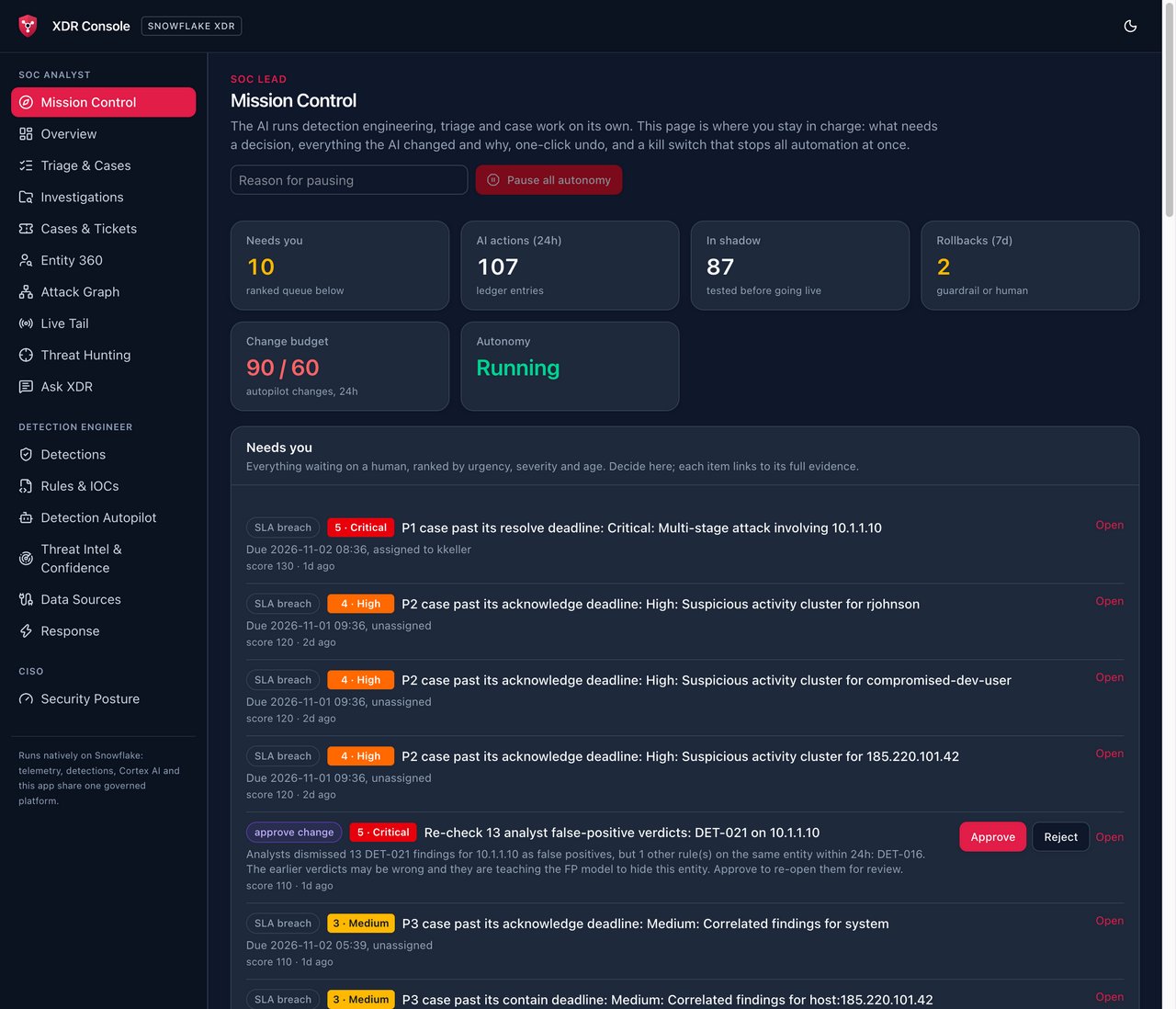
The demo story shows why this matters. Analysts dismissed rule DET-021 on two hosts: a scheduled vulnerability scanner, which is a correct call, and the real command-and-control beacon on 10.1.1.10, which is a mistake. The confidence model keeps the scanner suppressed, because it’s uncorroborated and spot-checked. The C2 findings re-open, because the beaconing rule DET-016 corroborates them. The Autopilot then asks a human to re-check the 13 earlier verdicts, because analysts may be teaching the model to hide this host. You can see that request in the Mission Control screenshot near the top: “Re-check 13 analyst false-positive verdicts: DET-021 on 10.1.1.10”.
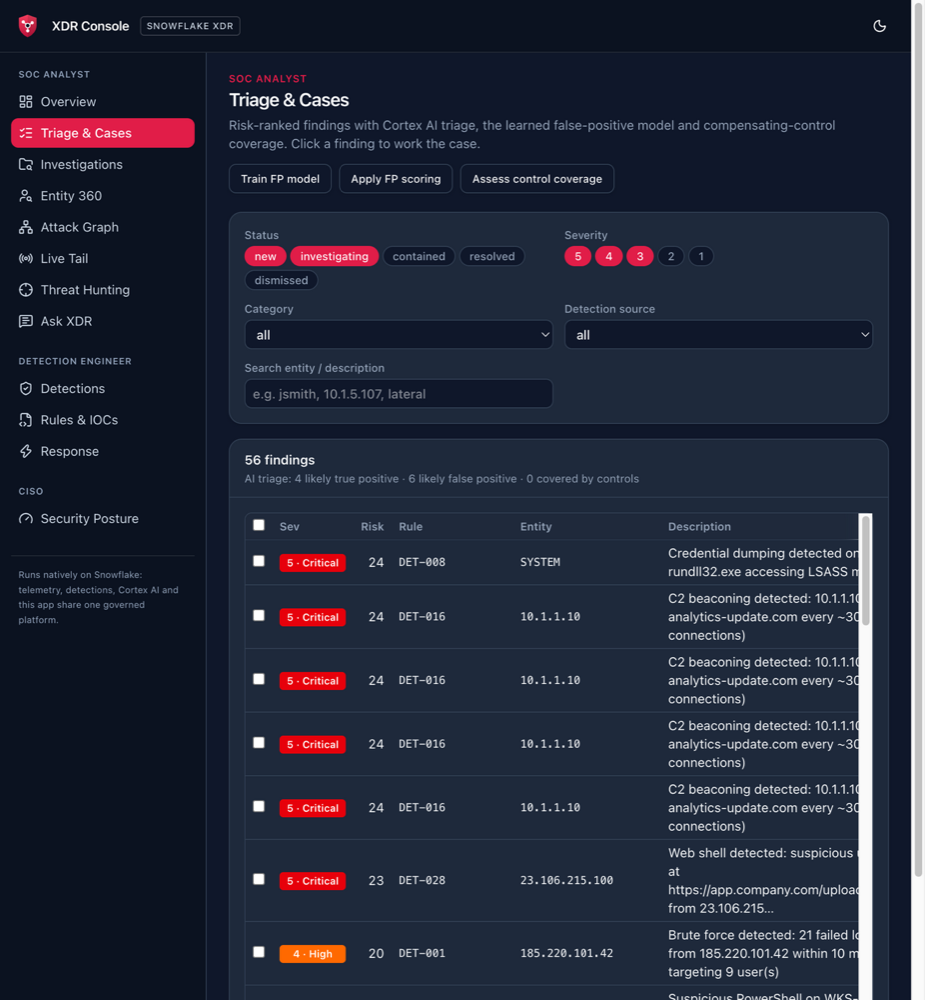
Behaviour baselines (UEBA) follow the same philosophy. Thirty-day profiles of each user, host and role don’t raise alerts of their own. An anomaly adds a capped, explained factor to an existing finding’s confidence. In the demo, an analyst with 12 normal days signs in from a new country and reads 1.5 million rows. The Snowflake “very large query result” rule (SF-006) fires, and its confidence rises from 30% to 66%, with every reason listed.
Investigations and the attack graph#
Findings are grouped into incidents by entity and kill-chain stage, each with an entity graph, an attacker timeline and an AI-written campaign story.
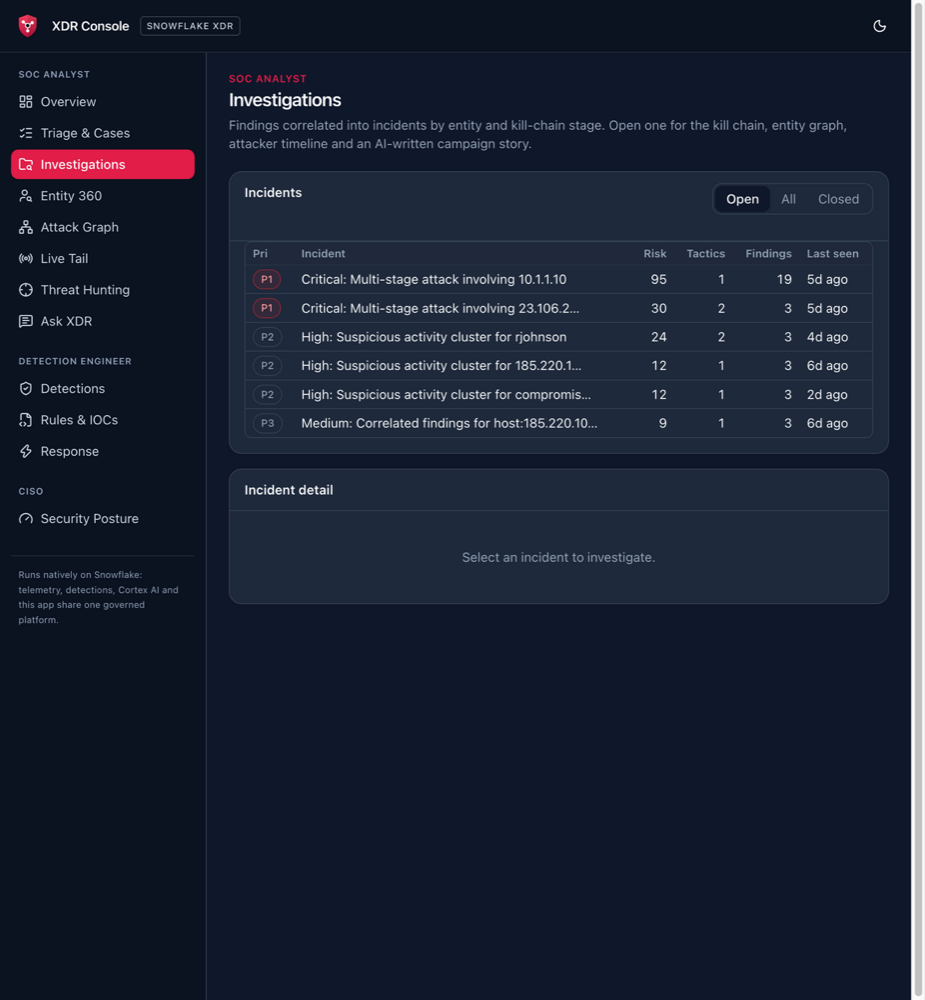
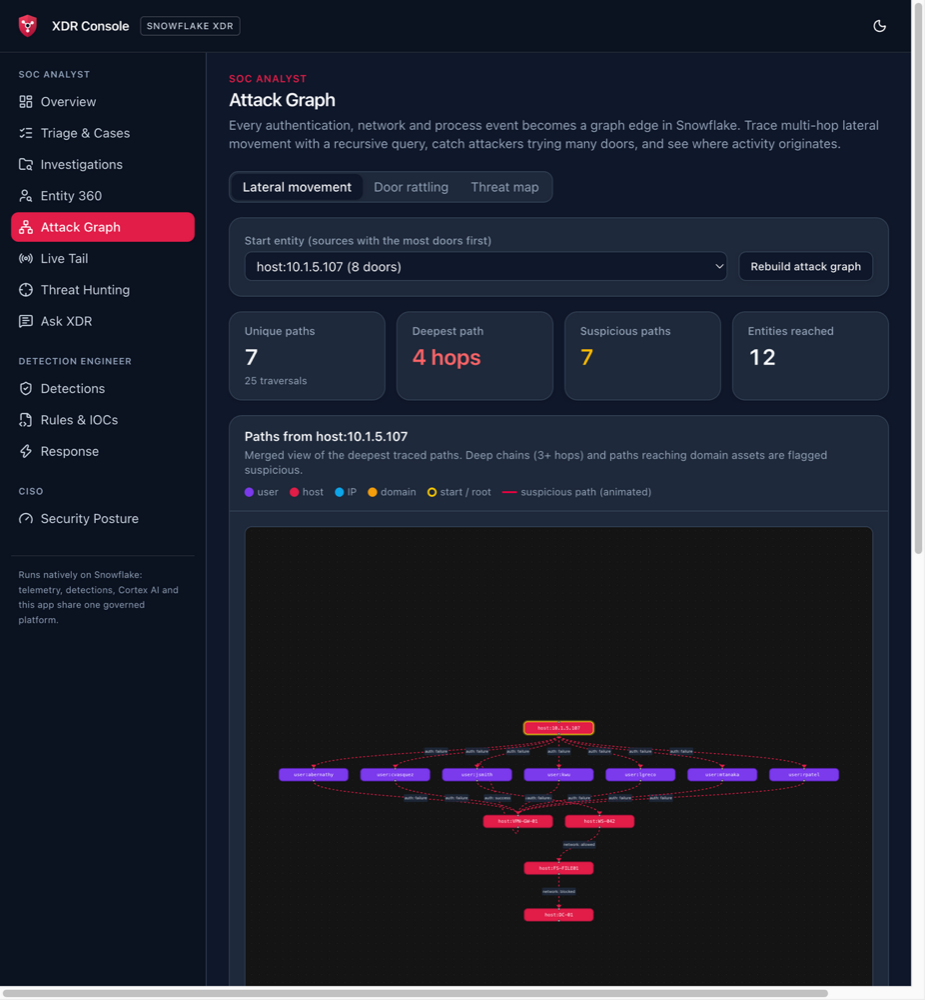
The attack graph turns every authentication, network, process and DNS event of the last seven days into an edge. Tracing lateral movement is then one recursive CTE: walk forward in time from a starting entity, never revisit a node, stop at five hops.
-- simplified from setup/16_attack_graph.sql (TRACE_ATTACK_PATHS)
WITH RECURSIVE walk AS (
    SELECT src_entity, dst_entity, _time, 1 AS hop,
           ARRAY_CONSTRUCT(src_entity, dst_entity) AS path_entities
    FROM SNOWFLAKE_XDR.DETECTIONS.ATTACK_PATH_EDGES
    WHERE src_entity = :P_START_ENTITY
    UNION ALL
    SELECT w.dst_entity, e.dst_entity, e._time, w.hop + 1,
           ARRAY_APPEND(w.path_entities, e.dst_entity)
    FROM walk w
    JOIN SNOWFLAKE_XDR.DETECTIONS.ATTACK_PATH_EDGES e
      ON e.src_entity = w.dst_entity
     AND e._time > w._time                                                   -- strictly forward in time
     AND ARRAY_POSITION(TO_VARIANT(e.dst_entity), w.path_entities) IS NULL   -- no cycles
    WHERE w.hop < 5
)
SELECT ... FROM walk ORDER BY hop DESC, _time ASC LIMIT 25;
Paths of three or more hops, or paths that reach domain infrastructure, are flagged. A second set-based query catches “door rattling”: one source touching many distinct targets within an hour, most of them failing.
In the demo campaign, 10.1.5.107 sprays VPN credentials across seven users, lands as jsmith, moves to workstation WS-042, then to file server FS-FILE01, and is stopped by a firewall at the domain controller DC-01:
Cases, tickets and response, with guardrails in SQL#
Incidents follow a NIST-style lifecycle (open → acknowledged → investigating → contained → eradicated → recovered → closed) with SLAs per priority, and MTTA, MTTC and MTTR metrics. Every state change, comment and task goes through a procedure that records the actor and whether it was a human, the agent, the Autopilot, a ticket system or the platform.
Incident reports are generated in a way I’d recommend for any AI reporting: every figure comes from SQL, and Cortex only writes the narrative around those facts. The model never computes a number.
Tickets sync both ways with Jira Cloud or ServiceNow (Security Incident Response or ITSM). Once a ticket exists, its workflow state wins; detection data stays authoritative in Snowflake. Only summaries and a console link leave Snowflake unless a connection explicitly allows raw evidence. A mock Jira tracker built into the console lets you demo the round trip without credentials.
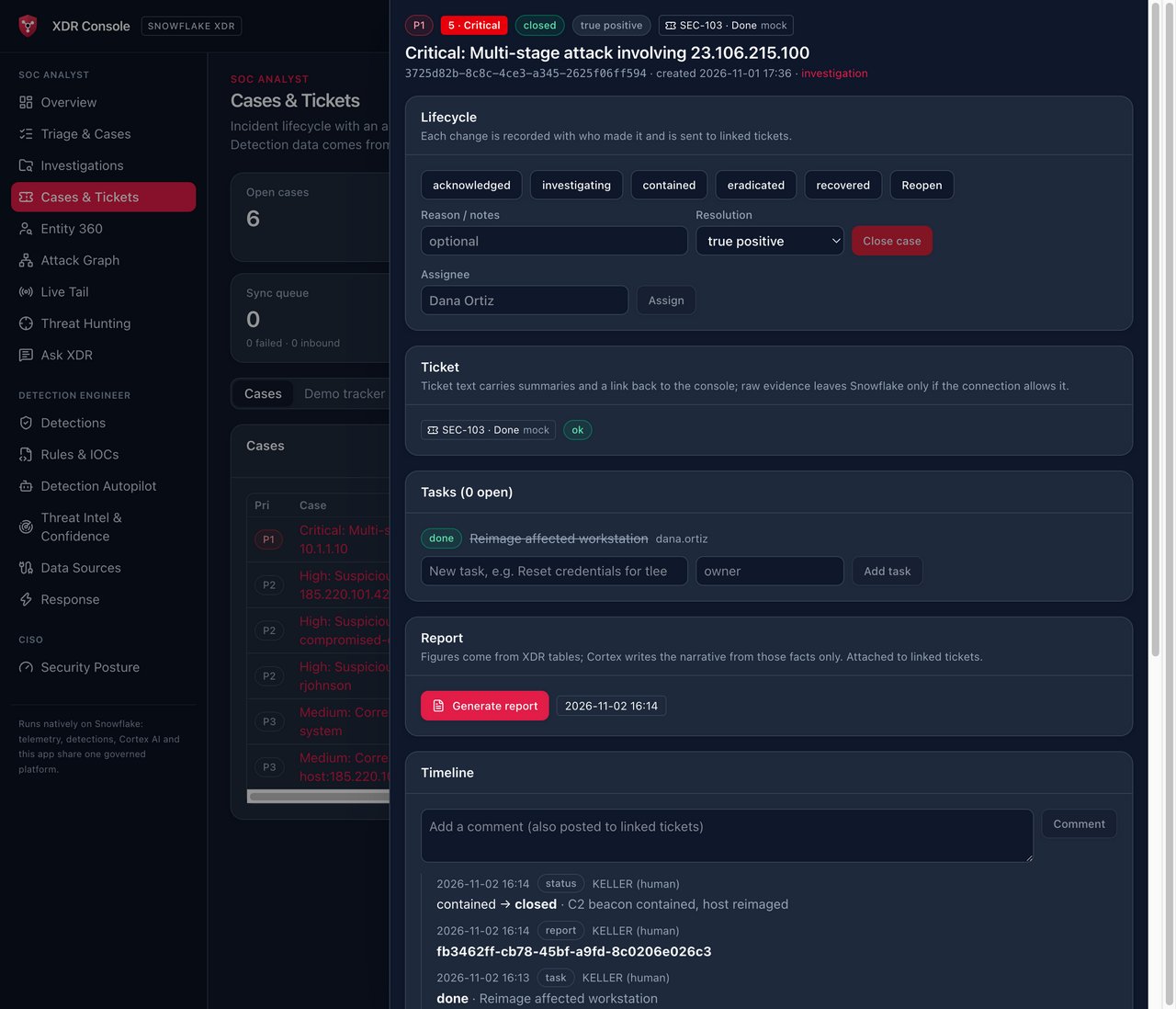
Response is where autonomy gets dangerous, so the guardrails live in SQL, not only in the UI. P1 and P2 cases are investigated automatically: pivots, blast radius, Trust Center, threat intel, database activity. The investigation then requests the response action that fits the entity, such as suspending the user in the identity provider they sign in with or isolating the host through the EDR it reports to.
The Snowflake action, contain_snowflake_user, removes every granted role except PUBLIC and records exactly what it removed, so undo restores it. It’s an owner’s-rights procedure that refuses unless every check passes:
# simplified from setup/39_response.sql (CONTAIN_SNOWFLAKE_USER, EXECUTE AS OWNER)
if run[0]["STATUS"] != "approved":
    return refuse(s, None, f"run is {run[0]['STATUS']}, it must be approved by a human first")
if not allowlisted(user):                    # RESPONSE_TARGET_ALLOWLIST
    return refuse(s, run_id, f"{user} is not on RESPONSE_TARGET_ALLOWLIST")
if user == caller:
    return refuse(s, run_id, "cannot contain the calling user")
held = {"ACCOUNTADMIN", "SECURITYADMIN", "ORGADMIN"} & set(roles)
if held:
    return refuse(s, run_id, f"{user} holds {', '.join(sorted(held))}; admins are never contained automatically")
The allowlist ships with exactly one entry, a login-disabled demo user. It deliberately doesn’t disable users or revoke tokens; those stay recommendations for a human.
The other connectors (Okta suspend and clear sessions, Entra disable and revoke sessions, CrowdStrike, Defender and SentinelOne host isolation, IOC blocking) go through one executor with the same guards. They ship in demo mode: the real vendor API request is built and stored on the run, but the effect is applied to a demo state table. Going live needs an external access integration and a secret per connector.
Mission Control: staying in charge#
If the AI runs detection engineering and first-line response, the human’s job changes from doing the work to supervising it. Mission Control is the home page for that:
- Needs you: one ranked queue of approvals, spot checks, response requests, SLA breaches, failed ticket syncs, failing canaries and autonomy promotions, each decided with one click.
- What the AI did: a ledger of every automatic change, with its reason, evidence and an undo button.
- Kill switch: one button stops the Autopilot, auto-suppression, pack installs, ticket routing and automatic response at once. Anyone on shift can pause it; only an admin can resume.
- Daily change budget, in total and per change type.
- Morning briefing by email and webhook at 07:00 UTC.
Autonomy is earned#
Two mechanisms decide how much rope the AI gets.
Canaries. Every day, each pack rule’s attack and benign fixtures are injected, for vendor-format fixtures through the real ingest procedure and the live mapping, and the platform checks that the rule fires on the first and stays quiet on the second. The canary data and anything it triggered are removed straight away. A failure lands in the needs-you queue and becomes a fix_broken change, so a broken parser shows up the same day instead of after the breach. The coverage shown in the console is verified coverage.
The trust ladder and track record. A weekly and monthly scorecard reports what the AI changed, what went live unattended, what was reversed, canary pass rates, and how precise AI-written rules are compared with pack rules, judged by analyst verdicts. Each change type is proposed for one step more autonomy once its approvals, canary pass rate and precision earn it, and drops back automatically after a rollback or canary failure. Every Monday, five unattended changes are sampled for review: “would you have made this change?” Disagreement demotes that change type one step.
The CISO view#
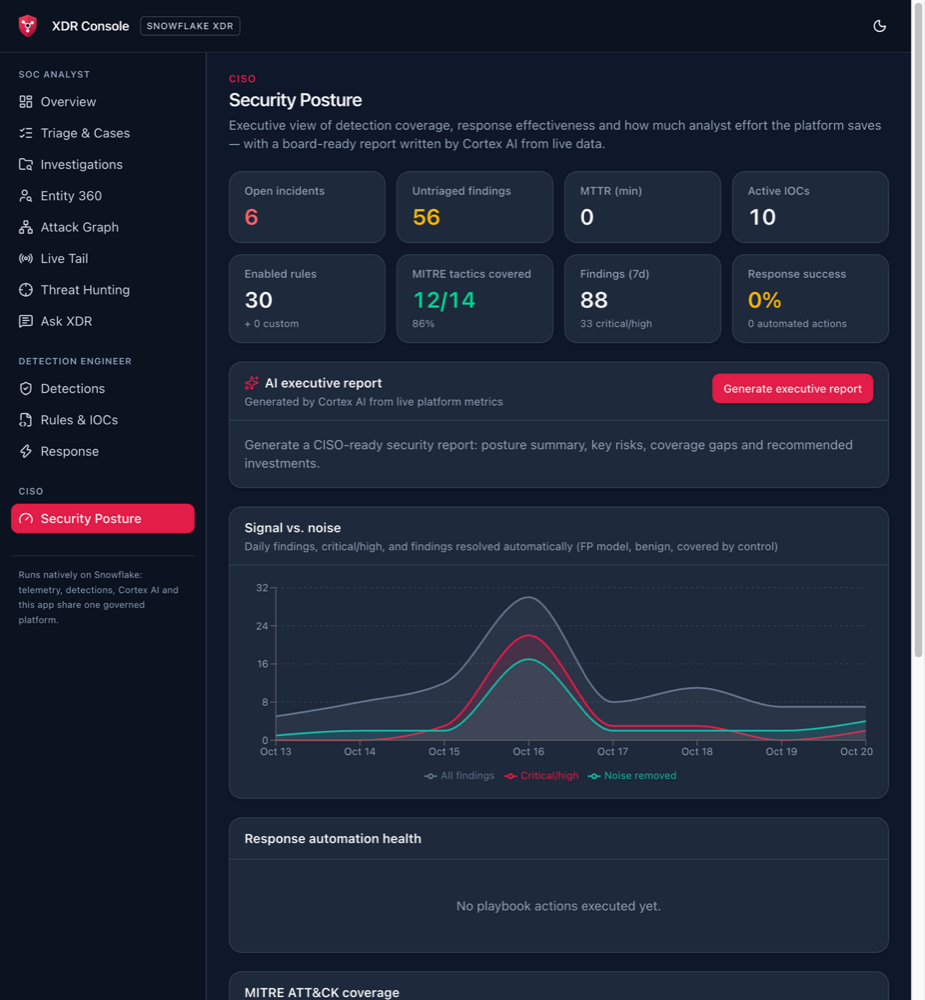
The CISO gets a Security Posture page:
- open incidents and untriaged findings
- MITRE tactic coverage
- signal versus noise over time: all findings, critical and high, and the noise removed automatically
- response automation health
- SOC 2, ISO 27001:2022 and NIST CSF 2.0 evidence, scored from live data (evidence for an audit, not a certification)
One button has Cortex write a board-ready report from the live metrics: posture summary, key risks, coverage gaps and recommended investments. The screenshot is from an early build, before any playbook had run, so response success still shows 0%:
That’s the model I’d want for any agentic system in a regulated environment, and it connects to the governance points from Beyond RBAC and keep shipping AI agents securely: autonomy is a setting per type of action, it’s earned from measured outcomes, and it’s revocable in one click.
Near real time, on a data platform#
The standard path is batch: mappings every minute, detections every five, so a finding arrives about six minutes after the event. That’s fine for most identity and data-access detections, but not for an EDR alert on a domain controller.
The fast lane uses two Snowflake primitives:
-- EDR alerts from three vendors in one shape, kept fresh by Snowflake
CREATE OR REPLACE DYNAMIC TABLE RAW_LOGS.HOT_EDR_ALERTS
    TARGET_LAG = '1 minute'  REFRESH_MODE = INCREMENTAL  WAREHOUSE = XDR_WH
AS SELECT ... FROM RAW_LOGS.OTEL_LOGS WHERE source_id = 'crowdstrike' ...
   UNION ALL SELECT ... WHERE source_id = 'defender' ...
   UNION ALL SELECT ... WHERE source_id = 'sentinelone' ...;

-- Serverless, triggered by new rows: no schedule, at most every 10 seconds
CREATE OR REPLACE TASK DETECTIONS.TASK_FAST_LANE
    TARGET_COMPLETION_INTERVAL = '1 MINUTE'
    USER_TASK_MINIMUM_TRIGGER_INTERVAL_IN_SECONDS = 10
    WHEN SYSTEM$STREAM_HAS_DATA('RAW_LOGS.OTEL_LOGS_FAST_STREAM')
AS CALL DETECTIONS.RUN_FAST_RULES();
Streams on dynamic tables can’t trigger tasks, so the task watches a stream on the landing table and refreshes the dynamic table on demand before running the fast rules. A probe sends a real OTLP alert through the whole chain every six hours and records the result as the fast rule’s canary. It currently measures 12–22 seconds from ingest to finding. A latency view reports median and p95 per rule, so the SLO is measured, not assumed.
Why Snowflake is an interesting place for this#
- One copy of the data. Security telemetry, business data and the SOC’s own state (cases, verdicts, rules) are in the same place. A hunt can join login history with HR data or the sensitive-data tags on a table without exporting anything.
- The SOC is governed like everything else. Console roles map to Snowflake roles, tenants are separated with a row access policy, and the platform’s own actions are in
ACCESS_HISTORYandQUERY_HISTORY. The tool that watches everyone is itself auditable. - Retention is a storage decision, not a licence decision. A retro-hunt over 30 days, or a year, is a query.
- AI next to the data. Cortex runs where the telemetry is, under the same roles and the same audit trail, so automating an AI step is a task schedule, not an integration project.
- It coexists. Tables use Splunk CIM field names, so Splunk DB Connect can query them directly, and real-time detection can stay where it is today.
Where it’s the wrong tool: endpoint agents, sub-second inline blocking, and anything that has to work while the network to the cloud is down.
What I’d harden before anyone uses this for real#
This is a prototype, and I’d rather name the gaps than have you find them.
- Prompt injection through log data. Attackers control many log fields: user agents, command lines, email subjects, file names. Those fields reach Cortex in triage, investigation notes and mapping proposals. The design already limits the damage: reports take figures only from SQL, AI-written SQL is guarded, and nothing destructive runs without human approval. But AI-written narratives should be treated as untrusted text, log content should be clearly delimited in prompts, and I’d add prompt-injection payloads to the canary fixtures so that resistance is tested daily like everything else.
- The SQL guard is a regex. It’s a good seatbelt, but machine-written rule SQL currently runs inside the platform’s own owner’s-rights procedures. I’d execute it under a dedicated role that can only
SELECTfromRAW_LOGS, so even a guard bypass can’t write anything. - Approvals checked in SQL, not only in the UI. The console requires the admin role to approve containment. The response procedure checks that a run was approved, but not who approved it. I’d enforce approver role and four-eyes separation in the procedure itself.
- Cost. A mapping task every minute, detections every five minutes, ticket sync every two minutes and a triggered fast lane will keep a warehouse busy. The scheduled pipeline tasks ship suspended for that reason. Before going live, I’d measure credits per source and move as much as possible to serverless and triggered tasks.
- Live integrations. The Jira, ServiceNow, identity provider and EDR connectors follow the documented APIs, but only the mock and webhook paths have been tested end to end.
- Real data at real volume. Precision, recall and confidence calibration have only been measured on synthetic campaigns. Real telemetry is noisier, and billions of events a day would need clustering and search-optimisation work that hasn’t been done.
Try it#
git clone https://github.com/sfc-gh-kkeller/snowflake-xdr && cd snowflake-xdr
scripts/deploy_demo.sh --connection <your-snow-cli-connection>          # idempotent
scripts/deploy_demo.sh --fresh --yes-drop-everything                     # rebuild from zero, ~18 min
scripts/deploy_demo.sh --with-otel-receiver                              # also deploy the OTLP receiver (needs Docker)
scripts/reset_demo_clock.sh                                              # move demo timestamps to "now"
You need a Snowflake account where you can use ACCOUNTADMIN, Snowflake CLI 3.26+, Cortex AI (COMPLETE, AI_CLASSIFY, AI_SIMILARITY, Cortex Search and Cortex Agents), and Snowflake App Runtime for the console. Use a demo account, not one that matters. The main pipeline tasks (detections, correlation, Autopilot, ticket sync) are created suspended and the console runs detections on demand. A few lightweight ones start running: the triggered fast lane and its probe, UEBA, the weekly Sigma sync, the TAXII retro-hunt and the review sampling. Suspend them when you’re done, so the demo doesn’t use credits. Some good things to try once it’s up:
CALL SNOWFLAKE_XDR.INCIDENTS.SEED_DEMO_COMPROMISE();thenAUTO_INVESTIGATE('new'), approve the containment in Mission Control, checkSHOW GRANTS TO USER XDR_DEMO_COMPROMISED, then press Undo.- Ask XDR: “What did the Detection Autopilot change this week?” and “Is automation hiding any real attacks?”
python3 -m pytest sigmafor the Sigma compiler tests, andscripts/sync_sigma.sh --refreshto pull and verify the latest SigmaHQ release.
Is it production-ready? No, and it isn’t meant to be. It’s a project to inspire people about what’s possible on Snowflake, and it isn’t endorsed by Snowflake. But a working XDR, with self-maintaining detections, verified coverage and a human firmly in charge, built from standard data-platform parts? That’s a pretty good illustration of what’s possible when the security platform moves to the data instead of the other way round.