Originally published on Medium on July 25, 2024.
Snowflake can alert your SIEM or XDR or any downstream systems automatically of any suspicious events in a timely manner.
The benefit is that you can react to security related incidents in an automated and fast way without needing to export any logs from Snowflake or run, host and maintain any additional code outside of Snowflake.
Here is just a quick guide that shall serve as a sample how you can setup Snowflake to send an API request to your SIEM system’s API such as Splunk, Sentinel etc. in order to raise an incident in a timely manner in an automated way.
While it is possible to have Snowflake raise incidents on any available data apart from Snowflakes audit logs (meaning you can also raise alerts in audit logs ingested into Snowflake from 3rd party applications), this example focuses on raising an incident when a user has tried to login into Snowflake using the wrong user password.
This use case is particularily interesting for safeguarding service accounts that are forced to use a password and where OAuth or Keypair authentication is not possible.
A single failed login attempt for these users should already raise an alarm.
This is especially interesting for those service users that connect from an ever changing public IP address space to Snowflake such as PowerBI Cloud Service, where setting Network Policies in Snowflake can become challenging if you are not willing to use the PowerBI Gateway for those fully automated report creation use cases.
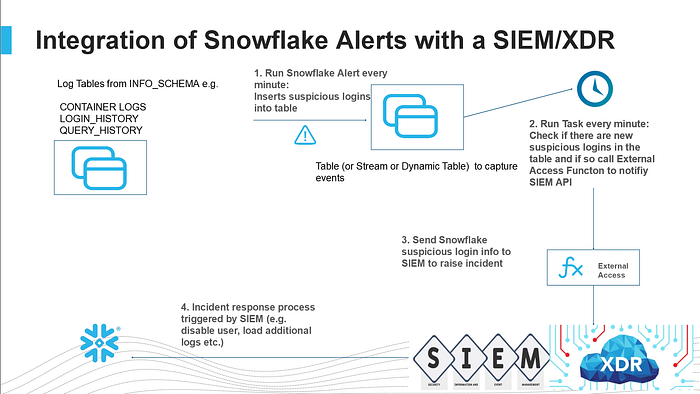
The process works by running a Snowflake Alert Task every minute to check for any failed login attempts using password authenticaton.
If there are any new failed password authentication attempts then the Snowflake Alert Task will create a record of that in the LOGIN_EVENTS table.
The Alert Task will check within a time range of the last 5 minutes in the Snowflake authentication logs from the point in time when the task is running.
So there is a chance that the same event will be detected multiple times if you run the Alert Task every minute, but that doesn’t matter.
The reason it does not matter is that we will only record any events that we have not logged yet previously into the LOGIN_EVENTS table given that each failed login attempt in Snowflake has a unique event ID.
Once the event is recorded another Snowflake Task, which also runs every minute will check, if there are any new failed login attempt records in the LOGIN_EVENTS table.
If so we take the information of the record(s) and send it/them via External Access function UDF (just an API call) to your SIEM or XDR system in order to raise an incident.
Finally the Task will also update the column as being “SENT=True” with a timestamp and also create a record of the SIEM’s API response.
Next time the Task will check the records, it will see that all records have already been sent and that no further action is required.
Meanwhile if an incident was raised in the SIEM by Snowflake, the SIEM system can trigger the incident response process to react to the incident as you see fit.
You can have your SIEM system connect to Snowflake and disable the user and load additional log records into the SIEM relevant for this incident.
Implementation#
Now is the time to login to your Snowflake account and create a new SQL worksheet.
You will need the ACCOUNTADMIN role temporarily.
1. Create the SIEM Monitor Role#
Let’s create a Snowflake Alert Task to run every minute and check if there were any failed password login attempts in the last 5 minutes and if so, record that event into the LOGIN_EVENTS table.
In order for our user to be able to do so, you will need the MONITOR privilege on every user (or just the users you want to monitor).
You can follow this guide along with the highly privileged role ACCOUNTADMIN to get through it quickly all the way, but I would highly recommend to create a bespoke role right now INSTEAD of using a highly privileged user permanently.
So best you switch to ACCOUNTADMIN temporarily and do the following (replace XXX with YOUR username):
use role accountadmin;
CREATE OR REPLACE ROLE SIEM_MONITOR;
grant role siem_monitor to user XXXX;
GRANT CREATE WAREHOUSE ON ACCOUNT TO ROLE siem_monitor;
GRANT MANAGE WAREHOUSES ON ACCOUNT TO ROLE siem_monitor;
GRANT CREATE DATABASE ON ACCOUNT TO ROLE siem_monitor;
GRANT CREATE ROLE ON ACCOUNT TO siem_monitor;
GRANT EXECUTE TASK ON ACCOUNT TO ROLE siem_monitor;
GRANT EXECUTE ALERT ON ACCOUNT TO ROLE siem_monitor;
GRANT CREATE INTEGRATION ON ACCOUNT TO ROLE  siem_monitor;


use role siem_monitor;

CREATE OR REPLACE WAREHOUSE siem_alert_demo WITH WAREHOUSE_SIZE='X-SMALL';
grant usage on warehouse siem_alert_demo to role SIEM_MONITOR;

CREATE OR REPLACE DATABASE SIEM_ALERT_DEMO_DB;
CREATE OR REPLACE SCHEMA SIEM_ALERT_DEMO_SCHEMA;

grant usage on database SIEM_ALERT_DEMO_DB to role accountadmin;
grant usage on schema SIEM_ALERT_DEMO_DB.SIEM_ALERT_DEMO_SCHEMA to role accountadmin;
grant usage on warehouse siem_alert_demo to role accountadmin;

CREATE OR REPLACE ROLE MONITOR_USERS;
grant role monitor_users to role siem_monitor;

CREATE OR REPLACE PROCEDURE set_monitor_privileges_on_all_users(users varchar)
RETURNS varchar
LANGUAGE PYTHON
RUNTIME_VERSION = '3.8'
PACKAGES = ('snowflake-snowpark-python')
HANDLER = 'run'
EXECUTE AS CALLER
AS
$$
from snowflake.snowpark import Session

def run(session, users):
      users=users.replace('[','')
      users=users.replace(']','')
      users=users.split(',')
      for user in users:
              sql = """GRANT MONITOR ON USER """+user+""" TO ROLE monitor_users"""
              result=session.sql(sql).collect()[0][0]

      return "done"
$$;

grant usage on procedure set_monitor_privileges_on_all_users(varchar) to role accountadmin;
use role accountadmin;
GRANT CREATE NETWORK RULE ON SCHEMA SIEM_ALERT_DEMO_DB.SIEM_ALERT_DEMO_SCHEMA TO ROLE siem_monitor;
call set_monitor_privileges_on_all_users(select all_user_names());

use role siem_monitor;
revoke usage on procedure set_monitor_privileges_on_all_users(varchar) from role accountadmin;
revoke usage on warehouse siem_alert_demo from role accountadmin;
revoke usage on database SIEM_ALERT_DEMO_DB from role accountadmin;
revoke usage on schema SIEM_ALERT_DEMO_DB.SIEM_ALERT_DEMO_SCHEMA from role accountadmin;
We assign the role MONITOR_USERS which now has the privileges to monitor all users to the regular user role SIEM_MONITOR that you are currently using to create this demo with.
2. Create the Login Events Table, Alert and View#
Now we continue so let’s setup our login event table, a Snowflake Alert Task and a View that makes it easier to query login events:
use role siem_monitor;

-- Table to hold suspicious/failed logins
create or replace TABLE LOGIN_EVENTS (
 EVENT_TIMESTAMP TIMESTAMP_LTZ(3),
 EVENT_ID NUMBER(38,0),
 EVENT_TYPE VARCHAR(16777216),
 USER_NAME VARCHAR(16777216),
 CLIENT_IP VARCHAR(16777216),
 REPORTED_CLIENT_TYPE VARCHAR(16777216),
 REPORTED_CLIENT_VERSION VARCHAR(16777216),
 FIRST_AUTHENTICATION_FACTOR VARCHAR(16777216),
 SECOND_AUTHENTICATION_FACTOR VARCHAR(16777216),
 IS_SUCCESS VARCHAR(3),
 ERROR_CODE NUMBER(38,0),
 ERROR_MESSAGE VARCHAR(16777216),
 RELATED_EVENT_ID NUMBER(38,0),
 CONNECTION VARCHAR(16777216),
 SENT BOOLEAN DEFAULT FALSE,
 SENT_TIME TIMESTAMP_NTZ(9),
 SIEM_RESPONSE VARCHAR(16777216)
);

-- View for failed password logins in the last 5 minutes
create or replace view logins as
select * from table(
  information_schema.login_history(
    TIME_RANGE_START => dateadd('minutes',-5,current_timestamp()),
    current_timestamp()
  )
)
where IS_SUCCESS='NO'
  and FIRST_AUTHENTICATION_FACTOR='PASSWORD'
order by event_timestamp;

-- Alert that checks every minute and records new failed logins
CREATE OR REPLACE ALERT strange_login
  WAREHOUSE = siem_alert_demo
  SCHEDULE = '1 minute'
  IF( EXISTS(
      select event_id from logins
))
  THEN
INSERT INTO login_events
SELECT *,false, NULL,NULL
FROM logins AS src
WHERE NOT EXISTS (SELECT event_id
                  FROM  login_events AS tgt
                  WHERE tgt.event_id = src.event_id);

ALTER ALERT STRANGE_LOGIN RESUME;
This will record any failed login attempts into the table LOGIN_EVENTS, but only if the EVENT_ID is not already in the table, so we don’t have any duplicates.
3. Create the External Access Function and SIEM Integration#
We have to make sure that any event that has not been sent over to the SIEM system can now be sent.
3a) External Access Function#
In order to get that done we need to create the external access function to make the API call to a SIEM.
In this demo I am using a public MOCK API service that just returns an echo of whatever we are sending.
In real life you will have to setup an external access function to your SIEM system. This will not only mean that you need to change the API URL and add things like a BEARER TOKEN, but it will also mean that you will have to adapt and change the JSON payload that needs to be sent.
Currently this payload is sent over a public IP address space via the internet or Cloud Service Provider backbone.
This tutorial can also be adapted to use classic Snowflake external functions (instead of external access functions) which can also connect via Privatelink (on AWS today and soon on Azure). External access functions will be able to send payload over Privatelink soon as well.
Another way is of course to create a proxy API in a DMZ until private connectivity is available, if your SIEM is not hosted in the public Cloud.
For now in this demo we keep it simple and just send the whole LOGIN_EVENT table info to the MOCK API.
CREATE OR REPLACE NETWORK RULE siem_alert_network_rule
  MODE = EGRESS
  TYPE = HOST_PORT
  VALUE_LIST = ('echo.free.beeceptor.com:443');


CREATE OR REPLACE EXTERNAL ACCESS INTEGRATION siem_apis_access_integration
  ALLOWED_NETWORK_RULES = (siem_alert_network_rule)
  ENABLED = TRUE;


CREATE OR REPLACE FUNCTION alert_siem_login(incident variant, url string)
RETURNS variant
LANGUAGE PYTHON
RUNTIME_VERSION = 3.8
HANDLER = 'incident_alert'
EXTERNAL_ACCESS_INTEGRATIONS = (siem_apis_access_integration)
PACKAGES = ('snowflake-snowpark-python','requests')
AS
$$
import _snowflake
import requests
import json
session = requests.Session()

def incident_alert(incident, url):

    if incident != '':
        payload = incident
    else:
        payload={}
    headers = {}

    response = requests.request("POST", url, headers=headers, data=payload)

    return response.text
$$;
3b) Stored Procedure to Send Events#
Now that we are able to send JSON payload to an API we can create the Stored Procedure that goes through the LOGIN_EVENTS table and sends any new events to the SIEM:
CREATE OR REPLACE PROCEDURE sent_suspicious_logins()
RETURNS STRING
LANGUAGE PYTHON
RUNTIME_VERSION = '3.8'
PACKAGES = ('snowflake-snowpark-python')
HANDLER = 'run'
EXECUTE AS CALLER
AS
$$
from snowflake.snowpark import Session
import json

to_sent={}

def run(session):
  sql1 = """select to_variant(
SELECT
  ARRAY_AGG(json) AS aggregated_results
FROM
  (
    SELECT
      OBJECT_CONSTRUCT(*) AS json
    FROM
      (select * from login_events where sent=false)
  )
    )"""

  to_sent=json.loads(session.sql(sql1).collect()[0][0])

  for siem_payload in to_sent:
    sql_siem = """UPDATE
                    login_events
                    SET
                        sent = TRUE,
                        sent_time = CURRENT_TIMESTAMP(),
                        siem_response= (select alert_siem_login('""" +json.dumps(siem_payload).replace('\"','"')+\
                                                       """','https://echo.free.beeceptor.com:443/siem_api/incident'))
                    WHERE
                        sent = FALSE"""
    sql_siem_result=session.sql(sql_siem).collect()[0][0]

  return "payload sent"
$$;
3c) Schedule the Task#
With that all that is left to do is call the Stored Procedure every minute to make sure it regularly checks and sends new events to the SIEM automatically.
CREATE OR REPLACE task sent_strange_logins_to_siem
  WAREHOUSE = siem_alert_demo
  SCHEDULE = '1 minute'
  AS
call sent_suspicious_logins();

alter task sent_strange_logins_to_siem resume;
4. Testing#
In order to see if everything is working it’s good to test with a user to try to login to Snowflake using the wrong password once or twice.
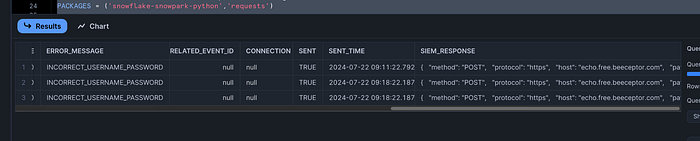
After that keep running a SELECT query on the LOGIN_EVENTS table and you will see how it’s being populated with the login events and also with the SIEM_RESPONSE payload so you can see that the event was successfully sent.
SELECT * from LOGIN_EVENTS;You should see this at the beginning of the table:

And at the end of the table you can see if the column SENT is still set to FALSE and if the other columns like SENT_TIMESTAMP and SIEM_RESPONSE are still NULL.
In that case the event was recorded in the table, but not sent to the SIEM yet.
Once the column SENT is set to TRUE and the SENT_TIMESTAMP and SIEM_RESPONSE columns have values, you can be sure that your SIEM was notified and an incident raised:
Here are some sample APIs from MS Sentinel that can be used:
Or Splunk:
Where Can You Go From Here?#
Many options are possible.
You could create Snowflake dashboards and/or Streamlit dashboards so incidents can be easily visualized. Or have Snowflake itself deactivate the user first — just add another stored procedure to the mix that does that.
Other events are also interesting to monitor — maybe you want to be notified about queries that some people should not execute? Such as changes of NETWORK POLICIES? Maybe you want to monitor logs from Snowflake Container Services or running containers from an event table?
Or you think beyond Snowflake and ingest logs from other applications into Snowflake and build your dashboards and incident response API calls right within Snowflake.
With Snowflake Notebooks threat hunting in Python or regular SQL has never been more approachable.
Having all logs in Snowflake and the power to create automated API calls and doing threat hunting right in Snowflake means you can ingest and have as many logs available from as many systems as you like in a hot storage ready to query via Python and SQL at any time.
Complete SQL Workbook#
Here is the whole SQL workbook for easy copy and pasting (make sure to replace XXXX with your username before you run this!):
-- === ROLE SETUP ===
use role accountadmin;
CREATE OR REPLACE ROLE SIEM_MONITOR;
grant role siem_monitor to user XXXX;
GRANT CREATE WAREHOUSE ON ACCOUNT TO ROLE siem_monitor;
GRANT MANAGE WAREHOUSES ON ACCOUNT TO ROLE siem_monitor;
GRANT CREATE DATABASE ON ACCOUNT TO ROLE siem_monitor;
GRANT CREATE ROLE ON ACCOUNT TO siem_monitor;
GRANT EXECUTE TASK ON ACCOUNT TO ROLE siem_monitor;
GRANT EXECUTE ALERT ON ACCOUNT TO ROLE siem_monitor;
GRANT CREATE INTEGRATION ON ACCOUNT TO ROLE  siem_monitor;

use role siem_monitor;

CREATE OR REPLACE WAREHOUSE siem_alert_demo WITH WAREHOUSE_SIZE='X-SMALL';
grant usage on warehouse siem_alert_demo to role SIEM_MONITOR;

CREATE OR REPLACE DATABASE SIEM_ALERT_DEMO_DB;
CREATE OR REPLACE SCHEMA SIEM_ALERT_DEMO_SCHEMA;

grant usage on database SIEM_ALERT_DEMO_DB to role accountadmin;
grant usage on schema SIEM_ALERT_DEMO_DB.SIEM_ALERT_DEMO_SCHEMA to role accountadmin;
grant usage on warehouse siem_alert_demo to role accountadmin;

CREATE OR REPLACE ROLE MONITOR_USERS;
grant role monitor_users to role siem_monitor;

CREATE OR REPLACE PROCEDURE set_monitor_privileges_on_all_users(users varchar)
RETURNS varchar
LANGUAGE PYTHON
RUNTIME_VERSION = '3.8'
PACKAGES = ('snowflake-snowpark-python')
HANDLER = 'run'
EXECUTE AS CALLER
AS
$$
from snowflake.snowpark import Session

def run(session, users):
      users=users.replace('[','')
      users=users.replace(']','')
      users=users.split(',')
      for user in users:
              sql = """GRANT MONITOR ON USER """+user+""" TO ROLE monitor_users"""
              result=session.sql(sql).collect()[0][0]

      return "done"
$$;

grant usage on procedure set_monitor_privileges_on_all_users(varchar) to role accountadmin;
use role accountadmin;
GRANT CREATE NETWORK RULE ON SCHEMA SIEM_ALERT_DEMO_DB.SIEM_ALERT_DEMO_SCHEMA TO ROLE siem_monitor;
call set_monitor_privileges_on_all_users(select all_user_names());

use role siem_monitor;
revoke usage on procedure set_monitor_privileges_on_all_users(varchar) from role accountadmin;
revoke usage on warehouse siem_alert_demo from role accountadmin;
revoke usage on database SIEM_ALERT_DEMO_DB from role accountadmin;
revoke usage on schema SIEM_ALERT_DEMO_DB.SIEM_ALERT_DEMO_SCHEMA from role accountadmin;

-- === LOGIN EVENTS TABLE & ALERT ===
create or replace TABLE LOGIN_EVENTS (
 EVENT_TIMESTAMP TIMESTAMP_LTZ(3),
 EVENT_ID NUMBER(38,0),
 EVENT_TYPE VARCHAR(16777216),
 USER_NAME VARCHAR(16777216),
 CLIENT_IP VARCHAR(16777216),
 REPORTED_CLIENT_TYPE VARCHAR(16777216),
 REPORTED_CLIENT_VERSION VARCHAR(16777216),
 FIRST_AUTHENTICATION_FACTOR VARCHAR(16777216),
 SECOND_AUTHENTICATION_FACTOR VARCHAR(16777216),
 IS_SUCCESS VARCHAR(3),
 ERROR_CODE NUMBER(38,0),
 ERROR_MESSAGE VARCHAR(16777216),
 RELATED_EVENT_ID NUMBER(38,0),
 CONNECTION VARCHAR(16777216),
 SENT BOOLEAN DEFAULT FALSE,
 SENT_TIME TIMESTAMP_NTZ(9),
 SIEM_RESPONSE VARCHAR(16777216)
);

create or replace view logins as
select * from table(
  information_schema.login_history(
    TIME_RANGE_START => dateadd('minutes',-5,current_timestamp()),
    current_timestamp()
  )
)
where IS_SUCCESS='NO'
  and FIRST_AUTHENTICATION_FACTOR='PASSWORD'
order by event_timestamp;

CREATE OR REPLACE ALERT strange_login
  WAREHOUSE = siem_alert_demo
  SCHEDULE = '1 minute'
  IF( EXISTS(
      select event_id from logins
))
  THEN
INSERT INTO login_events
SELECT *,false, NULL,NULL
FROM logins AS src
WHERE NOT EXISTS (SELECT event_id
                  FROM  login_events AS tgt
                  WHERE tgt.event_id = src.event_id);

ALTER ALERT STRANGE_LOGIN RESUME;

-- === EXTERNAL ACCESS & SIEM INTEGRATION ===
CREATE OR REPLACE NETWORK RULE siem_alert_network_rule
  MODE = EGRESS
  TYPE = HOST_PORT
  VALUE_LIST = ('echo.free.beeceptor.com:443');

CREATE OR REPLACE EXTERNAL ACCESS INTEGRATION siem_apis_access_integration
  ALLOWED_NETWORK_RULES = (siem_alert_network_rule)
  ENABLED = TRUE;

CREATE OR REPLACE FUNCTION alert_siem_login(incident string, url string)
RETURNS string
LANGUAGE PYTHON
RUNTIME_VERSION = 3.8
HANDLER = 'incident_alert'
EXTERNAL_ACCESS_INTEGRATIONS = (siem_apis_access_integration)
PACKAGES = ('snowflake-snowpark-python','requests')
AS
$$
import _snowflake
import requests
import json
session = requests.Session()

def incident_alert(incident, url):
    if incident != '':
        payload = incident
    else:
        payload={}
    headers = {}
    response = requests.request("POST", url, headers=headers, data=payload)
    return response.text
$$;

CREATE OR REPLACE PROCEDURE sent_suspicious_logins()
RETURNS STRING
LANGUAGE PYTHON
RUNTIME_VERSION = '3.8'
PACKAGES = ('snowflake-snowpark-python')
HANDLER = 'run'
EXECUTE AS CALLER
AS
$$
from snowflake.snowpark import Session
import json

to_sent={}

def run(session):
  sql1 = """select to_variant(
SELECT
  ARRAY_AGG(json) AS aggregated_results
FROM
  (
    SELECT
      OBJECT_CONSTRUCT(*) AS json
    FROM
      (select * from login_events where sent=false)
  )
    )"""

  to_sent=json.loads(session.sql(sql1).collect()[0][0])

  for siem_payload in to_sent:
    sql_siem = """UPDATE
                    login_events
                    SET
                        sent = TRUE,
                        sent_time = CURRENT_TIMESTAMP(),
                        siem_response= (select alert_siem_login('""" +json.dumps(siem_payload).replace('\"','"')+\
                                                       """','https://echo.free.beeceptor.com:443/siem_api/incident'))
                    WHERE
                        sent = FALSE"""
    sql_siem_result=session.sql(sql_siem).collect()[0][0]

  return "payload sent"
$$;

CREATE OR REPLACE task sent_strange_logins_to_siem
  WAREHOUSE = siem_alert_demo
  SCHEDULE = '1 minute'
  AS
call sent_suspicious_logins();

alter task sent_strange_logins_to_siem resume;

-- === MONITORING ===
show tasks;
show alerts;
SELECT * from LOGIN_EVENTS;

SELECT *
FROM TABLE(INFORMATION_SCHEMA.ALERT_HISTORY(
    SCHEDULED_TIME_RANGE_START => dateadd('hour',-1,current_timestamp())
))
ORDER BY SCHEDULED_TIME DESC;

SELECT *
FROM TABLE(INFORMATION_SCHEMA.TASK_HISTORY(
    SCHEDULED_TIME_RANGE_START => dateadd('hour',-1,current_timestamp())
))
ORDER BY SCHEDULED_TIME DESC;

-- === CLEAN UP (optional) ===
-- use role siem_monitor;
-- drop role monitor_users;
-- drop warehouse siem_alert_demo;
-- drop database SIEM_ALERT_DEMO_DB;
-- drop EXTERNAL ACCESS INTEGRATION siem_apis_access_integration;