One login for the user. Per-user RBAC and audit in Snowflake. And Snowflake, not your app code, decides which roles the app may use.
Code: github.com/sfc-gh-kkeller/snowflake-saml-oauth-passthrough (MIT). A design guide, idempotent Entra and Snowflake setup scripts, and a working reference app (FastAPI and Preact) with a Role Check page that shows which roles are actually active on every path.
Personal project, not an official Snowflake product. Every claim marked as verified below was tested against a real Entra tenant and Snowflake account, but review it before you use anything in production.
The situation#
This comes up in almost every enterprise I work with. There’s an internal web application, often years old, that signs users in with SAML 2.0 against Microsoft Entra ID. That isn’t going to change. Now the application needs to read from Snowflake, or call a Cortex Agent, and it needs to do so as the signed-in user:
- so row access and masking policies apply to that person;
- so
QUERY_HISTORYshows who actually asked; - so nobody has to justify a shared service account to the auditors.
I covered the same goal for an AI chat platform in No Service Accounts. The difference here is the starting point: a SAML app, which has nothing it can hand to Snowflake.
Two problems#
1. SAML can’t be exchanged for an OAuth token. Entra ID has no flow that turns a SAML assertion into an OAuth access token. The app has no reusable session token either. So after login, it holds proof of who the user is, but nothing Snowflake will accept.
2. The obvious shortcut has a trap. The common fix is to get a token with the session:role-any scope and let the app pick the role per request, with EXTERNAL_OAUTH_ALLOWED_ROLES_LIST on the integration as the safety net. Here’s what that list actually does: it caps only the primary role. Every other role the user holds stays active as a secondary role.
In the demo, the app asks for APP_ANALYST. The test user holds about 40 roles. With a role-any token, 38 of them stayed active as secondaries, including APP_RESTRICTED, SECURITYADMIN, ORGADMIN and ACCOUNTADMIN, and the PII schema that only APP_RESTRICTED may read was readable through both the REST API and the SQL API:
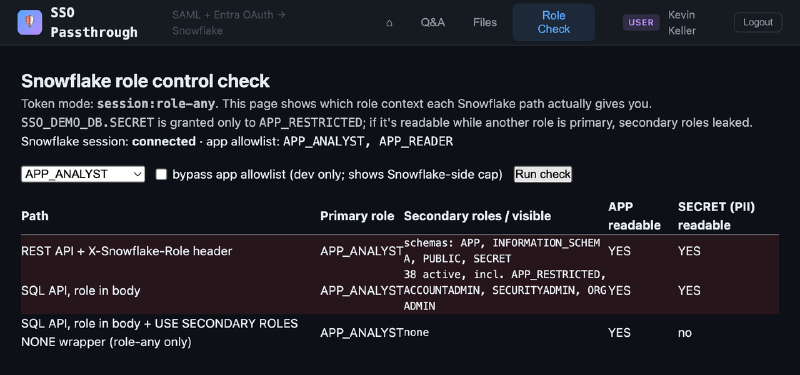
If your app uses role-any today, it’s worth checking CURRENT_SECONDARY_ROLES() on every path it uses.
The pattern#
Browser ──SAML──► Entra ID ──assertion──► App ACS (backend)
                                             │ interstitial → /authorize
                                             │ prompt=none, login_hint=<upn>, PKCE
                                             ▼
                                         Entra ID (existing session, no UI)
                                             │ auth code
                                             ▼
                                   App backend (confidential client)
                                   code → access + refresh token for Snowflake,
                                   role-scoped, stored encrypted, server-side only
                                             │
                                             ▼
                          Snowflake SQL API / REST / Cortex Agent
                          Bearer <user token>, role = APP_ANALYST
                          → runs as the user, no secondary roles
The recommended design has three parts.
1. A silent OIDC hop, chained onto the SAML login#
Right after the app’s SAML Assertion Consumer Service (ACS) validates the assertion, it sends the browser straight to Entra’s /authorize endpoint with prompt=none, the user’s UPN as login_hint, the tenant domain_hint, and PKCE. The user already has an Entra session from the SAML login a second ago, so Entra returns an authorization code without showing any UI. The user sees one login that takes about a second longer.
params = {
    "client_id": settings.entra_client_id,
    "response_type": "code",
    "redirect_uri": _oidc_redirect(),
    "scope": sfo.oidc_scopes(),              # the Snowflake role scopes
    "state": state,
    "nonce": secrets.token_urlsafe(16),
    "code_challenge": challenge,
    "code_challenge_method": "S256",
    "login_hint": user.email,                # UPN from the SAML assertion
    "domain_hint": settings.entra_domain_hint,
    "prompt": "none",                        # silent: reuse the Entra session
}
The backend is a confidential client. It exchanges the code, stores the access and refresh tokens encrypted and server-side only, and never sends them to the browser. Because it holds a refresh token, there are no further redirects for the rest of the session. Before storing anything, it checks that the OIDC identity matches the SAML identity:
oidc_upn = (id_claims.get("preferred_username") or id_claims.get("upn") or "").lower()
if oidc_upn != user.email:
    raise HTTPException(401, "OIDC identity does not match SAML identity")
2. A dedicated resource app with role scopes#
Instead of session:role-any, create a dedicated Entra resource app for this application, with v2 tokens and one scope per Snowflake role: session:role:APP_ANALYST, session:role:APP_READER. Admin-consent the web app to those scopes only, and never to role-any.
Two things make this work:
- Entra emits every consented scope for a resource, whatever the request asks for. So the consent grant is the Entra-side role allowlist.
- With a role-scoped token, Snowflake disables secondary roles itself. It also rejects any role that isn’t in the token.
You don’t need to touch the central Snowflake app registration that your BI tools already use.
3. A second External OAuth integration on the v2 issuer#
Snowflake allows one External OAuth integration per issuer. That’s usually read as “one per Entra tenant”, and the central one is already taken. But Entra v1 tokens (https://sts.windows.net/<tid>/) and v2 tokens (https://login.microsoftonline.com/<tid>/v2.0) have different issuers. So a second integration, for the dedicated v2 resource app, is accepted next to the existing one. (A duplicate on the same issuer is rejected with error 003524.)
CREATE SECURITY INTEGRATION ENTRA_SSO_SCOPED_V2
  TYPE = EXTERNAL_OAUTH  ENABLED = TRUE  EXTERNAL_OAUTH_TYPE = AZURE
  EXTERNAL_OAUTH_ISSUER = 'https://login.microsoftonline.com/<tid>/v2.0'
  EXTERNAL_OAUTH_JWS_KEYS_URL = 'https://login.microsoftonline.com/<tid>/discovery/v2.0/keys'
  EXTERNAL_OAUTH_AUDIENCE_LIST = ('<resource app client id GUID>')  -- v2 aud is the GUID, not api://
  EXTERNAL_OAUTH_TOKEN_USER_MAPPING_CLAIM = 'preferred_username'    -- v2 tokens have no upn claim
  EXTERNAL_OAUTH_SNOWFLAKE_USER_MAPPING_ATTRIBUTE = 'LOGIN_NAME'
  EXTERNAL_OAUTH_ANY_ROLE_MODE = 'ENABLE'
  EXTERNAL_OAUTH_ALLOWED_ROLES_LIST = ('APP_ANALYST', 'APP_READER')
  IS_AGENTIC = TRUE;
This integration’s allowlist applies to this app only, not to every client on the tenant. One caveat from the guide: the v1/v2 split relies on documented Entra token behaviour, but Snowflake’s issuer-keyed uniqueness isn’t formally documented. Confirm it with Snowflake before you depend on it in production.
The result: Snowflake enforces the boundary#
Same user, same request, with a role-scoped token. Snowflake runs with APP_ANALYST only. There are no secondary roles and no PII, on every path, with no wrapper in the app:
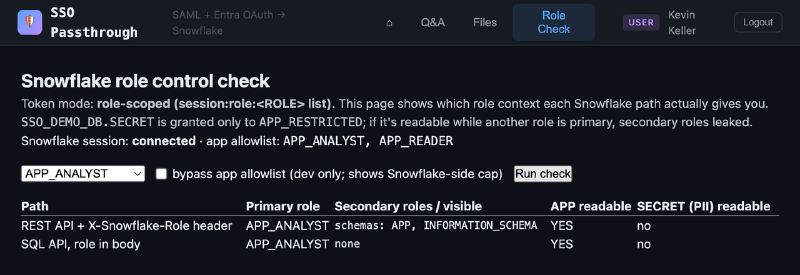
And if the app’s own allowlist is bypassed and it asks for a role outside the token, Snowflake rejects the request with error 390317 instead of falling back to the default role:
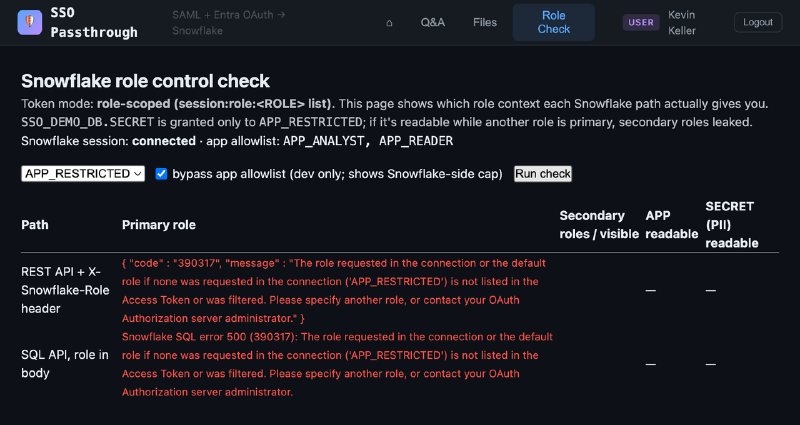
The verified behaviour, for a test user holding about 40 roles including ACCOUNTADMIN:
| Request with a role-scoped token | Result |
|---|---|
SQL API with role: APP_ANALYST or APP_READER | Runs; CURRENT_SECONDARY_ROLES() is empty; restricted schema denied |
REST API with X-Snowflake-Role | Same; the restricted schema isn’t even visible |
Cortex Agent agent:run plus its SQL tool | Runs as APP_ANALYST, no secondary roles; restricted table denied |
| Any other role, even one in the integration allowlist | Rejected (390317) |
USE SECONDARY ROLES ... | Refused (3107), so the app can’t widen its own session |
| No role given | Rejected, because the default role isn’t scoped. Always send the role |
Every call the app makes, including Cortex Agent inference and the SQL the agent generates, runs as the signed-in user under the role in their token. Nothing runs as a service account, and nothing falls back to the user’s DEFAULT_ROLE. QUERY_HISTORY shows every query under the end user’s name with ROLE_NAME = APP_ANALYST.
Broad in Entra, narrow in Snowflake#
In most organisations, changing Entra scopes means a ticket to the identity team. Changing Snowflake configuration is one ALTER. The design uses that asymmetry:
| Layer | Owner | Changes | Holds |
|---|---|---|---|
| Entra role scopes (consent grant) | Identity team | Rarely, ideally once | Every app role you can foresee, including roles that don’t exist in Snowflake yet |
EXTERNAL_OAUTH_ALLOWED_ROLES_LIST | Snowflake team | Any time | The roles allowed today |
| Grants to the app roles | Snowflake team | Any time | What each role can do |
| Backend role selection | App team | Per request | One role from the allowed set, always sent explicitly |
This was verified with one token, never re-issued, scoped to APP_READER, APP_ANALYST and a not-yet-existing APP_FUTURE:
- While
APP_FUTUREdidn’t exist, requests for it were rejected, and the unknown scope did no harm. - After creating and granting it, requests were still rejected, because it wasn’t in the integration allowlist.
- After adding it to the allowlist, it worked immediately, with no secondary roles.
- Removing
APP_ANALYSTfrom the allowlist revoked it at once, even though it was still in the token.
So you consent a superset in Entra once, and then enable and revoke roles entirely on the Snowflake side. Compared with role-any, you keep that flexibility and get two extra guarantees: Snowflake disables secondary roles itself, and the token stays capped at the scoped list even if someone widens the Snowflake allowlist by mistake.
Agents get their own treatment, as the same user#
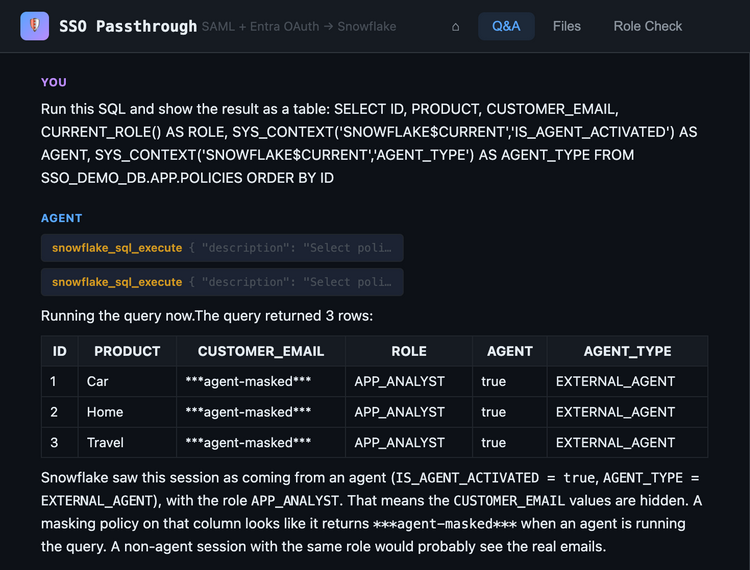
The integration is created with IS_AGENTIC = TRUE, so Snowflake treats every session from this app as an AI agent acting on behalf of the signed-in user. CURRENT_USER() is still the end user and CURRENT_ROLE() is still the scoped role. But IS_AGENT_ACTIVATED is now true and AGENT_TYPE is EXTERNAL_AGENT, so agent-aware policies can treat the app differently from the same person in Snowsight:
CREATE MASKING POLICY SSO_DEMO_DB.APP.MASK_EMAIL_FROM_AGENTS AS (val STRING) RETURNS STRING ->
  CASE WHEN SYS_CONTEXT('SNOWFLAKE$CURRENT', 'IS_AGENT_ACTIVATED')::BOOLEAN = TRUE
       THEN '***agent-masked***'
ELSE val END;| Session | User and role | IS_AGENT_ACTIVATED | CUSTOMER_EMAIL |
|---|---|---|---|
The app, IS_AGENTIC = TRUE | End user, APP_ANALYST | TRUE (EXTERNAL_AGENT) | ***agent-masked*** |
The same app, IS_AGENTIC = FALSE | End user, APP_ANALYST | FALSE | jane.doe@example.com |
| The same user in Snowsight or the CLI | End user | FALSE | jane.doe@example.com |
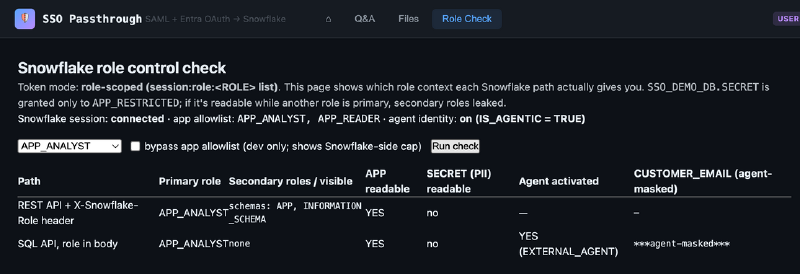
That applies to the Cortex Agent’s own SQL too. When the agent queries the table with the user’s token, the emails are masked:
You can flip the flag live with ALTER SECURITY INTEGRATION ENTRA_SSO_SCOPED_V2 SET IS_AGENTIC = FALSE;. It takes effect on the next query, with the same token, no re-login needed. Note that the flag covers the whole integration: if the same app also needs non-agent traffic, give that its own integration. For more on agent identity and the controls it enables, see Keep Shipping.
If you can only get role-any#
Sometimes even a one-time consent of a role superset on a dedicated app isn’t possible. The repo also implements and demonstrates the fallback, and it’s worth knowing its sharp edges:
- Close secondary roles on every request. The app runs each query inside a single Snowflake Scripting block that starts with
USE SECONDARY ROLES NONE. If that statement fails, the query doesn’t run, so failure is safe. - Use one statement, not several. In a multi-statement SQL API request, the child results are fetched in a new session with the user’s
DEFAULT_ROLE, whatever role you asked for. - Bind variables don’t work inside that wrapper. Use a vetted library’s client-side binding, never put user input into identifiers, and remember that Snowflake treats backslash as an escape character in strings.
- Add a session policy as the backstop.
ALLOWED_SECONDARY_ROLES = ()also closes the REST API path, which has no per-request secondary-role control. But it applies to the user everywhere, including their Snowsight sessions.
With role-any, the backend is the per-app enforcement point and the integration allowlist is the only hard boundary. A leaked token can use any role inside that allowlist. That’s why the role-scoped design is the recommendation.
Gotchas I hit along the way#
All verified with real tokens:
| Gotcha | What to do |
|---|---|
The SQL API ignores the X-Snowflake-Role header and runs under DEFAULT_ROLE | Always send role in the request body. REST, MCP and the Agent API do honour the header |
| Entra’s default SAML NameID is an opaque ID, not the UPN | Read the UPN from the .../claims/name attribute, or the silent hop fails with AADSTS50058 |
| A hidden iframe for the silent hop fails in Safari, Firefox, iOS and private browsing | Use a top-level redirect, with a tiny interstitial page after the ACS POST |
| A pure SPA only gets 24-hour refresh tokens | Make the backend a confidential client that holds the refresh token |
| v2 tokens differ from v1 | aud is the client ID GUID, and the user claim is preferred_username |
| MCP endpoints can return auth errors as HTTP 200 with a JSON-RPC error | Always inspect the response body |
Not yet tested: Safari, iOS and private-browsing behaviour of the silent hop, Conditional Access sign-in frequency, and end-to-end logout across both the SAML and OIDC sessions.
Try it#
You need an Entra tenant where you can create app registrations and grant admin consent, a Snowflake account with ACCOUNTADMIN, the az and snow CLIs, Pixi, Node.js, and a Snowflake user whose LOGIN_NAME equals your Entra UPN.
git clone https://github.com/sfc-gh-kkeller/snowflake-saml-oauth-passthrough
cd snowflake-saml-oauth-passthrough

az login --tenant <your-tenant>
./setup/entra_setup.sh                 # resource apps + SAML web app, admin consent

(cd app && pixi install)
app/.pixi/envs/default/bin/python setup/render.py \
    --sf-account <ORG-ACCOUNT> --sf-user <SNOWFLAKE_USER> --mode scoped

snow sql -c <connection> -f setup/snowflake_setup.sql
app/start.sh                           # http://localhost:9000
Sign in with Microsoft, then open Role Check. To see the trap for yourself, re-render with --mode role-any, restart and sign in again. The README has the clean-up commands for both Snowflake and Entra.
The takeaway#
You don’t have to replace a SAML app to give it per-user access to Snowflake. A silent OIDC hop gets the token without a second login. A dedicated, role-scoped resource app makes Snowflake disable secondary roles and reject everything outside the token. And a second integration on the v2 issuer gives you a per-app allowlist that the Snowflake team can change any time, while the identity team configures Entra once. The one thing to avoid is the shortcut: role-any plus an allowlist looks like least privilege, but it quietly leaves every other role switched on.
References#
- External OAuth with Microsoft Entra ID · External OAuth overview
- Secondary roles · Session policies
- Snowflake SQL API · Agent identity
- Microsoft identity platform: access token claims (v1 and v2) · OAuth 2.0 authorization code flow
Behaviour reflects Snowflake and Entra ID as of November 2026. Check the current documentation for your edition and region. Views are my own.