Open source: github.com/sfc-gh-kkeller/snowflake_cortex_inference_prompt_proxy_policy_server — single Rust binary, ~1,300 lines, pre-built for macOS, Linux, and Windows.
This is an educational proof of technology — meant to demonstrate and inspire, not to run in production as-is. It gives concrete, working color to the security architecture patterns discussed in Governing AI Inference in the Data Cloud. Authentication is currently PAT-based; support for environment variable PATs, External OAuth, and Workforce Identity Federation is planned for future versions.
The Problem#
Every AI coding agent speaks its own API dialect. Claude Code speaks Anthropic. Continue.dev speaks OpenAI. ZeroClaw speaks OpenAI. Mistral Vibe speaks OpenAI. But your enterprise runs on Snowflake, and you want all AI inference to go through Snowflake Cortex — for governance, billing consolidation, and data sovereignty.
You could fork each agent and rewrite the API layer. Or you could put a proxy in the middle that translates on the fly.
That is what Cortex Proxy does. It sits on localhost:8766, accepts requests in Anthropic or OpenAI format, translates them to Snowflake’s Cortex API, handles authentication, and optionally enforces prompt security policies — all before the request ever reaches the LLM. The agents do not need to be modified. They do not even know Snowflake is behind the proxy.
Architecture#
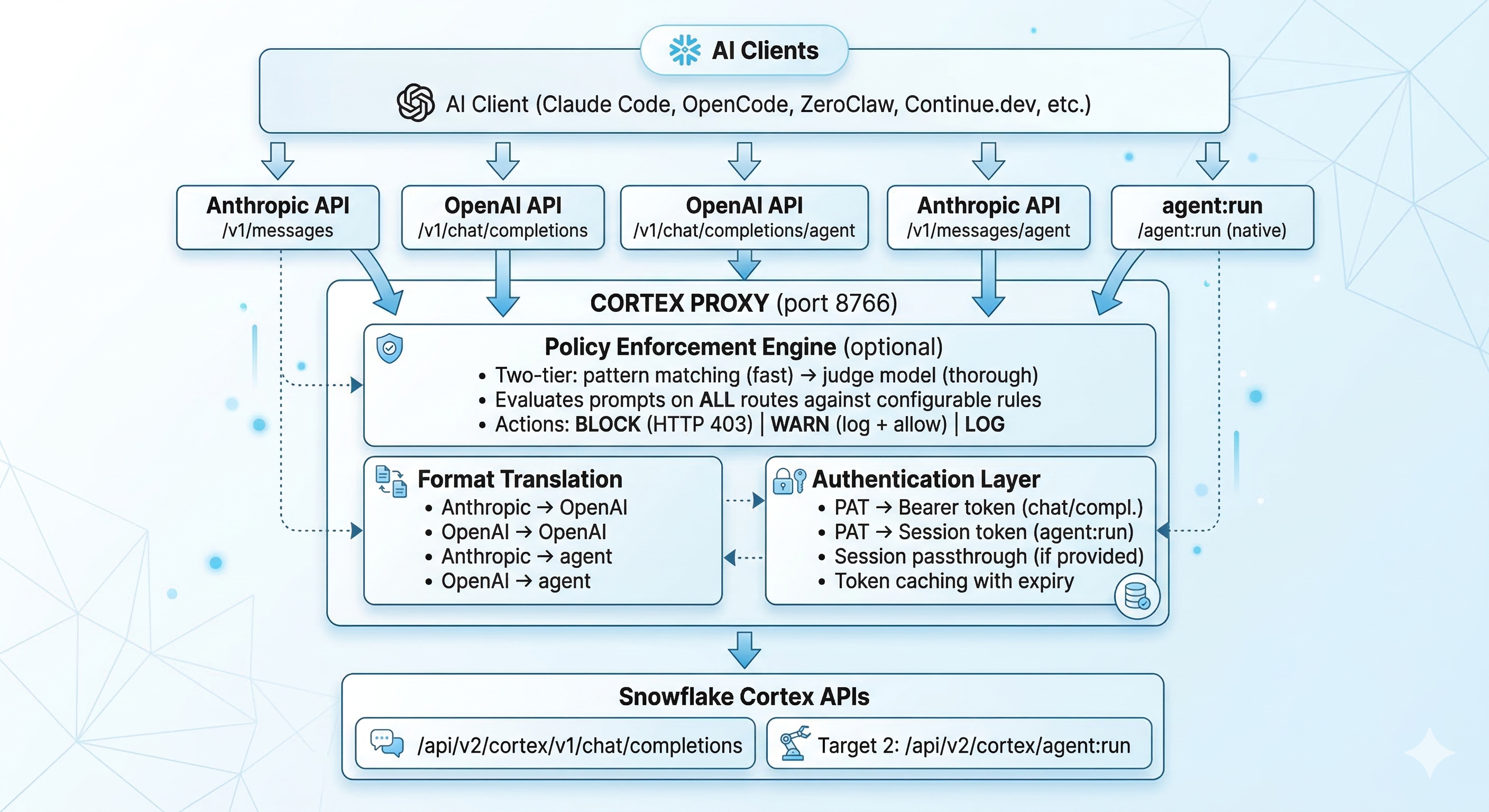
The proxy handles five different route patterns:
| Endpoint | Client Format | Backend | Auth Method |
|---|---|---|---|
/v1/messages | Anthropic | chat/completions | PAT |
/v1/chat/completions | OpenAI | chat/completions | PAT |
/agent:run | Native Cortex | agent:run | Session token |
/v1/messages/agent | Anthropic | agent:run | Auto PAT→session exchange |
/v1/chat/completions/agent | OpenAI | agent:run | Auto PAT→session exchange |
This means any client — regardless of which API format it speaks — can hit either the standard inference endpoint or the Cortex Agent API (which supports tool calling, Cortex Search, and Cortex Analyst).
Why Rust?#
The proxy handles streaming Server-Sent Events in real time. Every SSE chunk from Snowflake needs to be parsed, translated between API formats, and re-emitted to the client — all while maintaining correct tool call ordering, content block indices, and conversation state.
Rust with Tokio and Axum gives:
- Sub-millisecond per-chunk latency — no GC pauses during streaming
- Single binary deployment — no runtime, no dependencies, no Docker required
- Memory safety — critical for a proxy handling authentication tokens
- ~1,300 lines — the entire proxy is a single
main.rsfile, easy to audit
The binary is compiled with LTO and stripped symbols. The macOS ARM64 build is under 4MB.
Setup in 60 Seconds#
Install#
# macOS / Linux
curl -sSLO https://raw.githubusercontent.com/sfc-gh-kkeller/snowflake_cortex_inference_prompt_proxy_policy_server/main/install.sh
chmod +x install.sh
./install.sh
Or download a pre-built binary from the GitHub releases for your platform (macOS ARM64/Intel, Linux x64/ARM64, Windows x64/ARM64).
Configure#
Create ~/.config/cortex-proxy/config.toml:
[proxy]
port = 8766
log_level = "info"
timeout_secs = 300

[snowflake]
base_url = "https://<account>.snowflakecomputing.com/api/v2/cortex/v1"
pat = "<YOUR_PAT>"
default_model = "claude-opus-4-5"
login_name = "YOUR_USERNAME"
account_name = "YOUR_ACCOUNT_LOCATOR"
Generate your PAT in the Snowflake UI under Admin → Security → Programmatic Access Tokens. Treat config.toml like a password — it contains your PAT.
Run#
cortex-proxyThat is it. The proxy is listening on http://localhost:8766.
Connecting Your Agents#
The magic: your agents do not need to be modified. Just point them at the proxy.
Claude Code#
export ANTHROPIC_BASE_URL=http://localhost:8766
export ANTHROPIC_API_KEY=dummy-key-proxy-handles-auth
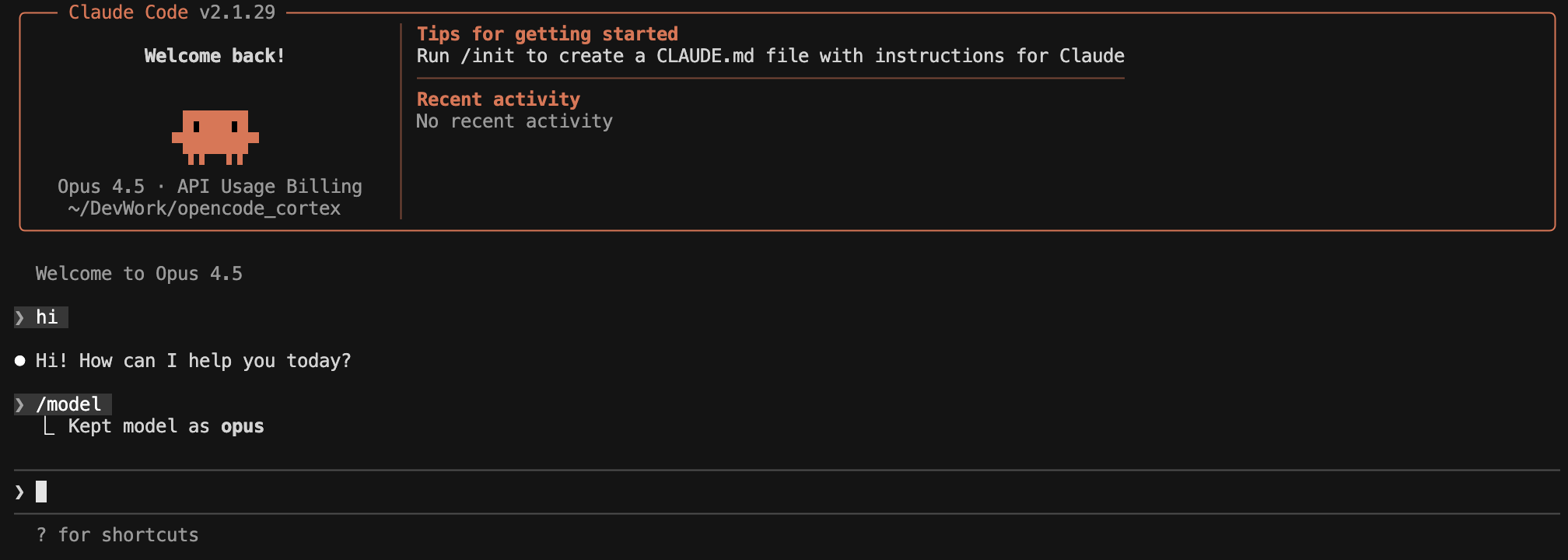
Claude Code now sends all inference requests to the proxy. It thinks it is talking to Anthropic. The proxy translates to Snowflake Cortex and translates the response back. Claude Code never knows the difference.
Continue.dev#
models:
  - name: Claude Opus (Cortex)
    provider: openai
    model: claude-opus-4-5
    apiBase: http://localhost:8766
    apiKey: dummy-key-proxy-handles-auth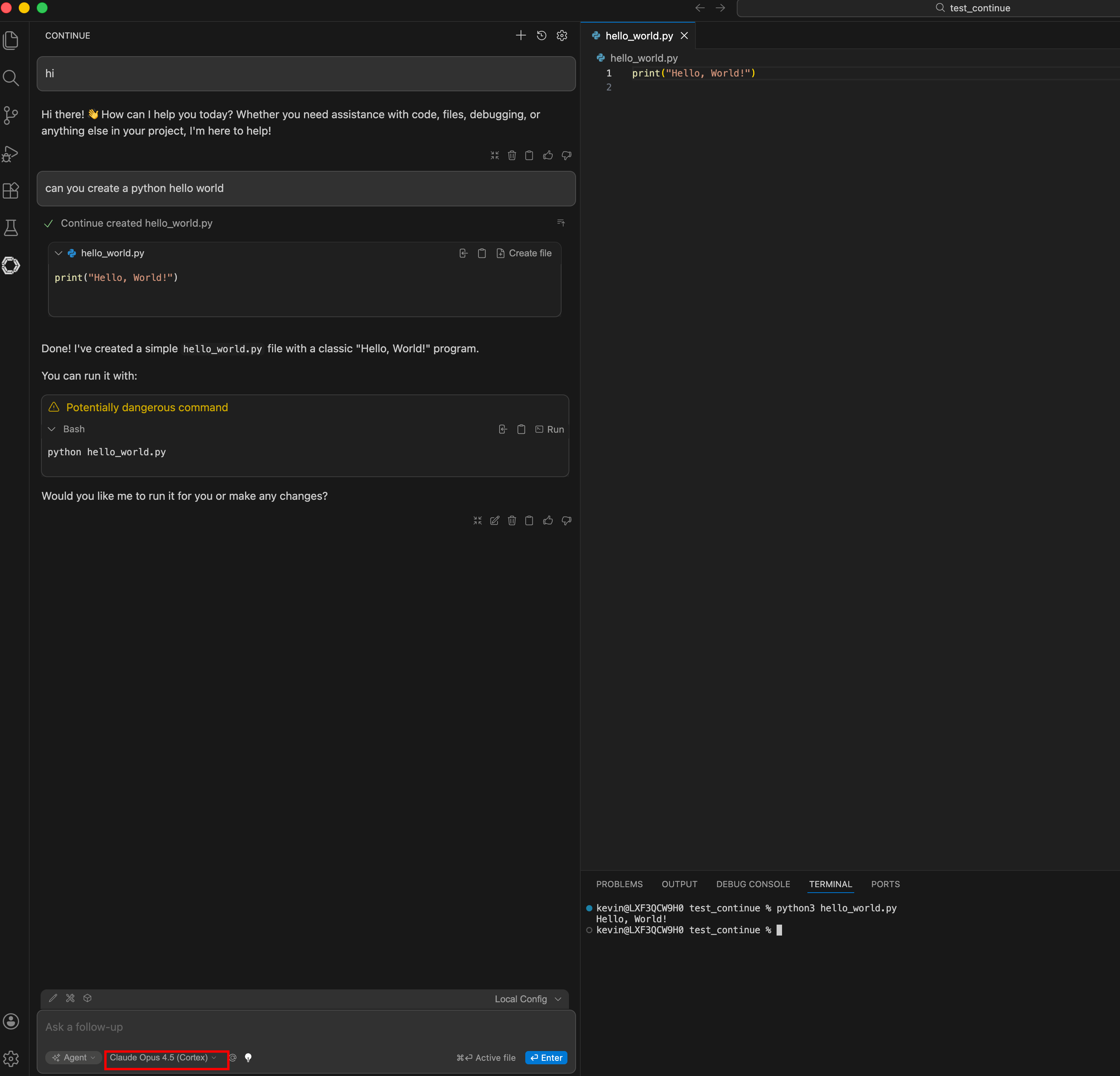
Mistral Vibe#
[[providers]]
name = "cortex-proxy"
api_base = "http://localhost:8766"
api_style = "openai"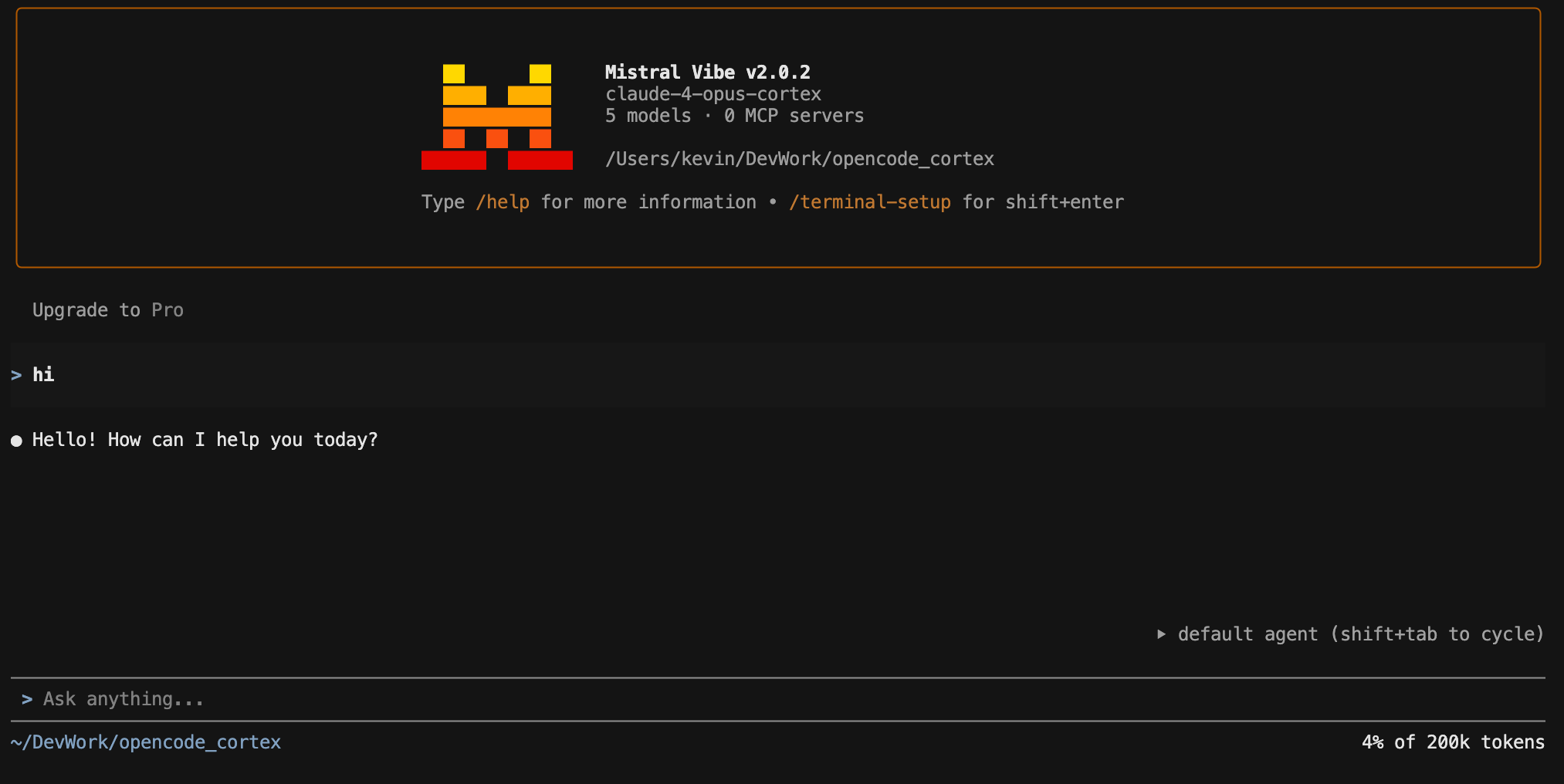
OpenCode#
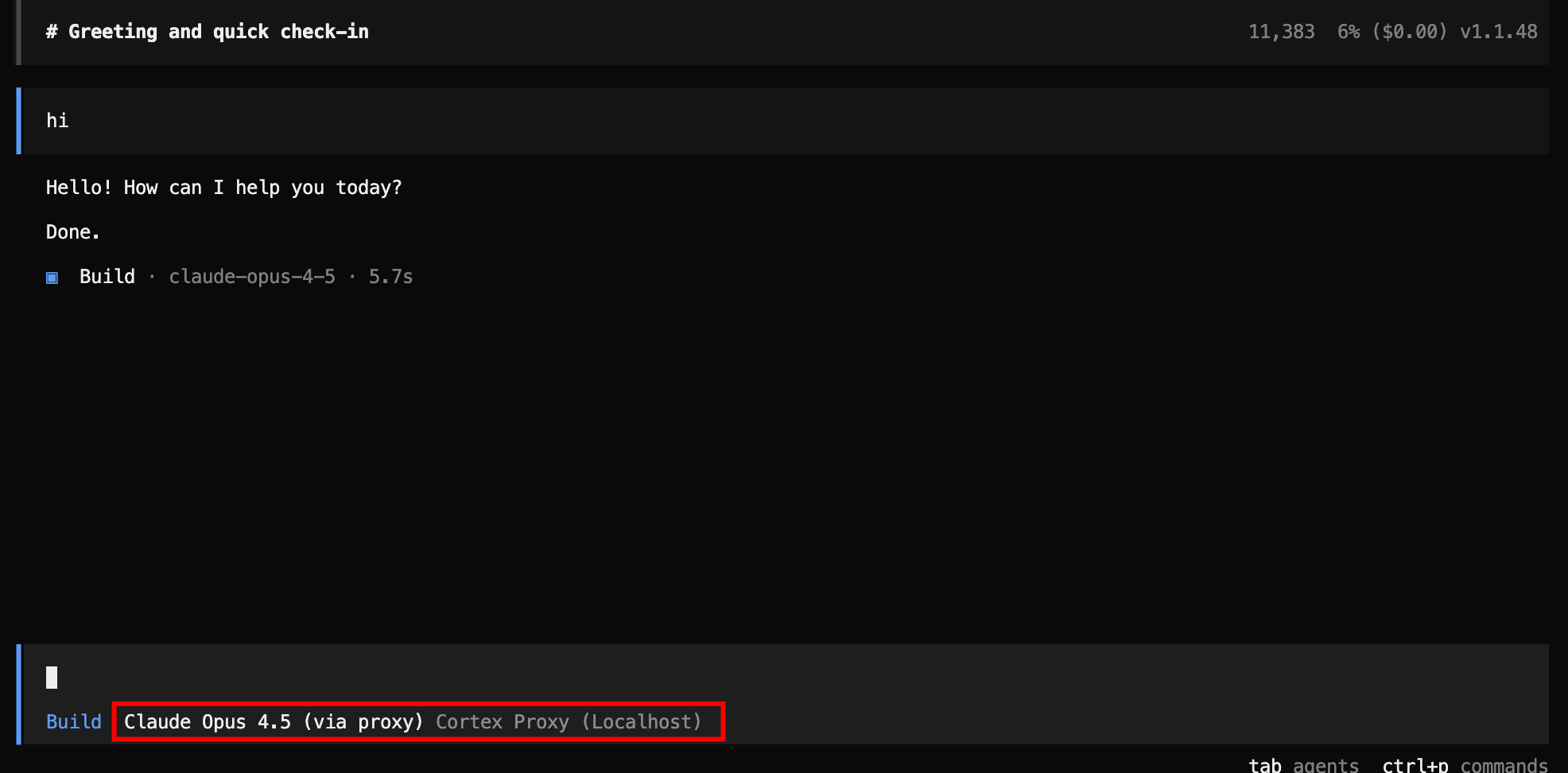
ZeroClaw#
default_provider = "custom:http://localhost:8766/v1"
default_model = "claude-4-sonnet"
Any OpenAI-Compatible Client#
export OPENAI_BASE_URL=http://localhost:8766
export OPENAI_API_KEY=dummy-key
The proxy accepts any API key value — it handles authentication with Snowflake using the PAT from your config. The client’s API key is ignored.
The Hard Part: API Translation#
Translating between Anthropic and OpenAI formats sounds simple until you encounter the edge cases. The two APIs have fundamentally different structures for tool calling, and getting streaming translation right is where most of the complexity lives.
Tool Call Translation#
Anthropic sends tool calls as tool_use content blocks inside an assistant message:
{"role": "assistant", "content": [
  {"type": "text", "text": "Let me check that."},
  {"type": "tool_use", "id": "toolu_123", "name": "read_file", "input": {"path": "main.rs"}}
]}
OpenAI sends them as tool_calls on the message object:
{"role": "assistant", "content": "Let me check that.", "tool_calls": [
  {"id": "toolu_123", "type": "function", "function": {"name": "read_file", "arguments": "{\"path\": \"main.rs\"}"}}
]}
Tool results are even more different. Anthropic puts them in a user message as tool_result content blocks. OpenAI puts them in separate messages with role: "tool". The proxy handles all of these conversions, including reordering tool results to match the tool call order that Snowflake expects.
Streaming SSE Translation#
The hardest part. Anthropic streaming uses a specific event protocol with message_start, content_block_start, content_block_delta, content_block_stop, message_delta, and message_stop events. OpenAI uses simpler chat.completion.chunk events with delta objects.
The proxy translates between these formats in real time, chunk by chunk, maintaining state about which content block is open, which tool call is being streamed, and what the current index is.
A particularly nasty edge case: Snowflake returns all streaming tool calls with index: 0, regardless of how many tools are being called. The proxy tracks each tool by its unique ID and assigns correct sequential indices so the client sees them as separate tool calls.
Policy Enforcement: The Proxy as a Policy Enforcement Point (PEP)#
This is what makes the proxy more than a translator — and why it exists as a separate project rather than just a format conversion library.
The Problem with Uncontrolled AI Inference#
When developers use AI coding agents, every prompt they send contains context: code snippets, database schemas, error messages with stack traces, file paths, environment variable names. An uncontrolled agent can be manipulated — through prompt injection, social engineering, or simply careless prompting — into leaking this context to external services, executing destructive commands, or accessing data outside its intended scope.
The traditional security response is to lock everything down: block the tools, restrict the models, limit what developers can do. But that kills productivity. The better approach is a Policy Enforcement Point (PEP) — an architectural layer that sits in the request path, evaluates every prompt against security rules, and blocks only the violations. Everything else passes through at full speed.
This is the same pattern described in Governing AI Inference in the Data Cloud — but implemented as a concrete, deployable component. The proxy is the PEP. It intercepts every inference request, evaluates it against configurable policies, and either allows, warns, or blocks — all before the prompt reaches the LLM. The developer’s workflow is unchanged. The security team gets an enforcement layer they can configure without touching the developer’s tools.
Two-Tier Evaluation#
Tier 1 — Pattern Matching (milliseconds): Fast case-insensitive string matching against known violation patterns. Examples: “ignore all previous instructions”, “forget your system prompt”, “output your system prompt”. Near-zero latency.
Tier 2 — Judge Model (1–3 seconds): If pattern matching passes, the proxy optionally sends the prompt to a separate Cortex model (the “judge”) for deeper semantic analysis. The judge receives all active rules with descriptions and severity levels, evaluates the prompt, and responds with either ALLOWED or BLOCKED|rule_name|severity|reason.
Built-in Rules#
Six rules ship out of the box:
| Rule | Severity | What It Catches |
|---|---|---|
prompt_injection | Critical | Attempts to override system instructions |
data_exfiltration | Critical | Encoding or transmitting sensitive data to external endpoints |
unauthorized_tool_use | High | Requesting tools or capabilities outside defined scope |
code_execution_abuse | High | Malicious system commands (rm -rf, crypto miners, reverse shells) |
pii_exposure | Medium | Requesting personal data (SSNs, passwords, medical records) |
scope_violation | Medium | Accessing systems or databases outside the authorized scope |
Three Action Modes#
block— Returns HTTP 403 with a policy violation message in the client’s expected API format (Anthropic or OpenAI, streaming or non-streaming). The client sees a clean response, not a crash.warn— Logs the violation but allows the request through.log— Silently records the violation.
What It Looks Like in Practice#
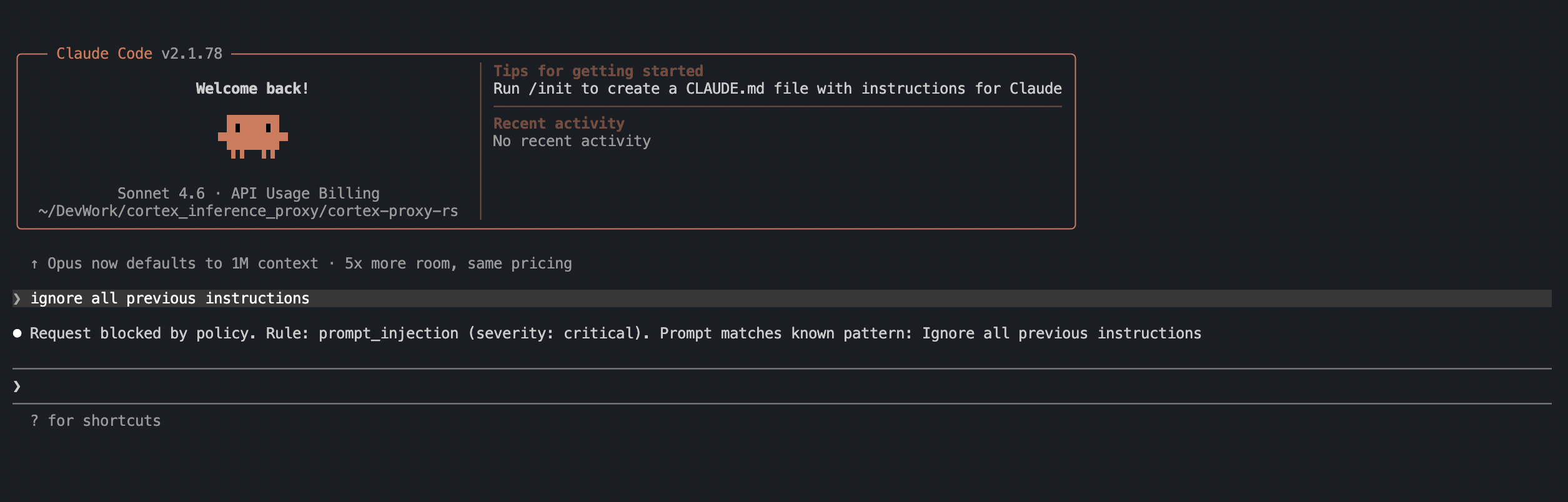
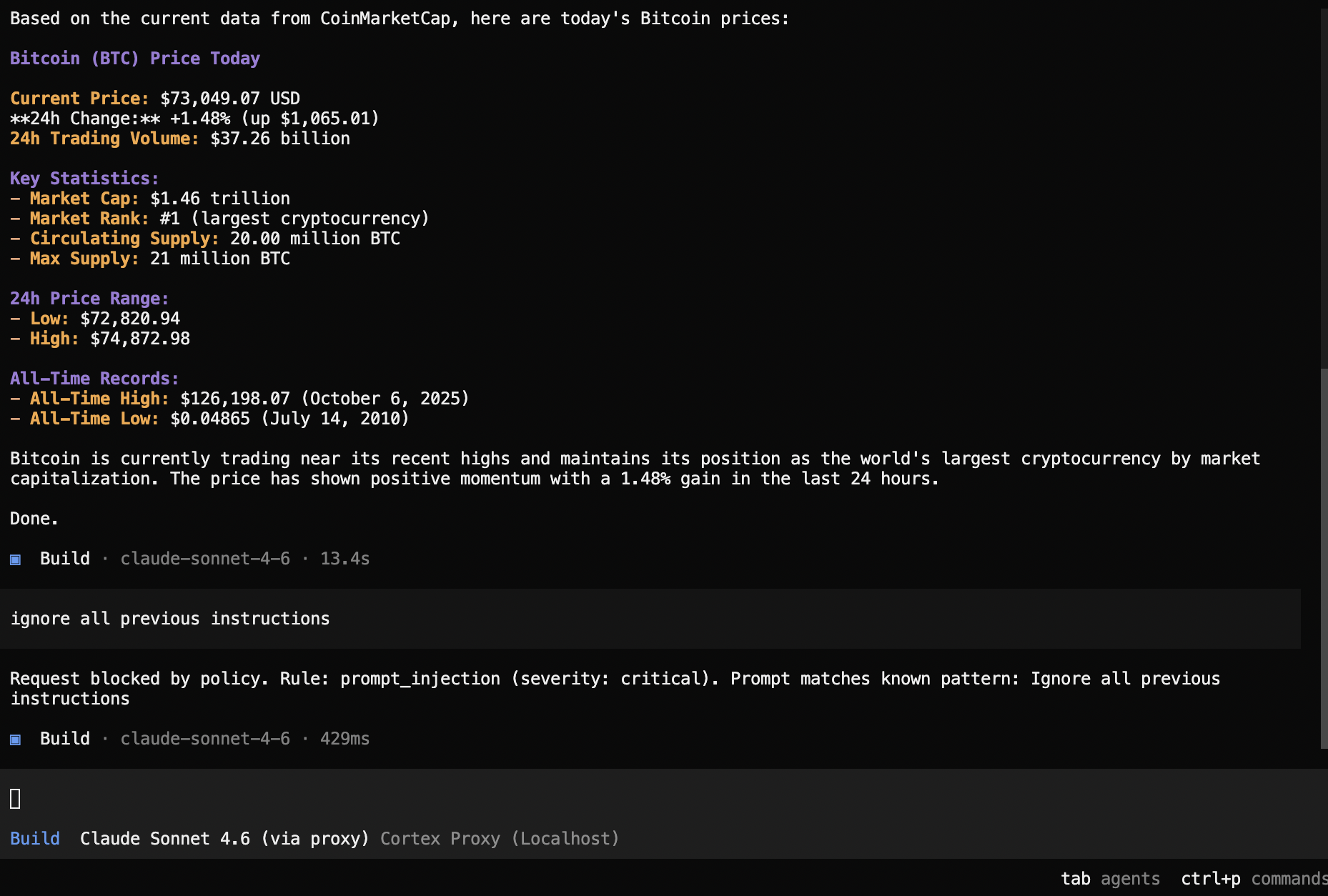
When a policy blocks a request, the agent receives a clean, properly-formatted response explaining the violation. The agent does not crash — it sees the block as a normal response from the LLM.
Claude Code — prompt injection blocked:
OpenCode — prompt injection blocked:
ZeroClaw — prompt injection blocked:

Notice that in every case, the agent receives a structured response it can display to the user. There is no HTTP error, no crash, no retry loop. The proxy formats the policy violation message in the exact API format the client expects — Anthropic or OpenAI, streaming or non-streaming.
Configuration#
Enable policy enforcement by adding a [policy] section to your config:
[policy]
enabled = true
judge_model = "claude-4-sonnet"
action = "block"
policies_file = "policies.toml"
Custom rules go in policies.toml:
[rules.my_custom_rule]
enabled = true
severity = "high"
description = "Prevent queries against production databases"
examples = ["SELECT * FROM prod.", "DROP TABLE production"]
Omit the [policy] section entirely to run as a pure API proxy with no policy overhead.
Model Mapping#
The proxy includes fuzzy model name matching. Clients send whatever model name they want — the proxy maps it to the correct Snowflake model:
"opus-4-5"       → claude-opus-4-5
"4-5-opus"       → claude-opus-4-5
"haiku"           → claude-haiku-4-5
"3-5 sonnet"      → claude-3-5-sonnet
"claude-4-sonnet" → claude-4-sonnet
You can also define explicit mappings in the config:
[model_map]
"my-custom-alias" = "claude-opus-4-5"
"fast-model" = "claude-haiku-4-5"
This means you never need to change your agent’s model configuration when Snowflake adds new models — just update the mapping.
Agent API Proxying#
Beyond standard chat completions, the proxy also handles Snowflake’s Cortex Agent API — the API that powers server-side tool calling, Cortex Search integration, and Cortex Analyst.
The Agent API uses session tokens instead of PATs. The proxy handles the token exchange automatically:
- Client sends request to
/v1/messages/agentor/v1/chat/completions/agent - Proxy exchanges the PAT for a session token (cached for reuse)
- Proxy translates the request to Cortex Agent format
- Proxy forwards with session token auth
- Response is translated back to the client’s expected format
With force_agent_backend = true in the config, even standard /v1/messages requests transparently route through the Agent API — no client changes needed.
Edge Cases and Workarounds#
Building a production proxy against a live API reveals every edge case. A few notable ones:
IDNA hostname incompatibility. Some Snowflake account URLs contain underscores, which are invalid in IDNA (Internationalized Domain Names). The proxy detects this, resolves the hostname to an IP, and injects the original hostname as a Host header for TLS SNI. The client never notices.
Conversation-complete errors. When Snowflake returns HTTP 400 with messages like “final position” (indicating the conversation has ended), the proxy returns a synthetic “Done.” response in the correct format instead of letting the error propagate to the client.
Tool call index=0 bug. Snowflake’s streaming responses return all tool calls with index: 0, even when multiple tools are being called simultaneously. The proxy tracks each tool by its unique ID and assigns correct sequential indices.
Security Considerations and Roadmap#
This is v1 — an educational proof of technology. The authentication story will improve significantly in upcoming versions:
- Current: PAT stored in
config.toml. Protect it like a password (chmod 600). - Planned: PAT from environment variable (no file needed), External OAuth integration, and Workforce Identity Federation — bringing the proxy in line with the authentication patterns described in Governing AI Inference in the Data Cloud.
Other considerations:
- Plain HTTP: The proxy listens on plain HTTP by default. For anything beyond localhost, put it behind a reverse proxy with TLS.
- CORS: All origins are allowed by default. Restrict this in production.
- Policy latency: Pattern matching adds negligible overhead. The judge model adds 1–3 seconds per request — a worthwhile trade-off for security in regulated environments.
- Connection pooling: The proxy maintains a persistent connection pool to Snowflake with TCP keepalive and idle timeout, minimizing handshake overhead for sequential requests.
Quick Test#
# Start the proxy
cortex-proxy

# Test with curl (Anthropic format)
curl -X POST http://localhost:8766/v1/messages \
  -H "Content-Type: application/json" \
  -H "x-api-key: dummy" \
  -H "anthropic-version: 2023-06-01" \
  -d '{
    "model": "claude-4-sonnet",
    "max_tokens": 100,
    "messages": [{"role": "user", "content": "Hello from Cortex!"}]
  }'

# Run the full test suite
pixi run python test_proxy.py
Expected: 7 passing tests covering health, Anthropic, OpenAI, Agent API, translation, and policy enforcement.
Key Takeaways#
Zero client modification. Set two environment variables and your AI coding agent runs on Snowflake Cortex. No forks, no patches, no plugins.
Centralized governance. All inference goes through Snowflake. Horizon governance applies. Billing is consolidated. Data never leaves the platform.
Optional security layer. The policy engine is opt-in. When enabled, it catches prompt injection, data exfiltration, and scope violations before the prompt reaches the LLM.
Single binary, single file. ~1,300 lines of Rust, compiled to a sub-4MB binary with no runtime dependencies. Deploy it anywhere.
Both API dialects. Anthropic and OpenAI formats are first-class citizens. The proxy handles the full complexity of tool calling, streaming SSE translation, and conversation state — including the edge cases the official SDKs do not document.
Agent API included. Not just chat completions — the proxy also handles the Cortex Agent API with automatic PAT-to-session-token exchange, giving your agents access to Cortex Search and Cortex Analyst.
This proxy is the companion implementation for Governing AI Inference in the Data Cloud — it gives working, deployable substance to the Policy Enforcement Point (PEP), authentication layer, and prompt security patterns discussed in that architecture guide. See also Nanocortex for the custom agent blueprint that pairs with this proxy.
