Run any project on a remote machine as if it were local: your code, your exact environment, and all. And give your AI agents a sealed, throwaway machine to work on, created with one command and gone when they’re done.

Rixi is open source (MIT): github.com/KellerKev/rixi. Personal project, currently v0.17. It isn’t on PyPI yet, so you install a tagged release straight from git.
At its core, Rixi is a secure remote task runner: ship a Pixi project to a server, run it, stream the output back over an encrypted channel. Around that core sits everything an AI agent needs from a machine of its own.
Coding agents need somewhere to run code. Running it on your laptop means the agent can touch your files, your credentials and your network. Running it in a hosted sandbox means your code, data and model calls go through someone else’s platform. Rixi’s answer is a box: a machine you control (a cloud VM, an on-prem server, a GPU, a Kubernetes pod or an air-gapped host) that you can create with one command, lock down from the outside, hand to an agent, and destroy when the agent is done.
At a glance#
rixi up: one command from a cloud API key to a ready, authenticated box on Hetzner, Scaleway or AWS.rixi downdestroys it and billing stops.rixi.Sandbox: a throwaway box as one Python object, made for agent runs.- Sealed boxes: outbound traffic blocked or allowlisted in the cloud provider’s firewall, outside the box, where nothing running on it as root can undo it.
- Locked down by default: pinned TLS per box, a fresh two-minute token per request, AES-256-GCM sealing on top, and optionally your code running as an ordinary user instead of root.
- Governed model access: the box’s model calls go through a policy engine with PII rules and a signed audit trail, straight to your own endpoint, or nowhere. Your choice per box.
rixi mcp: boxes as tools for Claude Code, Cursor or any MCP client.- Long-running work: detach, reattach from anywhere, send input, redeploy code into a running task.
- A terminal, preview URLs, persistent volumes, stop/start and S3 buckets.
- A TypeScript SDK next to the Python one, a Metaflow compute backend, a fleet gateway with cheapest-box scheduling and budget caps, and a throwaway CI runner per GitHub Actions job.
The 30-second version#
pip install "git+https://github.com/KellerKev/rixi@v0.17.3" # not on PyPI yetfrom rixi import Client
rixi = Client("http://127.0.0.1:9000") # add token="…" when the server has auth on
print(rixi.run(".", task="train").output) # package this dir + its env → ship → run → stream backThat call packaged the current directory, code and its resolved Pixi environment, uploaded it over an encrypted channel, ran the train task on the remote machine in an isolated subprocess, and streamed the output back. No Dockerfile, no image registry, no “works on my machine”. The same from the shell is rixi run --server http://127.0.0.1:9000 --task train .
No server yet? One command makes one#
rixi up --provider hetzner --size sample-cpu --name mybox    # HCLOUD_TOKEN in the environment
rixi run --task train .                                      # runs on mybox, the default profile
rixi profiles                                                # what's running
rixi down mybox # destroy it; billing stops| Size | Hetzner | Scaleway | AWS (experimental) |
|---|---|---|---|
sample-cpu: builds, tests, light jobs | cx23 | DEV1-M | t3.medium |
sample-gpu: basic ML and model inference | — | L4-1-24G (24 GB) | g6.xlarge |
rixi up creates the server, installs Rixi on it, waits until it’s reachable, negotiates an encryption key, applies any network policy, and saves a connection profile. The box serves HTTPS with a certificate made for it, and the profile pins that one certificate and no other, so nothing on the way can read, change or replay a request. Every request also carries a fresh token that’s valid for two minutes, for that one box, signed by a key that never leaves your machine.
On the hosted service you can describe what you need instead of a size: --gpu-ram 40, --ram, --vcpu or --gpu L4|L40S|any gets the cheapest box that has it. Self-hosters get the same from the gateway.
Sandboxes for AI agents#
For an agent, a box is a place to run commands and move files, confined to /workspace: rixi exec "pytest -q", rixi put, rixi get, rixi ls. For a throwaway box per agent run, rixi.Sandbox wraps all of it:
from rixi import Sandbox

with Sandbox.create(provider="scaleway", policy={"egress": {"mode": "block"}}) as sb:
    sb.write_file("main.py", "print(6 * 7)")
    print(sb.exec("python3 main.py").stdout)     # 42, and the box is gone after the block
The TypeScript SDK does the same in Node 18+, with no runtime dependencies:
import { Sandbox } from "rixi-sdk";

await using sb = await Sandbox.create({ size: "cpu-s", policy: { egress: { mode: "block" } } });
await sb.writeFile("main.py", "print(6 * 7)");
console.log((await sb.exec("python3 main.py")).stdout);      // 42; the box goes at scope end
Three design choices make this safe to hand to an agent.
Seal it from the outside. --egress block, or --egress allowlist --egress-allow 203.0.113.0/24,198.51.100.7:443, closes the box down once it’s ready, in its own cloud firewall. A firewall rule inside the box is only as strong as the code running there; an agent with root, or a malicious package it installed, could remove it. A rule in the provider’s firewall can’t be touched from the box. DNS to the box’s resolvers stays open, and --allow-from limits who may connect (--allow-from auto uses your own address, but only when two services agree on what it is). A box has to install itself with outbound traffic open, so until the policy is on its firewall it gets no SSH, and on hosted and gateway boxes the server answers nothing but health checks. Nothing of yours runs before the seal is in place. If egress is blocked, you ship the environment as an offline bundle.
Decide how the box reaches models. Agents usually need an LLM, and that’s often the riskiest call they make. --model-access makes it an explicit choice:
| Mode | What happens |
|---|---|
governed | Model calls go through a gateway and the malgra policy engine: policies, PII rules and a signed audit trail. The box gets a token that only works for that box; your provider key never enters it. |
direct | --model-url https://…/v1 --model-key …: the box calls your own endpoint with your own key, nothing in between. |
none | The default. No model access at all. |
Either way, OPENAI_BASE_URL and OPENAI_API_KEY are set for every command, so standard SDKs work unchanged.
Take root away, if you want. A box is a throwaway machine, so by default what you run on it runs as root. On hosted and gateway boxes, --unprivileged runs everything you start (tasks, commands, the terminal, file access) as an ordinary user instead. The Rixi server, the box’s agent and its credentials stay root’s, so an agent that goes wrong can’t reach them, and a revoked token really is out. The price: no system packages and no SSH key on that box.
Give the agent boxes as tools. rixi mcp serves boxes over the Model Context Protocol. An agent can create a box, run commands and background processes on it, move files, ship a Pixi project, and destroy the box. It runs on your machine and talks to the boxes directly, so command output and files never pass through a hosted service. It ships projects only from inside the project directory, and it destroys only the boxes it created itself. In Claude Code, Cursor or any MCP client:
{"mcpServers": {"rixi": {"command": "rixi", "args": ["mcp"], "env": {"RIXI_API_KEY": "rxk_…"}}}}Hosted boxes created this way shut down after a time-to-live (two hours by default), so a forgetful agent can’t leave a GPU running all weekend. Set RIXI_MCP_PROVIDER to use your own cloud account instead.
How it fits together#
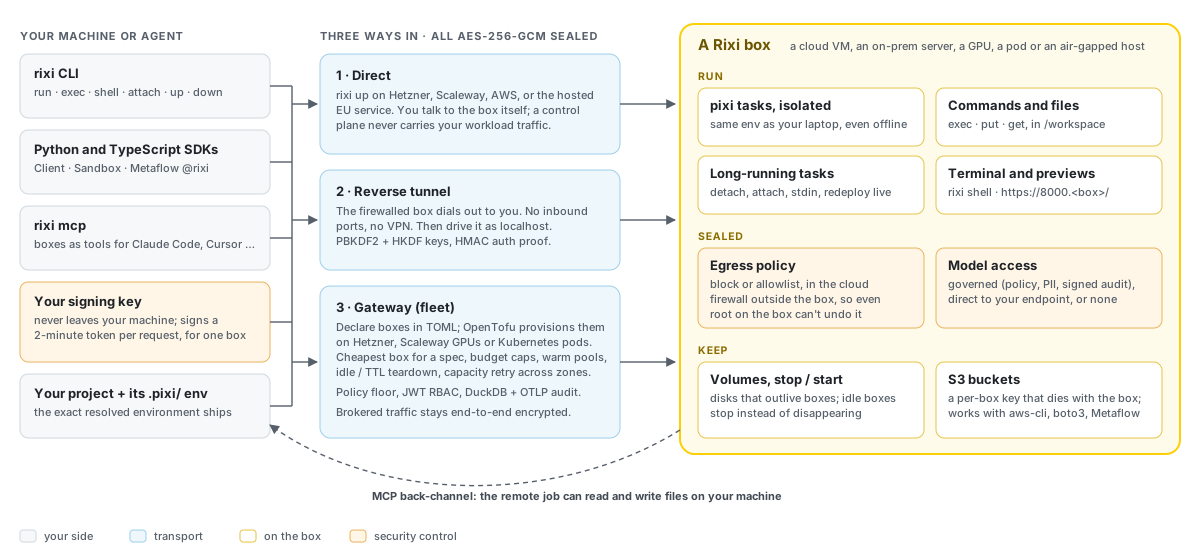
There are three ways to reach a box:
- Direct: you talk to the box itself. That’s what
rixi upand the hosted service do. If a control plane is involved, it only handles launching, tokens and shutdown, never your workload traffic. - Reverse tunnel: a box behind a firewall dials out to you, so there are no inbound ports to open and no VPN to request. You then drive it as
http://localhost:…. - Gateway: a control plane for a fleet, with on-demand provisioning, scheduling, budgets and audit (more below).
Long-running work, and keeping it#
Start a training run, close your laptop, and check back from somewhere else:
rixi run --detach --task train .          # prints a task id; the run keeps going
rixi exec --background "npm run dev"      # any command, kept as a task too
rixi tasks                                # what's running, what finished (exit codes)
rixi attach <id>                          # replay its output, then follow (Ctrl-C detaches)
rixi input <id> "yes"                     # a line to its stdin
rixi restart <id> · rixi redeploy <id> . · rixi kill <id> · rixi logs <id>
redeploy pushes changed code into a running task without tearing it down, which makes Rixi a perfectly good deployment tool for small services.
On top of that:
rixi shellopens an interactive terminal on the box, a PTY over a WebSocket. Window resizes follow and the exit code passes through.- Preview URLs.
rixi preview 8000serves a port of a hosted box at its own HTTPS address, with a certificate issued on the box. It’s private by default: the link carries a token, and ports you didn’t open, including the box’s own API, never answer. - Volumes and stop/start. A volume outlives boxes and can be attached to the next one.
rixi stoppowers a box off with its disk kept (compute stops billing), and--on-idle stopmakes an idle box stop instead of disappearing. - S3 buckets for results, artifacts and datasets, usable with aws-cli, boto3 or s3fs. A box can get its own key that dies with it, limited to some buckets or to reading. Self-hosters get the same through the gateway’s S3 proxy.
Hard problems that become one command#
All of these follow from one primitive: ship a project and its environment to a box and run it there.
| Problem | How Rixi handles it |
|---|---|
| The environment won’t reproduce on the GPU box | Rixi ships the exact resolved environment (.pixi/) with the code. What you tested is what runs. |
| The box is air-gapped | --offline-mode bundles the resolved environment into the upload. The server detects it and runs with PIXI_OFFLINE=1; nothing is fetched or solved on the target. |
| The box is behind a firewall | The box dials out over an encrypted reverse tunnel. No inbound ports, ever. |
| The remote job needs files on my laptop | An MCP back-channel exposes your local filesystem to the remote task as a tool, so a job on the GPU box writes its results straight back to your machine. |
| One Metaflow step needs a GPU | Add @rixi to that step. It runs on a box, artifacts flow through S3, and the rest of the flow stays local. |
| Serve my fine-tuned model to existing tools | Run the model as a keep-alive task and put the proxy in front. One model answers OpenAI, Anthropic and Ollama API calls. |
| A clean CI machine per job | The CI runner provisions a box, registers it as an ephemeral GitHub Actions runner, runs one job, and tears the box down. |
The Metaflow integration uses the same extension point as @batch and @kubernetes, so it really is one line:
from metaflow import FlowSpec, step, rixi

class TrainFlow(FlowSpec):
    @step
    def start(self):
        self.data = load()            # local
        self.next(self.train)

    @rixi(resource="hetzner-cpu")     # this step runs on a rixi box; the rest stay local
    @step
    def train(self):
        self.model = fit(self.data)
        self.next(self.end)

    @step
    def end(self):
        deploy(self.model)            # back on your laptop, reading the model from the datastore
The flagship example, showcase-gpu-lifecycle, goes end to end: provision a GPU, QLoRA fine-tune on it, serve the result behind an OpenAI-compatible API, then destroy the box so billing stops.
Pixi at the core#

Rixi only works this way because of Pixi, the package manager from prefix.dev. Pixi resolves a project’s whole environment from conda-forge and PyPI into a local .pixi/ folder, pinned by a lockfile, on Windows, macOS and Linux. It also has a built-in task runner, so pixi run train is a complete, reproducible description of “run the training”.
That local folder is the trick. Because the resolved environment is just a directory next to the code, Rixi can send it with the code. There’s no recipe to rebuild on the server, nothing to solve, and no drift, which is also what makes true air-gapped execution possible. Every Rixi task is a Pixi task: the server runs pixi run <task> inside the uploaded project.
Security model#
Rixi runs code on remote machines by design, so security isn’t an add-on.
- A token per request, checked first. On
rixi upboxes, the client signs a fresh ES256 JWT for every request: audience = that box, expiry = two minutes, unique ID. The signing key never leaves your machine, and the server reads nothing of a request before its token checks out. On self-run servers, JWT verification uses a public key or a JWKS URL, with a pinned algorithm allow-list, so the token header can’t choose a weaker algorithm.--audienceand--require-expstop a token for one server from working on another, and where TLS isn’t possible,--single-use-tokensaccepts each token once, so one seen on the wire is worthless. - Pinned TLS. Each
rixi upbox gets a certificate of its own, and the Python and TypeScript SDKs trust exactly that certificate. An SDK holding a key refuses any answer that comes back in the clear. Your own server, the gateway, the tunnel and the SMCP server take--tls-cert/--tls-key. - End-to-end AES-256-GCM on top. Code, inputs and output are also sealed under a per-session key negotiated over RSA right after boot, with use-bounded key rotation. The handshake never sends the shared secret: each side proves it knows it with an HMAC, the server’s proof covers the public key it offers, and a handshake can be finished only once, by whoever began it, within a minute. Encryption hides what’s sent; the token says who may send it.
- Egress control outside the box, in the provider’s firewall, as described above.
- Loopback by default. A server bound to a non-loopback address refuses to start without authentication unless you explicitly pass
--insecure. Even on loopback it refuses requests that a web page could make from your browser: anything naming another site inOrigin, or reaching the server under a name other than localhost. - Hardened uploads. Archives are unpacked with path-traversal and symlink filtering, task names are validated, and decompression size is capped. On the way out,
rixi runleaves files that look like credentials (.env,*.pem, keys, cloud credential folders) out of the package;.rixiignoreadds patterns, or sends one anyway with!. - Hardened tunnels. Per-deployment key-derivation salt, 600,000-round PBKDF2 plus HKDF-split keys, and an HMAC proof so the shared secret is never sent. Each connection gets its own key, with direction and a counter bound into every frame, so frames can’t be replayed or reflected.
- A back-channel that can’t be spoofed. A remote task asks your machine for a local file by printing a request line. Only lines carrying the token made for that run count, so text a task merely prints can’t pose as a request.
- Pinned installs. Boxes and the installer fetch Pixi as a pinned release archive, checked against its recorded hash, instead of piping an installer script into a root shell. Caddy, the Docker base image and every GitHub Action are pinned too.
- Secrets in environment variables, never on the command line, where they’d show up in
ps.
For agents talking to tools over a network, Rixi uses SMCP, Secure MCP: MCP’s tool model unchanged, wrapped with authentication, per-message encryption and signed payloads. Rixi is also a full peer in SMCP’s agent-to-agent (A2A) federation. It can forward a task to a downstream node carrying the user’s identity, with signed forwarding proofs, forward-secret ECDH session keys and AES-256-GCM. Every message is accepted once and only while fresh, every reply names the request it answers inside the signed payload, and a forwarding proof is good once, for the one task whose hash it carries. That code is checked byte for byte against shared cross-language test vectors.
Scaling up: the gateway#
For a fleet instead of one box, the gateway is an open-source control plane in the same repo:
- Provisioning on demand. Declare boxes by name in TOML, and the gateway stands them up with OpenTofu on Hetzner (CPU), Scaleway (CPU plus L4, L40S and H100 GPUs) or Kubernetes, where a box is just a pod on your own cluster. You can bring your own OpenTofu module.
- Teardown so billing stops. Idle, time-to-live, on-release or manual. Warm pools keep a box ready for requests that can’t wait for a cold start. On a GPU stock-out, it retries across zones and instance types.
- Cost control. Ask for the cheapest box that matches a spec. Per-provider pricing is refreshed from the provider APIs, running and lifetime cost per box is tracked, and budget caps bound the fleet’s hourly burn rate (
max_eur_per_hour) and total spend (max_fleet_eur). - Governance. An admin policy floor that users can only tighten, JWT role-based access per resource, one-time provisioning tokens, and a queryable audit trail in DuckDB plus OpenTelemetry, with an admin API and web console. Each provisioned box proves a registration token made for it, and a box someone asked for can be seen, reached and released only by its owner.
- Safe to try, hard to expose by accident. On loopback the gateway needs no setup. On an address others can reach, it won’t start without a key to verify client JWTs and TLS, unless you pass
--dev, which says plainly what it waives. - Two modes. In tunnel mode, boxes dial out to the gateway, which routes encrypted traffic it can’t read. In direct mode, clients talk to boxes directly and the gateway only sees heartbeats.
A hosted option#
If you don’t want to run any of this, --provider eutonomous gets the box from a hosted service on EU-only machines, paid from a prepaid wallet. You create an API key at rixi.eutonomous.eu, and then rixi up --provider eutonomous --size cpu-s (also cpu-l, gpu-l4, gpu-l40s). The API key can only launch, issue tokens for and shut down boxes. The box itself is reached directly over TLS with a token for that box alone, so your code and output don’t flow through the service. Volumes, S3 buckets, preview URLs and the in-browser terminal are available there.
By the numbers#
| Release | v0.17.3 (MIT) |
| Interfaces | rixi CLI, Python SDK (Client, Sandbox), TypeScript SDK, MCP server, Metaflow @rixi |
| Providers | Hetzner, Scaleway (incl. L4 / L40S / H100 GPUs), AWS (experimental), Kubernetes, any server you run, hosted EU boxes |
| Tests | About 550 Python tests across the CLI, SDK, server, agent, gateway, command-line client, proxy and tunnel, including security regression tests, plus TypeScript end-to-end tests against a real server. CI also lints Python (ruff) and shell scripts (ShellCheck), tests the Metaflow extension, and installs the package the way users do, with a read-only token and actions pinned by commit |
Getting started#
pip install "git+https://github.com/KellerKev/rixi@v0.17.3"

# Local: start a server on loopback, then ship the hello example to it
git clone https://github.com/KellerKev/rixi && cd rixi
cd server && pixi install && pixi run python rixi_server.py --port 9000     # terminal 1
rixi run --server http://127.0.0.1:9000 --task hello examples/hello         # terminal 2

# Cloud: create a box, run on it, destroy it
rixi up --provider hetzner --size sample-cpu --name mybox
rixi run --task hello examples/hello
rixi down mybox
Prefer a container? docker build -t rixi-server . builds the server image; the Dockerfile shows the authenticated and TLS options. To install Rixi on a machine you already have, ./install-rixi.sh --host deploy@10.0.0.5 --key ~/.ssh/id_ed25519 does it over SSH.
Where it fits#
Rixi is strongest when the environment has to reproduce exactly, when the machine is firewalled or air-gapped, or when you want agents to run code somewhere sealed that you control. It’s not a hosted-only platform and it’s not a workflow orchestrator. Pair it with whatever scheduler you already use, or with Metaflow.
It’s a personal project that grows fast, so expect rough edges. If you’re building agents that need a real machine to work on, without handing them your laptop, it’s worth a look.
Rixi is open source: github.com/KellerKev/rixi · Package management by Pixi, from prefix.dev