The Problem#
Every organization has people who need answers from databases but don’t know SQL. The standard solutions — BI dashboards, data catalogs, managed text-to-SQL services — either require upfront effort to build and maintain, lock you into a vendor, or send your schema and data to external APIs.
What if you could point a local AI at your PostgreSQL database, let it learn the schema, and then ask questions in plain English — all running on your own hardware?
That’s Postgres Analyst: an open-source semantic layer for PostgreSQL powered by Ollama.
GitHub: github.com/KellerKev/postgres-analyst
Architecture#
┌─────────────────────────────────────────────────────────────────┐
│                        Browser (localhost:5173)                  │
│  ┌──────────────┐  ┌──────────────────┐  ┌──────────────────┐  │
│  │   Schema      │  │  Semantic Canvas │  │   Chat Panel     │  │
│  │   Explorer    │  │  (Visual Model)  │  │  (Natural Lang)  │  │
│  │              │  │                  │  │                  │  │
│  │  Tables      │  │  ┌─────┐ ┌────┐ │  │  User: "Show me  │  │
│  │  Columns     │  │  │users├─┤logs│ │  │   active users   │  │
│  │  Types       │  │  └─────┘ └────┘ │  │   from Germany"  │  │
│  │  PII Tags    │  │                  │  │                  │  │
│  └──────────────┘  └──────────────────┘  │  SQL: SELECT ... │  │
│       Preact + Vite Frontend             │  [Run] [Edit]    │  │
│                                          └──────────────────┘  │
└──────────────────────────┬──────────────────────────────────────┘
                           │ REST API
┌──────────────────────────┴──────────────────────────────────────┐
│                    FastAPI Backend                               │
│                                                                  │
│  ┌─────────────────┐  ┌──────────────────┐  ┌───────────────┐  │
│  │  Schema          │  │  Semantic Model  │  │  Query Engine │  │
│  │  Introspector    │  │  Manager         │  │               │  │
│  │                  │  │                  │  │  NL → SQL     │  │
│  │  Reads pg_catalog│  │  AI Descriptions │  │  Execute      │  │
│  │  Detects types   │  │  PII Detection   │  │  Error Fix    │  │
│  │  Maps relations  │  │  Column Context  │  │  Log History  │  │
│  └────────┬─────────┘  └────────┬─────────┘  └───────┬───────┘  │
│           │                     │                     │          │
└───────────┼─────────────────────┼─────────────────────┼──────────┘
            │                     │                     │
    ┌───────┴───────┐     ┌───────┴───────┐     ┌───────┴───────┐
    │  PostgreSQL   │     │    Ollama      │     │  PostgreSQL   │
    │  (Target DB)  │     │  (Local LLM)  │     │  (Metadata)   │
    │               │     │               │     │               │
    │  Your data    │     │  qwen2.5      │     │  Semantic     │
    │  Your schema  │     │  llama3       │     │  models,      │
    │               │     │  mistral      │     │  query logs   │
    └───────────────┘     └───────────────┘     └───────────────┘
The architecture has three clear layers:
- Introspection — reads
pg_catalogto discover tables, columns, types, and relationships. No manual configuration needed. - Semantic Enrichment — Ollama generates human-readable descriptions for every table and column, and detects PII (email, phone, SSN patterns). These descriptions become the context the LLM uses to understand your schema.
- Query Translation — natural language → SQL, with the semantic model as context. The LLM sees descriptions, not raw column names, which dramatically improves query accuracy.
How the AI Loop Works#
The query flow is a self-correcting agentic loop:
User Question           "Show me users who signed up last month"
       │
       ▼
┌─────────────────┐
│ Build Prompt     │     Semantic model + schema + question
│                  │     → structured prompt for LLM
└────────┬─────────┘
         │
         ▼
┌─────────────────┐
│ Ollama Generate  │     Local LLM generates SQL
│ (qwen2.5/llama) │     No data leaves your machine
└────────┬─────────┘
         │
         ▼
┌─────────────────┐
│ SQL Review       │     User sees generated SQL
│ [Edit] [Run]     │     Can modify before execution
└────────┬─────────┘
         │
         ▼
┌─────────────────┐     ┌─────────────────┐
│ Execute Query    │────▶│ Success?        │
└────────┬─────────┘     │ Yes → Results   │
         │               │ No → Error      │
         │               └────────┬────────┘
         │                        │ Error
         ▼                        ▼
┌─────────────────┐     ┌─────────────────┐
│ Return Results   │     │ Auto-Fix Loop   │
│ (table view)     │     │ Error + SQL →   │
└──────────────────┘     │ LLM → New SQL   │
                         └─────────────────┘
The auto-correction loop is the key differentiator. When a generated query fails (syntax error, wrong table name, type mismatch), the error message is fed back to the LLM along with the original question and the failed SQL. The LLM then generates a corrected query. This happens automatically — the user just sees the fixed result.
The Three-Panel UI#
Schema Explorer#
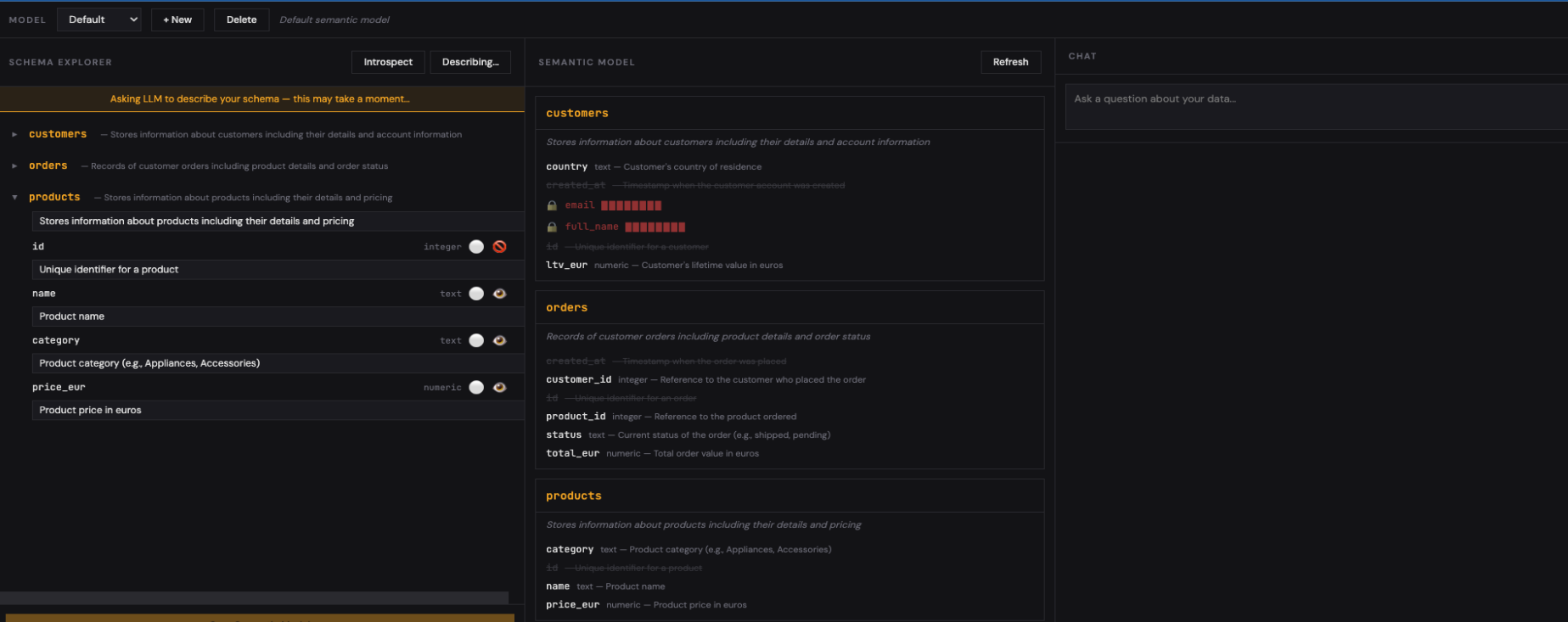
The left panel shows your database schema: tables, columns, types. Click Auto-Describe and Ollama generates human-readable descriptions for every table and column. It also flags columns that look like PII (emails, phone numbers, SSNs) — these can be masked in query results while still being visible to the LLM for context.
Semantic Canvas#
The center panel visualizes your semantic model as an interactive canvas. Tables are nodes, foreign keys are edges. You can drag, rearrange, and group tables to match how your team thinks about the data — not just how the schema is structured.
Multiple semantic models per database are supported. Your sales team might have a model focused on customers and orders, while your engineering team has one focused on logs and metrics — same database, different views.
Chat Panel#
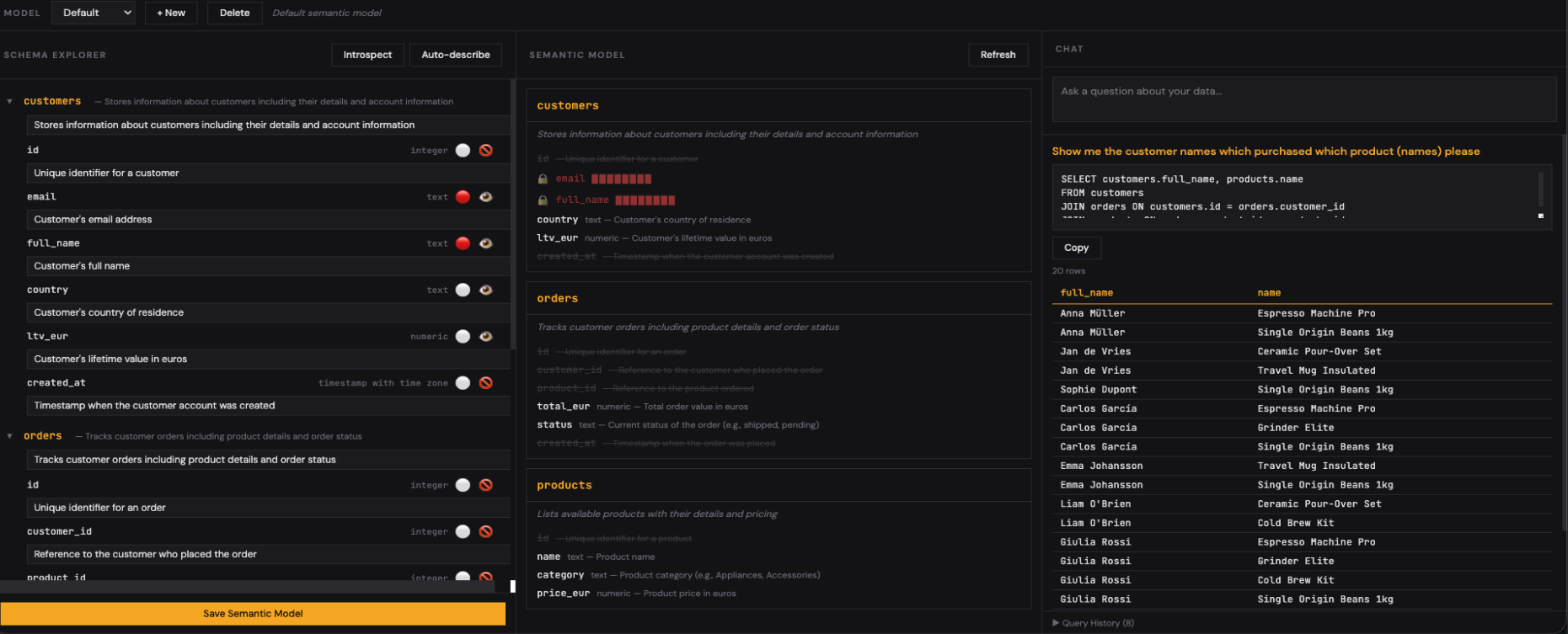
The right panel is where you query in natural language. The generated SQL is shown for review before execution. You can edit it, run it, or ask a follow-up question. Query history is logged for audit and reuse.
Why Local Matters#
Running inference locally via Ollama isn’t just a privacy feature — it changes what’s architecturally possible:
| Aspect | Cloud Text-to-SQL | Postgres Analyst (Local) |
|---|---|---|
| Schema exposure | Sent to external API | Never leaves your network |
| Data in prompts | Sample rows often included | Only metadata, never data |
| Cost | Per-token billing | Free after hardware |
| Latency | Network round-trip | Local inference (~1-3s) |
| Availability | Depends on vendor uptime | Works offline |
| Compliance | GDPR/DORA questions | No data processor relationship |
| Model choice | Vendor’s model | Any Ollama model (qwen2.5, llama3, mistral, codellama) |
For European organizations under GDPR, DORA, or NIS2, keeping schema metadata and query patterns local eliminates an entire class of compliance concerns.
PII Protection#
The PII detection layer deserves special attention. When Ollama analyzes your schema, it identifies columns that likely contain personal data:
- Email addresses — columns named
email,mail, or containing@patterns - Phone numbers — columns with phone/mobile/tel naming
- National IDs — SSN, BSN, tax ID patterns
- Names — first_name, last_name, full_name columns
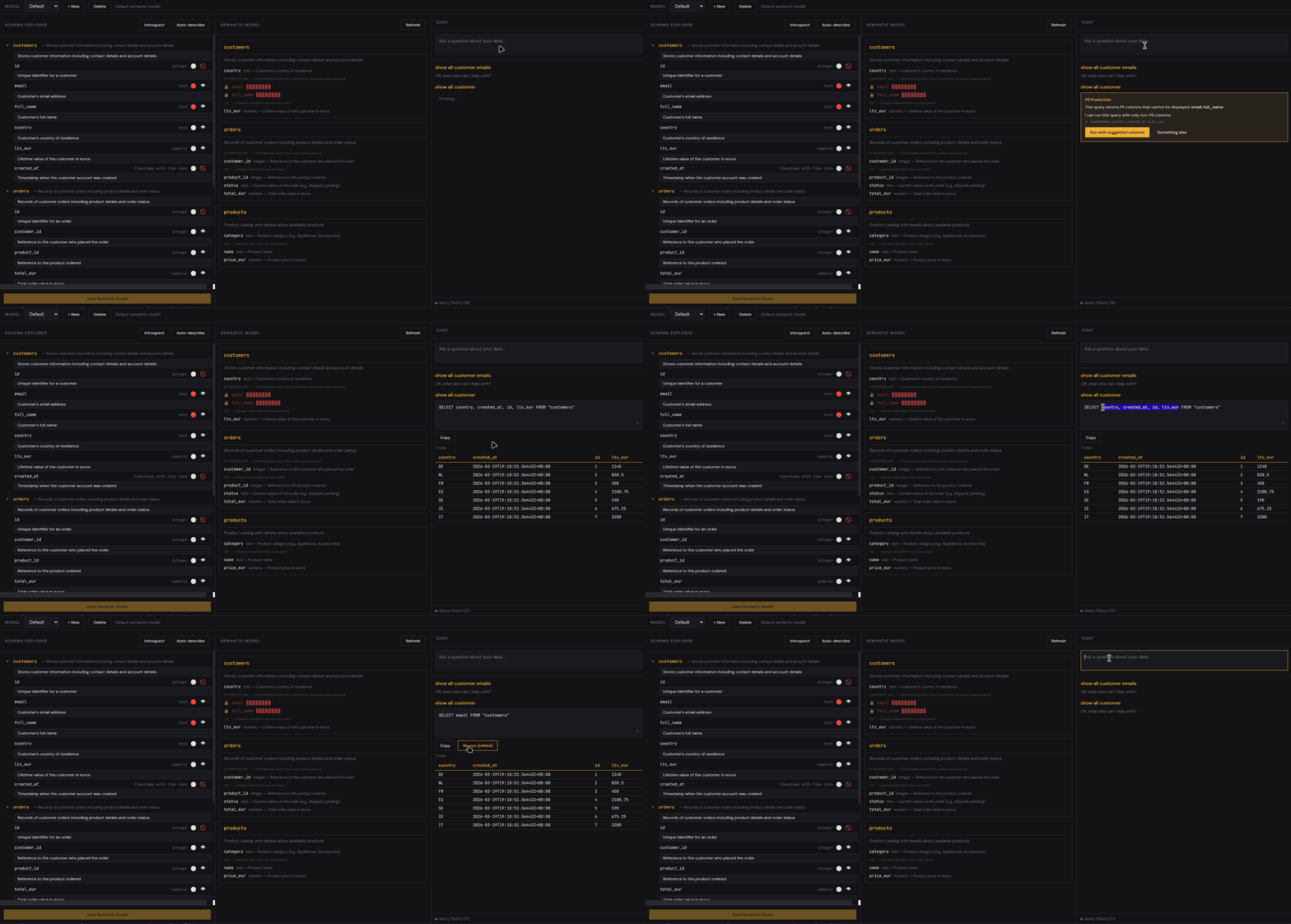
Flagged columns are still visible to the LLM (it needs to know they exist to generate correct JOINs), but their values can be masked in query results. The user sees ***@***.com instead of the actual email — the AI knows the column exists, but sensitive data never appears on screen.
Getting Started#
Prerequisites:
git clone https://github.com/KellerKev/postgres-analyst.git
cd postgres-analyst

# Initialize the metadata database
pixi run python backend/init_db.py

# Start backend
pixi run python -m uvicorn backend.main:app --reload --port 8000

# Start frontend (separate terminal)
cd frontend && pixi run npx vite
Open http://localhost:5173, connect to any PostgreSQL database, click Auto-Describe, and start querying in plain English.
What This Is (and Isn’t)#
This is an educational proof of technology — a teaching tool for understanding how semantic layers, text-to-SQL, and local LLM inference work together. It’s designed for PostgreSQL and Ollama enthusiasts who want to understand the mechanics behind AI-powered data access.
It is not a production data platform. There’s no authentication, no multi-user support, no query cost controls. But the patterns it demonstrates — schema introspection, semantic enrichment, agentic error correction, PII detection — are the same patterns used in production systems at scale.
The entire codebase is intentionally small and readable. The backend is a single FastAPI file. The frontend is four Preact components. If you want to understand how text-to-SQL actually works under the hood, this is a good place to start.
Related#
- Nanocortex — similar agentic pattern for Snowflake Cortex
- Containing AI Agents — defense-in-depth architecture for running agents safely
- PostgreSQL Playground — try PostgreSQL right in your browser with pgvector, pgcrypto, and more
