Security should unblock value, not delay it.
Every AI agent project I see hits the same wall before production. It isn’t the model, and it usually isn’t the budget. It’s a security review that can’t get a clear answer to one question: what is this agent allowed to do?
Here are three uncomfortable truths behind that wall.
Three uncomfortable truths#
1. Agent projects don’t die on cost. They die on trust.#
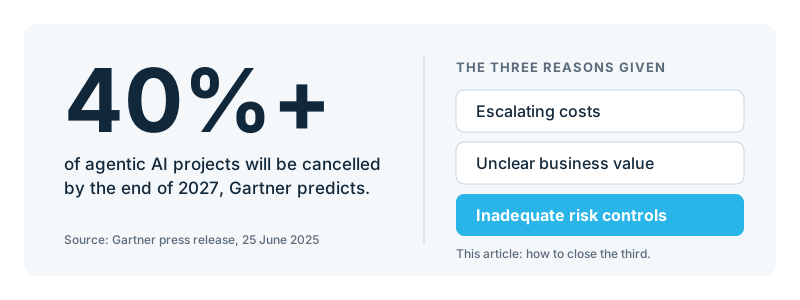
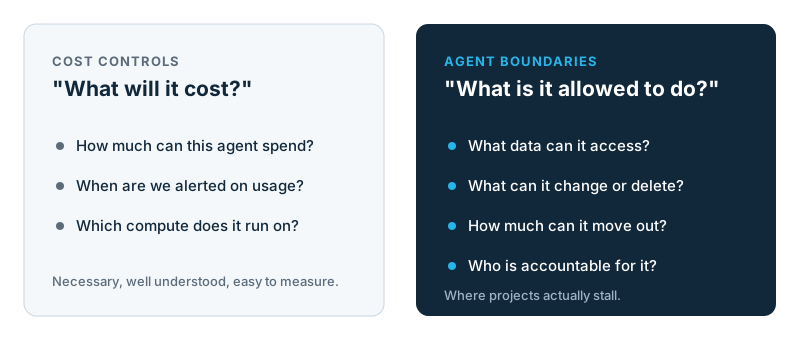
Gartner expects over 40% of agentic AI projects to be cancelled by the end of 2027, and “inadequate risk controls” is one of its three reasons.1 Cost controls are well understood. A spend cap tells you an agent can’t burn more than X. It tells you nothing about what the agent can read, change, delete, or send out of the company at 3 AM.
2. Blocking agents only works if you can identify them.#
In October 2026, at least five major U.S. banks moved to block outside AI agents from customer accounts.2 JPMorgan Chase confirmed it blocks external agents from acting for retail customers, while still allowing read-only data access through approved connectors.3 Banks also reported finding outside agents operating inside customer accounts.4
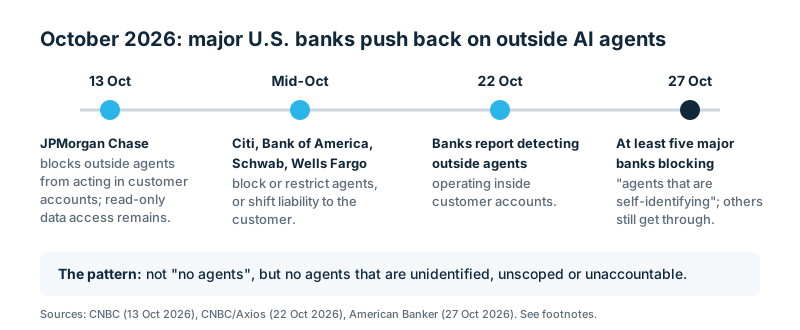
The telling detail is this quote from a security CEO in American Banker: “They’re blocking agents that are self-identifying, but they all recognize that there are still agents getting through.”2 An agent that logs in with a customer’s password looks exactly like the customer.
The lesson for every enterprise: agents aren’t the problem. Agents you can’t identify, scope, or hold accountable are. On the open internet, banks can’t force agents to identify themselves. Inside your own data estate, you can, but only if your architecture supports it.
3. Point tools can’t secure agents. Only a platform can.#
This is the controversial one. Most enterprises are assembling agent stacks from parts: an agent framework, a model gateway, a vector database, a data warehouse, and a separate data-loss tool. Each is reasonable on its own. Together, they lose exactly the context that agent security depends on.
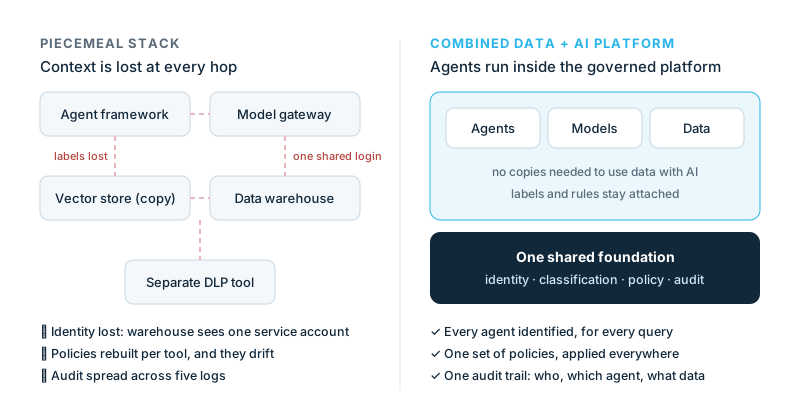
- Identity gets lost. The framework connects to the data with one shared service account, so the warehouse can’t tell which person, or which agent, is asking.
- Data labels don’t travel. Data copied into a vector store leaves its classification and policies behind.
- Policies drift. Masking rules get rebuilt in every tool, and the gaps between them are where data leaks.
- Audit is fragmented. “What did this agent do?” means stitching together logs from five systems.
- Every new agent project means re-securing the stack. That’s the open-ended review that keeps pilots from reaching production.
The fix is a platform: one place where identity, data classification, policy and audit are shared. There are two credible ways to get there.
A combined data and AI platform. Agents, models and data run under one governance layer. The agent doesn’t reach into the data platform; it runs inside it. Data doesn’t need to be copied out, and labels and rules stay attached, down to the row and column.
A network-layer security platform. Zero-trust and security service edge platforms sit in the traffic path between users, agents, AI apps and data sources, so they see the whole estate. The major vendors moved here in 2026: Zscaler’s AI Broker and AI Access Graph,5 Netskope’s Agentic Broker,6 Palo Alto Networks’ Prisma AIRS,7 and Cisco AI Defense8 all inspect or broker agent traffic, including MCP.
| Combined data + AI platform | Network-layer security platform | |
|---|---|---|
| Sees best | What the data is, and exactly what each query returned | Who and what talks to what, across the whole estate |
| Strongest at | Agent-aware masking, privilege ceilings, row-level export limits, detailed audit | Finding unapproved agents and AI apps, brokering MCP traffic, inline data-loss prevention |
| Blind spot | Agents and data outside the platform | What happens inside a platform once a connection is allowed |
They complement each other. The network layer stops agents nobody approved. The data platform decides what approved agents can actually see and take. What doesn’t work is the piecemeal middle.
The five controls every platform must provide#
Whichever architecture you choose, security reviews keep asking the same three questions. Five controls answer them.
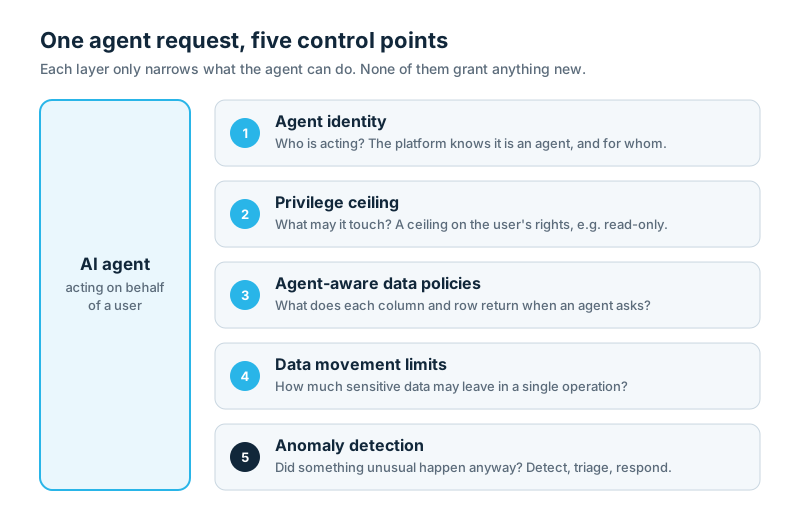
“Can an agent leak sensitive data in bulk at 3 AM?” Access controls say who may read a table, and masking says what a column shows. Neither says how much may leave in one go. You need data movement limits per channel (exports, downloads, APIs, agents), attached to your data classification so they follow the data, plus anomaly detection that spots unusual exports, including slow leaks across many small queries.
“Do we need new rules for every agent?” No, if the platform has agent identity: it recognises when any agent is acting, whether it’s the vendor’s own, a partner tool, or one your team built. Then one set of agent-aware data policies covers them all. The same analyst sees customer emails when querying directly and masked values when asking an unapproved agent. Agents that act for a person should be recorded as such; autonomous agents get their own identity.
“What if a powerful user’s agent makes a mistake?” A privilege ceiling limits any agent to a fraction of the user’s rights, such as read-only. It only ever narrows, never grants. The company sets the default, teams and users can tighten it, and nobody, least of all the agent, can loosen it. Senior people can then use AI safely.
What to ask any vendor or internal team:
| Control | The question to ask |
|---|---|
| Agent identity | Can the platform tell an agent session from a human one, for every agent we use? Can we see afterwards which agent did what, for whom? |
| Privilege ceiling | Can we cap what any agent can do on a user’s behalf, company-wide by default? Can an agent ever raise its own ceiling? |
| Agent-aware data policies | Can one policy treat agents differently from humans, without per-agent maintenance? |
| Data movement limits | Can we cap sensitive-data movement per channel, and does the cap follow our data classification? |
| Anomaly detection | Who gets alerted on unusual exports, and how quickly? |
Agent identity is the foundation. Every other control depends on knowing that an agent is acting, so “how does this agent log in?” is the first question to ask about any agent. An agent that signs in with a person’s password or a generic API key is that person, as far as your controls know. (For a deeper look at where this is heading, see my post on purpose-aware access control for AI agents.)
From pilot to production#
The point of all this is speed.
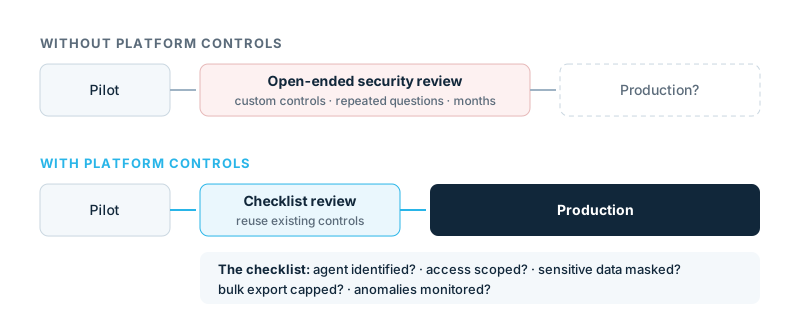
When the controls live in the platform, every new agent project reuses them, and the security review becomes a checklist instead of an investigation. Security is how the project gets approved, not the reason it’s held up. That’s what “keep shipping” means.
Where I’d start:
- Inventory your agents, and how each one connects to your data.
- Agree on a default for agents, for example read-only, no bulk export of sensitive data, and on who approves exceptions.
- Label your sensitive data. Every control works best when it can hang off a label.
- Turn on detection and route it to your security team.
- Hunt for the piecemeal gaps: any agent reaching data through a shared service account or a copy.
One example: how Snowflake delivers the five controls#
To make this concrete, here’s how one combined data and AI platform, Snowflake, implements the five control points. All of the features below are generally available as of November 2026.91011 The same agents, models, and data run under one identity, classification and policy layer, so the controls apply to Snowflake’s own agents and to partner and home-built agents.
| Control point | Snowflake capability | In one sentence |
|---|---|---|
| 1. Agent identity | Agent Identity12 | Sessions are marked as agent-driven automatically for Snowflake’s agents and its managed MCP server, and through agent-aware OAuth or dedicated agent users for everything else. |
| 2. Privilege ceiling | Restricted Session Scopes | A company-wide or per-user ceiling, such as read-only, applied to any agent session, which users can tighten per chat. |
| 3. Agent-aware data policies | Masking and row access policies that check for an agent | One tag-based policy covers every agent, and can tell Snowflake’s own agents apart from external ones. |
| 4. Data movement limits | Data Movement Policies | Row limits per channel (exports, downloads, programmatic access, agent access), attached to classification tags. |
| 5. Anomaly detection | Trust Center detections | Per-user baselines for unusual exports, plus a check that flags agents reading sensitive data that has no masking policy. |
For sales teams, the three customer questions with Snowflake answers:
| The customer asks | The answer on Snowflake |
|---|---|
| “Can an agent leak our data in bulk?” | No. Data Movement Policies cap how much protected data can leave in one operation, and the Trust Center flags unusual exports. |
| “Do we need new rules for every agent?” | No. Snowflake recognises any agent session, and one policy covers Snowflake’s agents, partner tools, and home-built agents. |
| “What if an admin’s agent makes a mistake?” | Restricted Session Scopes limit any agent to a fraction of the user’s rights, such as read-only, set once for the whole company. |
Good discovery questions to ask:
- Which agent projects are waiting on security sign-off today, and what’s the open question?
- Which data would you never want an agent to export, and is it labelled as sensitive yet?
- Which agents are you using or building, and how do they log in to your data?
- How many systems would you need to check to show an auditor what an agent did?
The technical detail for architects is below.
Technical detail: Data Movement Policies and Trust Center detections
Data Movement Policies#
DMP fills a gap the existing controls leave open:
- Access control answers: who can query this?
- Masking answers: what does this column return?
- Neither answers: how much sensitive data can leave in a single operation?
DMP does. You define row budgets per movement type, group them into a policy, and attach the policy to a tag or to the account. Snowflake then allows, alerts, or blocks.
-- 1. Rules: one per movement type
CREATE OR REPLACE DATA MOVEMENT RULE pii_export_block
  TYPE = 'COPY_INTO_EXTERNAL_STAGE'
  MAX_ROWS AS () RETURNS INTEGER
  -> (CASE
        WHEN SYS_CONTEXT('SNOWFLAKE$SESSION', 'ROLE')
             = 'DATA_EXPORT_ROLE' THEN NULL   -- approved export role: no limit
        ELSE 1000                              -- everyone else: 1,000 rows max
      END);

CREATE OR REPLACE DATA MOVEMENT RULE pii_agent_block
  TYPE = 'AGENT_ACCESS'
  MAX_ROWS AS () RETURNS INTEGER -> (0);      -- agents: no tagged rows at all

CREATE OR REPLACE DATA MOVEMENT RULE pii_fetch_alert
  TYPE = 'PROGRAMMATIC_FETCH'
  MAX_ROWS AS () RETURNS INTEGER -> (10000);  -- drivers/CLI: alert above 10k rows

-- 2. Policy: which rules enforce, which only alert
CREATE OR REPLACE DATA MOVEMENT POLICY pii_guardrails
  ENFORCE_RULES = (pii_export_block, pii_agent_block)
  ALERT_RULES   = (pii_fetch_alert);

-- 3. Attach to the tag (column, table, schema or database tag) ...
ALTER TAG pii_ssn_full SET DATA MOVEMENT POLICY pii_guardrails;

-- ... and optionally set an account-wide baseline for everything untagged
ALTER ACCOUNT SET DATA MOVEMENT POLICY governance.policies.baseline_dmp;
The building blocks:
| Object | What it does |
|---|---|
| Data movement rule | Controls one movement TYPE. Returns a MAX_ROWS integer. |
| Data movement policy | Groups rules into ENFORCE_RULES (can block) and ALERT_RULES (allow + alert). At most one rule per movement type in each list. |
| Attachment | ALTER TAG … SET DATA MOVEMENT POLICY or ALTER ACCOUNT SET DATA MOVEMENT POLICY. There’s no direct table attachment. |
MAX_ROWS semantics are simple: NULL = no limit · 0 = block · N = at most N rows. The rule body can read context through SYS_CONTEXT: the session role, as above, or statement details in the SNOWFLAKE$DATA_MOVEMENT namespace, such as stage attributes or the name of the agent.
How the attachments resolve:
- The most granular attachment wins. A column tag beats a table tag, which beats a schema tag, and so on. The account policy covers objects that no tag-based policy covers.
- The strictest row budget wins when a statement touches several protected objects.
- Tag propagation matters. By default, a tag carrying a DMP must have its propagation set to
ON_DEPENDENCY_AND_DATA_MOVEMENT, so the protection follows the data into derived tables. You can turn that requirement off with theENFORCE_TAG_PROPAGATION_FOR_DATA_MOVEMENT_POLICIESaccount parameter.
I like the tag-first design: you classify once, and the guardrail follows the data wherever the tag goes.
Six movement types, one classification#
DMP covers the paths data actually takes out of the platform:
| Movement type | Applies when Snowflake classifies the statement as… |
|---|---|
COPY_INTO_EXTERNAL_STAGE | Export / COPY INTO an external stage |
COPY_INTO_INTERNAL_STAGE | COPY INTO a Snowflake-managed stage inside the account |
AGENT_ACCESS | Access through an agent or MCP-style client (unless it’s a stage copy) |
SNOWSIGHT_UI | Data access originating from Snowsight |
UI_DOWNLOAD | Result downloads from the Snowsight UI (Workspaces results, notebooks, Query History) |
PROGRAMMATIC_FETCH | Drivers and connectors, SnowSQL, Snowflake CLI, SQL API, stored procedures |
Details to know before you design rules:
- One primary type per statement. Precedence is
COPY_INTO_EXTERNAL_STAGE→COPY_INTO_INTERNAL_STAGE→AGENT_ACCESS→SNOWSIGHT_UI→PROGRAMMATIC_FETCH, and the first match wins. An agent that runsCOPY INTOan external stage is handled by your external-stage rule, not your agent rule. Set the budgets with that in mind. UI_DOWNLOADbehaves differently. It’s evaluated after the query completes. When enforced, the download button is disabled. It only works as an enforce rule, never an alert rule, and its violations don’t appear inDATA_MOVEMENT_VIOLATIONS.- Budgets are per statement. DMP caps rows per operation, not cumulative volume across many statements. Catching slow, many-small-queries exfiltration is the job of the detection half.
- Known limits: unloads with
PARTITION BYare always blocked on protected tables, and DMP doesn’t protect cross-region shares.
For monitoring, SNOWFLAKE.ACCOUNT_USAGE.DATA_MOVEMENT_VIOLATIONS records violating queries: the enforced or alerted policy, the movement type, the user, and the tables. DATA_MOVEMENT_POLICIES, DATA_MOVEMENT_POLICY_RULES, and DATA_MOVEMENT_RULE_REFERENCES show the configuration. Expect up to two hours of latency on those views. Rules and policies are plain DDL, so they go through the same review and CI process as the rest of your schema.
Anomaly detection in the Trust Center#
DMP enforces fixed budgets. Detection looks for behaviour that’s unusual for a particular user. The Data Security scanner package has two event-driven scanners, both rated high severity:
- Users with anomalous amount of data unloaded to external stage
- Users with anomalous amount of data unloaded to internal stage. This one also flags
GEToperations that follow the unload, which is the classic “stage it, then download it” pattern.
Each compares a user’s export volume over the last 24 hours with that user’s own historical baseline. Each also checks query semantics, table access patterns, and stage characteristics to keep false positives down. Findings appear at most once every four hours, under Governance & security » Trust Center » Detections, for roles with TRUST_CENTER_ADMIN or TRUST_CENTER_VIEWER.
If you run agents, two more packages are worth turning on:
- AI Security includes Sensitive Data Accessed by Agent, a detection that fires when an agent reads classified sensitive columns that have no masking or row access policy. It’s a direct check on whether you’ve actually closed the gap that Scenario 2 is about. The same package flags a disabled prompt injection guardrail and CoCo CLI tokens that have no role restriction or network policy.
- Threat Intelligence has anomaly-style detections: authentication failure spikes, dormant-user sign-ins, logins from unusual IPs, unusual client applications, and outlier long-running queries.
Technical detail: how agent identity works, and agent-aware policies
Agent Identity#
What it is: a way for Snowflake to recognise that an AI agent is active in a session, so you can govern agent-driven access separately from a human or a plain service account. There are two modes:
- Delegated agents act on behalf of a user. The session belongs to the user and is marked agent-active.
- Autonomous agents act under their own identity, as a
SERVICE_AGENTuser.
It isn’t limited to CoCo or Snowflake’s own agents. A session becomes agent-active in any of these ways:
| How the agent connects | How it’s marked agentic |
|---|---|
| Cortex Agents, CoCo (CLI, Desktop, Snowsight), Snowflake CoWork | Automatically |
| Snowflake-managed MCP server | Automatically, for any MCP client |
| Your own app or third-party agent using Snowflake OAuth | Set IS_AGENTIC = TRUE on the OAuth security integration |
| Your own app or third-party agent using External OAuth (Entra ID, Okta, PingFederate, custom) | Set IS_AGENTIC = TRUE on the External OAuth integration |
| An app that delegates a user’s token to an agent | OAuth token exchange with act type agent |
| An autonomous agent with its own identity | A user created with TYPE = SERVICE_AGENT (authenticates with key-pair JWT or workload identity federation, including SPIFFE/SPIRE) |
There is one gap to know about. An agent that logs in as a regular user with a key pair or a programmatic access token is not recognised as an agent. To the platform, it looks like the user typing SQL. If you’re building or buying an agent, route it through OAuth with IS_AGENTIC, through the managed MCP server, or through a SERVICE_AGENT user.
How to use it in policies: two context values matter.
SYS_CONTEXT('SNOWFLAKE$CURRENT', 'IS_AGENT_ACTIVATED')returns whether an agent is active.SYS_CONTEXT('SNOWFLAKE$CURRENT', 'AGENT_TYPE')returns which kind:CORTEX_AGENT(a saved, named Cortex Agent),CORTEX_LITE_AGENT(an on-demand agent such as a CoCo client), orEXTERNAL_AGENT(anIS_AGENTICintegration, a token exchange, or aSERVICE_AGENTuser). It returnsNULLwhen no agent is active.
-- One masking policy, every agent, no per-agent maintenance
CREATE OR REPLACE MASKING POLICY email_agent_mask AS (val STRING) RETURNS STRING ->
  CASE
    -- no agent: normal RBAC behaviour for the human
    WHEN SYS_CONTEXT('SNOWFLAKE$CURRENT', 'IS_AGENT_ACTIVATED')::BOOLEAN = FALSE
      THEN val
    -- curated, saved Cortex Agents for the support team may see emails
    WHEN SYS_CONTEXT('SNOWFLAKE$CURRENT', 'AGENT_TYPE') = 'CORTEX_AGENT'
         AND IS_ROLE_IN_SESSION('SUPPORT_ROLE')
      THEN val
    -- every other agent, internal or external, gets a masked value
    ELSE '*** MASKED FOR AGENT ***'
  END;

-- Put it on a tag so every classified column is covered
CREATE OR REPLACE TAG sensitive_data_tag;
ALTER TAG sensitive_data_tag SET MASKING POLICY email_agent_mask;

ALTER TABLE customer_data MODIFY COLUMN email
  SET TAG sensitive_data_tag = 'Sensitive';
Humans see the email as usual. A curated Cortex Agent for the support team sees it. Ad-hoc agents, MCP clients, and external agents get the masked string, without you knowing in advance which agents will show up. The same check works in row access, projection, aggregation, and join policies. Note that SYS_CONTEXT returns a string unless the 2026_06 behaviour change bundle is enabled, so keep the ::BOOLEAN cast.
Auditing: ACCOUNT_USAGE.QUERY_HISTORY has an agent_type column for the agent that issued each query. ACCOUNT_USAGE.ACCESS_HISTORY has an agents_info column with the agent type, ID, and name, ordered from the nearest agent to the top-level one, so nested agent calls stay traceable.
SELECT query_start_time, user_name, agents_info, direct_objects_accessed
FROM snowflake.account_usage.access_history
WHERE agents_info IS NOT NULL
ORDER BY query_start_time DESC;
Technical detail: turning on agent context in agents you build (nanocortex example)
For Snowflake’s own agents and the managed MCP server, there’s nothing to do. For an agent you build yourself, the agent context is decided at authentication time, so it’s the login code that has to get it right. My nanocortex project, a minimal Cortex Agent CLI in a single Python file, implements both supported paths, so I’ll use it as the example.
Path A: IS_AGENTIC OAuth. The human stays the identity, and their queries are marked agentic. Use this when the audit trail should name the person, not a service account.
First, the integration:
CREATE OR REPLACE SECURITY INTEGRATION nanocortex_agent_oauth
    TYPE = OAUTH
    OAUTH_CLIENT = CUSTOM
    OAUTH_CLIENT_TYPE = 'CONFIDENTIAL'
    OAUTH_REDIRECT_URI = 'http://localhost:9000/callback'
    OAUTH_ISSUE_REFRESH_TOKENS = TRUE
    OAUTH_REFRESH_TOKEN_VALIDITY = 86400
    IS_AGENTIC = TRUE          -- every session from this integration is agent-active
    ENABLED = TRUE;

SELECT SYSTEM$SHOW_OAUTH_CLIENT_SECRETS('NANOCORTEX_AGENT_OAUTH');
Then the agent runs a normal authorization code flow with PKCE and logs in with the resulting token. Condensed from nanocortex.py:
# 1. Send the user to Snowflake's authorize endpoint. Bind the role into the
#    scope NOW: switching roles after login doesn't downscope the token.
verifier  = secrets.token_urlsafe(64)
challenge = base64.urlsafe_b64encode(
    hashlib.sha256(verifier.encode()).digest()).rstrip(b"=").decode()
state = secrets.token_urlsafe(16)

params = {
    "client_id": client_id,
    "response_type": "code",
    "redirect_uri": "http://localhost:9000/callback",  # must match the integration
    "state": state,
    "code_challenge": challenge,
    "code_challenge_method": "S256",
    "scope": "session:role:ANALYST",
}
webbrowser.open(f"{account_url}/oauth/authorize?{urllib.parse.urlencode(params)}")
# ... a loopback HTTP server captures ?code=...&state=... and checks state ...

# 2. Exchange the code for tokens (HTTP Basic client auth)
token = post_form(f"{account_url}/oauth/token-request",
                  auth=(client_id, client_secret), data={
    "grant_type": "authorization_code",
    "code": code,
    "redirect_uri": "http://localhost:9000/callback",
    "code_verifier": verifier,
})

# 3. Log in with the agentic token. This session is now agent-active.
conn = snowflake.connector.connect(
    account=account, user=user,
    authenticator="oauth", token=token["access_token"],
)
What I learned building it:
- Bind the role in the token scope (
session:role:ANALYST). That’s what actually limits the agent. AUSE ROLEafter login doesn’t shrink what the token can do. - Every session needs the agentic token. nanocortex has two logins: one for the Cortex Agent REST API and one for the Python connector that runs SQL tools. If only one of them uses the
IS_AGENTICtoken, masking differs depending on which path a query takes. Make sure every login the agent opens uses it. - Cache and refresh, don’t re-prompt. Store the access and refresh tokens (mode
0600), use the refresh grant, and have non-interactive runs fail clearly instead of popping up a browser. - Verify it, don’t assume it. nanocortex runs a probe at startup and on
/agent, and showsnot activatedin red if the session didn’t come back agent-marked. If it isn’t marked, none of the agent-aware masking is in force.
SELECT SYS_CONTEXT('SNOWFLAKE$CURRENT', 'IS_AGENT_ACTIVATED') AS is_agent_activated,
       SYS_CONTEXT('SNOWFLAKE$CURRENT', 'AGENT_TYPE')         AS agent_type,
       CURRENT_USER(), CURRENT_ROLE();
-- expected through the agent: TRUE | EXTERNAL_AGENT | ME@EXAMPLE.COM | ANALYST
Path B: a SERVICE_AGENT user. The agent has its own identity. Every session that user opens is agent-active, with no change on the client side, which makes it the sturdiest option for autonomous or scheduled agents:
CREATE USER IF NOT EXISTS nanocortex_agent
    TYPE = SERVICE_AGENT
    RSA_PUBLIC_KEY = '<public key body>'
    DEFAULT_WAREHOUSE = 'COMPUTE_WH'
    COMMENT = 'nanocortex agent identity';

CREATE ROLE IF NOT EXISTS nanocortex_agent_role;
GRANT ROLE nanocortex_agent_role TO USER nanocortex_agent;
The agent then authenticates with an ordinary key-pair JWT (authenticator = "SNOWFLAKE_JWT"), or with workload identity federation if it runs in a cloud workload. The difference from the gap above is the user type: a key pair on a regular user isn’t agentic, while a key pair on a SERVICE_AGENT user is.
nanocortex’s demo/agentic_masking.sql has the full setup for both paths, a masking policy to test against, and a QUERY_HISTORY check to run afterwards.
Technical detail: Restricted Session Scopes
What it is: a privilege ceiling on what an agent can do on behalf of a user. Effective access is the intersection of the user’s RBAC and the RSS. It never grants anything the user’s roles don’t already allow, and once it’s active in a session it can’t be loosened there.
It applies to any agent, not just CoCo. An admin-managed RSS kicks in whenever IS_AGENT_ACTIVATED is true, whatever the client: CoCo, CoWork, Cortex Agents, an MCP client on the managed MCP server, a partner tool on an IS_AGENTIC OAuth integration, or a SERVICE_AGENT user. When no agent is active, the same user works with their normal privileges.
There are three ways to set the ceiling.
1. Admin-managed, through a session policy. This is the main control. Set AGENT_RESTRICTED_SESSION_SCOPE on a session policy and attach it to the account or to specific users. The simplest version uses a predefined scope:
-- Account-wide: every agent session is read-only
CREATE SESSION POLICY governance.policies.agent_readonly_policy
  AGENT_RESTRICTED_SESSION_SCOPE = 'SNOWFLAKE$DATA_READ_WITH_AI';

ALTER ACCOUNT SET SESSION POLICY governance.policies.agent_readonly_policy;| Predefined scope | What agents get |
|---|---|
SNOWFLAKE$DATA_READ | Read-only on data objects (tables, views, streams, stages, workspaces) |
SNOWFLAKE$DATA_READ_WITH_AI | The above, plus object discovery and USAGE on agents, UDFs, and Cortex Agent MCP servers |
SNOWFLAKE$DATA_READ_PROGRAM_USAGE | Read-only plus calling UDFs and stored procedures |
For anything more specific, define your own scope object in YAML. This one gives the finance team’s agents read access to finance reporting and write access only to a sandbox and the user’s personal database, and it keeps agents off the admin roles completely:
CREATE RESTRICTED SESSION SCOPE governance.policies.finance_agent_scope AS $$
privilege_scopes:
  allowed_privileges:
    - privileges: [data read]
      databases: [FINANCE_PROD]
    - privileges: [data write]
      databases: [FINANCE_SANDBOX, USER$]
role_scopes:
  blocked_roles: [ACCOUNTADMIN, SYSADMIN, SECURITYADMIN]
  allow_role_switching: true
$$;

CREATE SESSION POLICY governance.policies.finance_agent_policy
  AGENT_RESTRICTED_SESSION_SCOPE = 'GOVERNANCE.POLICIES.FINANCE_AGENT_SCOPE';

ALTER USER finance_lead SET SESSION POLICY governance.policies.finance_agent_policy;
A user-level session policy replaces the account-level one for that user. The two aren’t merged. So the user-level scope has to be a complete ceiling on its own.
2. User-managed, per chat. Users can tighten their own session further: /guardrails (or cortex --with-restricted-session-scope=…) in the CoCo CLI, and + → Restrict this session/chat in CoCo Desktop and in Snowsight. This only narrows what the admin ceiling already allows, and it can’t be relaxed in the middle of a chat.
3. Token-bound, for your own apps and third-party agents. When an app uses OAuth token exchange to hand a user’s identity to an agent, it can attach a ceiling directly to the token with a Rich Authorization Request:
grant_type=urn:ietf:params:oauth:grant-type:token-exchange
subject_token=<user token>
subject_token_type=urn:ietf:params:oauth:token-type:access_token
act={"sub":"invoice-bot","type":"agent"}
authorization_details=[{"type":"snowflake-rss.v1","rss":"SNOWFLAKE$DATA_READ"}]
The resulting token is short-lived (one hour by default), labelled with the acting agent for audit, and capped by the RSS. If an admin-managed RSS also applies, Snowflake enforces the intersection of the two. Every layer can make the scope smaller, and none can make it bigger.
Things to keep in mind:
- No RSS means no ceiling. If the session policy doesn’t set
AGENT_RESTRICTED_SESSION_SCOPE, the agent has the user’s full access. blocked_rolesmatches exact role names. It doesn’t walk the role hierarchy, so privileges inherited through another role can still come through. Block the roles that actually carry the risky grants.- Warehouses are always usable. RSS limits data and object privileges, not compute. Pair it with a dedicated agent warehouse and a resource monitor.
- Owner’s-rights procedures can still write under
SNOWFLAKE$DATA_READ_PROGRAM_USAGE, because they run with the owner’s privileges. ALTER RESTRICTED SESSION SCOPEtakes effect immediately on every session and token issued from it, including changes that loosen it.- You can check what’s active in a session with
SELECT SYS_CONTEXT('SNOWFLAKE$SESSION', 'ACTIVE_RESTRICTED_SESSION_SCOPES');
Technical detail: the step-by-step configuration
- Make every agent identifiable. Set
IS_AGENTIC = TRUEon the OAuth integrations that agents use, prefer the managed MCP server for MCP clients, and useSERVICE_AGENTusers for autonomous agents. For agents you build, get the agent context right in the login code (see the nanocortex example above), and avoid agents that log in as a regular user with a PAT or key pair. - Classify. Get sensitive data tagged. Every control below is easier when it can hang off a tag.
- Set an account-wide agent ceiling. A session policy with
SNOWFLAKE$DATA_READ_WITH_AIis a sensible default. Add user-level policies with custom scopes where a team needs more. - Add
IS_AGENT_ACTIVATED/AGENT_TYPEto your tag-based masking and row access policies. - Attach Data Movement Policies to your most sensitive tags. Start with
AGENT_ACCESSandCOPY_INTO_EXTERNAL_STAGEas alert rules, watchDATA_MOVEMENT_VIOLATIONS, then move them to enforce. - Enable the Trust Center Data Security and AI Security scanner packages, and route the findings to wherever your SOC already looks.
References#
- Agent identity · IS_AGENT_ACTIVATED · SYS_CONTEXT (SNOWFLAKE$CURRENT)
- Restricted Session Scope for agents · OAuth token exchange for agent delegation
- Data movement policies · GA release note (Aug 19, 2026)
- Trust Center overview · Data Security scanner package GA (Oct 26, 2026)
Release status and behaviour are as documented at the time of writing (November 2026). Check the current Snowflake documentation for availability in your edition and region. Views are my own.
Gartner, “Gartner Predicts Over 40% of Agentic AI Projects Will Be Canceled by End of 2027”, press release, 25 June 2025. ↩︎
Penny Crosman, “Banks are blocking external AI agents. Is this sustainable?”, American Banker, 27 October 2026. ↩︎ ↩︎
Hugh Son, “JPMorgan Chase blocks outside AI agents like Muse, Instinct from directly accessing accounts”, CNBC, 13 October 2026. ↩︎
“AI agents raise concerns for banks”, CNBC (discussing Axios reporting), 22 October 2026. ↩︎
Maria Korolov, “Zscaler launches zero trust platform for agentic AI”, Network World, 9 June 2026. ↩︎
Netskope, “Netskope Unveils Netskope One AI Security, Delivering High-Performance Protection Across the Entire AI Ecosystem”, press release, 11 March 2026. ↩︎
Palo Alto Networks, “Palo Alto Networks Secures the AI Agent Revolution with the Launch of Prisma AIRS 2.0”, press release. ↩︎
Cisco, “Cisco Redefines Security for the Agentic Era with AI Defense Expansion and AI-Aware SASE”, press release, 10 February 2026. ↩︎
Snowflake, “Data movement policies: General availability”, release note, 19 August 2026. ↩︎
Snowflake, “Trust Center, Data Security scanner package: General availability”, release note, 26 October 2026. ↩︎
Snowflake, “Restricted Session Scope for agents: General availability”, release note, 3 September 2026. ↩︎
Snowflake documentation, “Agent identity”. ↩︎