Every enterprise in EMEA is being asked the same question by its board, its regulators, and its customers: “How are you governing the AI systems you’re deploying?”
Reference Implementation: github.com/sfc-gh-kkeller/snowflake_cortex_inference_prompt_proxy_policy_server — A Rust/Axum inference proxy implementing the Policy Enforcement Point (PEP) pattern described in this paper.
This is an architectural guide for security architects and CISOs. The principles are platform-agnostic; the practical examples draw on Snowflake’s security model.
Executive Summary#
The EU AI Act became fully applicable on 2 August 2025 for general-purpose AI models, with remaining High-risk AI system obligations taking effect 2 August 2026. DORA mandates operational resilience for financial institutions. NIS2 broadens cybersecurity obligations across critical sectors. Together, these regulations create a compliance trifecta that makes AI governance not optional but existential for EMEA enterprises.
This paper presents a defense-in-depth security architecture for AI agents and inference workloads. The principles are platform-agnostic. The practical examples draw on Snowflake’s security model to illustrate how each layer can be implemented in a modern data cloud.
The core thesis: security in depth applies to AI agents just as it applies to any other workload. An AI agent is not a special category that escapes traditional security controls. It is a workload that authenticates, authorizes, accesses data, communicates over networks, and must be audited. The difference is that AI agents make autonomous decisions about which tools to invoke and which data to access, meaning every control must be enforced architecturally, not through prompts or instructions.
Table of Contents#
- The Regulatory Landscape
- Layer 1: Network Isolation and Private Connectivity
- Layer 2: Authentication and Identity Propagation
- Layer 3: Authorization and Data Governance
- Layer 4: Data Protection, Encryption, and Exfiltration Prevention
- Layer 5: Auditing, Monitoring, and Observability
- MCP Security: Securing the Tool Layer
- Agent Integration Approaches: MCP vs Skills vs Custom Agents
- Putting It Together: A Reference Architecture
- Appendix: Token Exchange Patterns for Agent Identity
1. The Regulatory Landscape#
EU AI Act (Regulation (EU) 2024/1689)#
The EU AI Act establishes a risk-based classification framework for artificial intelligence. As of February 2025, prohibitions on unacceptable-risk AI practices are in force. By August 2025, obligations for general-purpose AI model providers apply. By August 2026, the full regime for High-risk AI systems becomes applicable, including:
- Risk management systems (Article 9): A continuous, iterative process of identifying, analyzing, estimating, and evaluating risks.
- Data governance (Article 10): Training, validation, and testing datasets must be relevant, representative, and free from errors.
- Technical documentation and logging (Articles 11-12): Automatic logging of events during the AI system’s lifecycle.
- Human oversight (Article 14): High-risk systems must be designed to allow effective human oversight.
- Accuracy, robustness, and cybersecurity (Article 15): Systems must be resilient to unauthorized third-party attempts to alter their behavior.
Penalties reach up to EUR 35 million or 7% of global annual turnover. Some member states, such as Italy (Law No. 132/2025), have introduced additional criminal liability for AI-related offenses.
DORA (Digital Operational Resilience Act)#
DORA mandates that financial entities maintain operational resilience for their ICT systems. AI workloads that support financial decision-making, risk assessment, or customer interaction fall squarely within DORA’s scope. Key requirements include:
- ICT risk management framework: AI inference infrastructure must be included in the entity’s risk identification and protection measures.
- Incident reporting: AI system failures or security breaches must be reported to supervisory authorities.
- Third-party risk management: AI platforms and model providers are ICT third-party service providers subject to contractual and oversight requirements.
- Resilience testing: AI systems must be included in the entity’s digital operational resilience testing program.
NIS2 (Directive (EU) 2022/2555)#
NIS2 extends cybersecurity obligations to essential and important entities across 18 sectors. Any organization deploying AI agents that interact with critical infrastructure, healthcare, energy, or transport systems must ensure:
- Cybersecurity risk management measures: Including supply chain security, incident handling, and business continuity.
- Reporting obligations: Significant incidents must be reported within 24 hours (early warning) and 72 hours (full notification).
- Management body accountability: Senior management must approve and oversee cybersecurity risk management measures, including those governing AI.
The Convergence#
For a European financial institution deploying AI agents on a data cloud platform, the regulatory picture is clear:
| Requirement | EU AI Act | DORA | NIS2 |
|---|---|---|---|
| Risk management | Art. 9 | Art. 6-16 | Art. 21 |
| Logging & audit | Art. 12 | Art. 12 | Art. 21(2)(g) |
| Incident reporting | Art. 62 | Art. 17-23 | Art. 23 |
| Supply chain / third party | Art. 25 | Art. 28-44 | Art. 21(2)(d) |
| Human oversight | Art. 14 | — | — |
| Encryption & data protection | Art. 15 | Art. 9(2) | Art. 21(2)(e) |
| Access control | Art. 15(4) | Art. 9(4)(c) | Art. 21(2)(i) |
The architecture described in this paper addresses all of these requirements through five security layers.
2. Layer 1: Network Isolation and Private Connectivity#
Principle#
AI agents must not be able to call outside their designated network zone, and must not be callable from outside their designated network zone.
This is the foundational layer. Before authentication, before authorization, before any data flows, the network boundary must constrain what an agent can reach and who can reach the agent.
Two Deployment Models#
Model A: Fully Hosted Agents (Platform-Native)#
When an AI agent runs entirely within the inference platform, the platform controls all network paths. The agent’s compute, model access, tool invocations, and data access all occur within the platform’s network boundary.
Snowflake Example: Cortex Agents
Cortex Agents run entirely within Snowflake’s infrastructure. They access Cortex LLM functions, Cortex Search services, and Snowflake tables without any traffic leaving the Snowflake network boundary. Network policies restrict which IP ranges or VPC endpoints can reach the Snowflake account, and the agent inherits these restrictions.
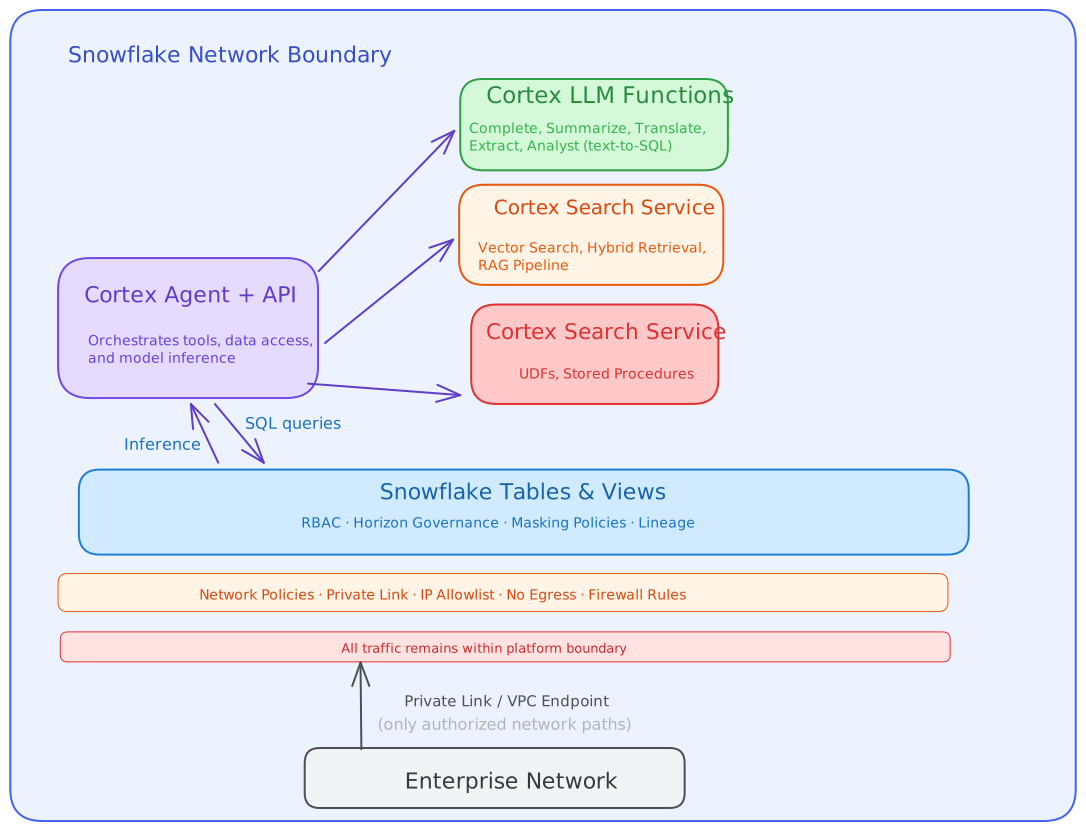
Key security properties:
- No egress path for the agent outside the platform.
- Inbound access controlled by network policies and Private Link.
- All tool invocations are internal API calls within the platform.
Model B: External Agents (Self-Hosted)#
When the AI agent runs outside the inference platform (e.g., a custom application using an LLM API), the agent must be isolated using container sandboxing and network segmentation.
┌──────────────────────────────────────────────────────────────┐
│              Container Orchestration (K8s / SPCS)            │
│                                                              │
│  ┌─────────────────────────────────────────────────────────┐ │
│  │                Agent Container (Sandboxed)               │ │
│  │  ┌──────────┐  ┌───────────────┐  ┌──────────────────┐  │ │
│  │  │ Agent    │  │ Tool Execution │  │ Read-Only Volume │  │ │
│  │  │ Runtime  │──│ (Restricted)   │  │ (No Write)       │  │ │
│  │  └──────────┘  └───────────────┘  └──────────────────┘  │ │
│  │                                                          │ │
│  │  Network: ONLY approved egress paths                     │ │
│  │  - inference-platform.internal:443  ✅                   │ │
│  │  - *.internet.com                   ❌ BLOCKED           │ │
│  │  - metadata-service (169.254.x.x)  ❌ BLOCKED           │ │
│  └─────────────────────────────────────────────────────────┘ │
│                                                              │
└──────────────────────────────────────────────────────────────┘
         │
         │ mTLS / Private Link
         ▼
┌──────────────────────────────────────────────────────────────┐
│              Inference Platform (e.g., Snowflake)            │
│              Protected by Private Link + Network Policy      │
└──────────────────────────────────────────────────────────────┘
Container hardening requirements:
- Read-only filesystem: The agent cannot write persistent data or executables.
- No network egress except to explicitly approved endpoints.
- No privilege escalation:
no-new-privileges, all capabilities dropped. - Resource limits: CPU, memory, and ephemeral storage are capped.
- Metadata service blocked: Prevents cloud credential theft (169.254.169.254).
Snowflake Example: Snowpark Container Services (SPCS)
SPCS runs OCI-compliant containers within Snowflake’s managed infrastructure. Network rules control which external endpoints the container can reach. Service-to-service communication within SPCS uses internal DNS. Ingress is controlled by Snowflake’s authentication and network policy layer.
Regionality, Data Residency, and Cross-Region Inference#
For regulated enterprises, where AI inference happens matters as much as how it is secured. In Snowflake, each account is hosted in a specific cloud region, which determines where data is stored and where compute is provisioned. Model availability can vary by region, and organizations may need explicit controls over whether inference is allowed to run outside the account’s default region. See: Intro to Regions
Snowflake Example: Cross-region inference for Cortex
Snowflake supports configurable cross-region inference via the account-level parameter CORTEX_ENABLED_CROSS_REGION. By default it is DISABLED (inference only in the account’s default region), but an ACCOUNTADMIN can explicitly enable cross-region inference either broadly (ANY_REGION) or restrict it to an allowlist of regions (for example AWS_US,AWS_EU). Cross-region inference is used when the model/feature is not supported in the default region. See: Cross-Region Inference
From a governance standpoint, this provides a concrete control surface for data sovereignty and risk management:
- Disable cross-region inference to enforce strict regional processing.
- Allow only specific regions to satisfy latency/model-availability needs while preserving policy boundaries.
- Audit and approve the exception as a formal risk decision (e.g., under EU AI Act / DORA third-party and data-transfer controls).
Snowflake also documents security and compliance considerations for cross-region inference, including that inputs/outputs are not stored or cached during cross-region processing, and that network path characteristics differ when crossing cloud providers.
Snowflake Example: Deploy custom models in-region using SPCS / Model Serving
When regional processing requirements or model selection constraints make managed foundation models unsuitable, Snowflake also supports deploying customer-managed models as services. Snowflake Model Serving hosts models as an HTTP server within Snowpark Container Services (SPCS), providing a dedicated endpoint with autoscaling and observability. This can be used to keep inference aligned to the region(s) where your Snowflake account and compute pools operate, and to run specialized models (including GPU-backed workloads) under the same Snowflake security and governance controls. See: Real-Time Inference REST API and SPCS Overview
The Inference Proxy Pattern (Optional)#
At the network boundary, an inference proxy (Policy Enforcement Point) can be deployed to inspect and control agent communications:
┌────────────┐    ┌──────────────────────────────────┐    ┌─────────────┐
│            │    │     Inference Proxy (PEP)         │    │             │
│  Client /  │───▶│  - Prompt inspection              │───▶│  AI Agent / │
│  User      │    │  - Tool invocation policy check   │    │  LLM        │
│            │◀───│  - Response sanitization           │◀───│             │
└────────────┘    │  - Rate limiting                   │    └─────────────┘
                  │  - Logging & audit trail            │
                  └──────────────────────────────────────┘
The inference proxy enforces:
- Prompt policies: Blocks prompt injection patterns and disallowed instructions before they reach the agent.
- Tool invocation policies: Validates that the agent is only requesting tools it is permitted to use.
- Response filtering: Strips sensitive data, PII, or credential patterns from agent responses.
- Rate limiting: Prevents abuse and runaway inference costs.
This is analogous to a web application firewall (WAF) for AI workloads. It operates at the network layer and is independent of the agent’s own logic, which is critical because agent logic can be manipulated through prompt injection.
Reference Implementation: The
cortex-proxyproject implements this pattern as a Rust/Axum proxy that sits between AI coding agents and Snowflake Cortex. It provides:
- API format translation (Anthropic <-> OpenAI <-> Snowflake Cortex) so diverse clients can use a single Snowflake backend
- Cortex Agent API proxying (
/agent:run) with both PAT auto-exchange (proxy exchanges PAT for session token via/session/v1/login-request) and session token passthrough- Policy Enforcement Engine (PEP): Intercepts prompts before forwarding, calls a configurable Cortex judge model to evaluate whether prompts violate security policies (prompt injection, data exfiltration, unauthorized tool use, PII exposure, scope violations)
- Policy configuration via TOML (local testing) with a separate FastAPI policy server for production use
- Actions are configurable:
block(reject request),warn(log and allow), orlog(audit only)Deep dive: Cortex Proxy: Use Any AI Coding Agent with Snowflake Cortex walks through the full implementation — API translation, streaming SSE conversion, two-tier policy evaluation, and screenshots of prompt injection being blocked across Claude Code, OpenCode, and ZeroClaw.
3. Layer 2: Authentication and Identity Propagation#
Principle#
Every action an AI agent takes must be traceable to a verified identity. The authentication model depends on whether the agent acts autonomously or on behalf of a human.
Scenario A: Autonomous Agents (Service Identity)#
When an agent operates autonomously (scheduled jobs, background processing, event-driven workflows), it authenticates as itself using a service identity.
Requirements:
- Credentials must be stored in a secrets manager, never in code or configuration files.
- Credentials must be rotated on a defined schedule.
- Credentials should be short-lived (hours, not months).
- Access must be scoped to the minimum required role.
Workload Identity Federation (WIF)
Where the execution environment supports it, Workload Identity Federation eliminates static credentials entirely. The platform issues an identity token to the workload based on its verified execution context (e.g., a Kubernetes service account), and this token is exchanged for platform credentials.
┌──────────────────┐    ┌──────────────────┐    ┌──────────────┐
│  Agent Runtime   │    │  Identity        │    │  Data        │
│  (K8s, Cloud     │───▶│  Provider        │───▶│  Platform    │
│   Function, CI)  │    │  (Entra, Okta)   │    │  (Snowflake) │
│                  │    │                  │    │              │
│  "I am workload  │    │  "Verified.      │    │  "Welcome,   │
│   X running in   │    │   Here is a      │    │   here is a  │
│   namespace Y"   │    │   signed token." │    │   session."  │
└──────────────────┘    └──────────────────┘    └──────────────┘
Where the WIF token cannot be used directly by the data platform, a token exchange (RFC 8693) converts the identity provider token into a platform-native credential:
POST /oauth/token-request HTTP/1.1

grant_type=urn:ietf:params:oauth:grant-type:token-exchange
&subject_token=<WIF_TOKEN>
&subject_token_type=urn:ietf:params:oauth:token-type:jwt
&requested_token_type=urn:ietf:params:oauth:token-type:access_token
&scope=session:role:AGENT_ROLE
Snowflake Example: External OAuth + Programmatic Access Tokens (PAT)
Snowflake supports External OAuth integration with identity providers like Entra ID. An agent can:
- Obtain a JWT from the identity provider (via Workload Identity Federation).
- Use the JWT to authenticate to Snowflake via External OAuth.
- Optionally exchange the JWT for a short-lived Programmatic Access Token (PAT) scoped to a specific role.
The PAT can then be used as a Bearer token for Snowflake’s REST API, including MCP server authentication. PATs have a configurable expiry (default: 1 day), are role-restricted, and can be rotated without service interruption.
Scenario B: Human-Delegated Agents (Identity Passthrough)#
When a human user invokes an agent through a shared application (chatbot, dashboard, collaborative tool), the human’s identity should be passed through to the agent’s downstream actions.
This is critical for:
- Audit trails: Knowing which human triggered which data access.
- Authorization enforcement: Applying the human’s RBAC permissions, not the agent’s service account permissions.
- Regulatory compliance: EU AI Act Article 14 requires traceability of human oversight decisions.
Token Exchange for Identity Passthrough
┌──────────────┐    ┌───────────────────────┐    ┌──────────────┐
│  Human User  │    │  Agent Application    │    │  Data        │
│              │    │                       │    │  Platform    │
│  Logs in     │───▶│  Receives user token  │    │              │
│  via SSO     │    │  Exchanges for        │───▶│  Sees human  │
│              │    │  platform token       │    │  identity    │
│              │    │  (on-behalf-of flow)  │    │  in session  │
└──────────────┘    └───────────────────────┘    └──────────────┘
The token exchange uses the on-behalf-of or delegation grant type:
POST /oauth/token-request HTTP/1.1

grant_type=urn:ietf:params:oauth:grant-type:token-exchange
&subject_token=<USER_TOKEN>
&subject_token_type=urn:ietf:params:oauth:token-type:id_token
&actor_token=<AGENT_SERVICE_TOKEN>
&actor_token_type=urn:ietf:params:oauth:token-type:jwt
&requested_token_type=urn:ietf:params:oauth:token-type:access_token
The resulting access token carries the human user’s identity as the subject and the agent’s identity as the actor, enabling the data platform to enforce the human’s RBAC permissions while knowing the agent performed the action.
Scenario C: Shared Service User (Fallback)#
When identity passthrough is architecturally impossible (legacy systems, batch pipelines), the agent may use a shared service user identity. In this case:
- The service user identity must have the minimum required permissions.
- Application-layer audit logging must record which human or workflow triggered each action.
- The service user must be tightly monitored for anomalous behavior.
- Session metadata (correlation IDs, source application identifiers) should be included in every request.
This is the least desirable pattern and should only be used when the platform does not support delegated authentication.
4. Layer 3: Authorization and Data Governance#
Principle#
You cannot rely on prompts to manage agent behavior. Data that shall not be accessed must be blocked from access through authentication and authorization controls, not through instructions to the agent.
This is perhaps the most critical principle in AI agent security. An LLM-based agent will follow whatever instructions it receives, including injected instructions from malicious inputs. If the agent has database-level access to sensitive data, no amount of prompt engineering will prevent a determined adversary from extracting that data through the agent.
Architecture: Authorization Must Be External to the Agent#
┌─────────────────────────────────────────────────────────────┐
│                     Authorization Layer                      │
│  ┌─────────────┐  ┌──────────────────┐  ┌───────────────┐  │
│  │    RBAC     │  │  Row Access      │  │  Column       │  │
│  │  (Roles &   │  │  Policies        │  │  Masking      │  │
│  │   Grants)   │  │  (Row-Level      │  │  Policies     │  │
│  │             │  │   Security)      │  │               │  │
│  └──────┬──────┘  └────────┬─────────┘  └───────┬───────┘  │
│         │                  │                     │          │
│         ▼                  ▼                     ▼          │
│  ┌─────────────────────────────────────────────────────────┐│
│  │            Data Catalog & Governance Layer               ││
│  │  - Object tagging (PII, CONFIDENTIAL, RESTRICTED)       ││
│  │  - Data classification (automatic & manual)              ││
│  │  - Tag-based access policies                             ││
│  │  - Lineage tracking                                      ││
│  └─────────────────────────────────────────────────────────┘│
└─────────────────────────────────────────────────────────────┘
         ▲
         │ Enforced by platform, NOT by agent
         │
┌────────┴────────┐
│    AI Agent      │
│   (Constrained   │
│    by its role)  │
└──────────────────┘
RBAC for Agents#
Create purpose-specific roles for AI agents with minimal permissions:
-- Agent role with read-only access to approved tables
CREATE ROLE ai_agent_customer_support;
GRANT USAGE ON DATABASE customer_db TO ROLE ai_agent_customer_support;
GRANT USAGE ON SCHEMA customer_db.support TO ROLE ai_agent_customer_support;
GRANT SELECT ON TABLE customer_db.support.tickets TO ROLE ai_agent_customer_support;
GRANT SELECT ON TABLE customer_db.support.faq TO ROLE ai_agent_customer_support;
-- No access to customer_db.billing, customer_db.pii, etc.
The agent cannot access billing data or PII tables regardless of what it is prompted to do, because the platform enforces the grant at the query execution layer.
Tag-Based Governance#
Modern data platforms support tag-based access policies where access is controlled by metadata rather than explicit grants:
-- Tag sensitive columns
ALTER TABLE customers MODIFY COLUMN ssn SET TAG pii_level = 'RESTRICTED';
ALTER TABLE customers MODIFY COLUMN email SET TAG pii_level = 'SENSITIVE';

-- Create masking policy based on tags
CREATE MASKING POLICY mask_pii AS (val STRING)
  RETURNS STRING ->
  CASE
    WHEN IS_ROLE_IN_SESSION('PII_READER') THEN val
    ELSE '***MASKED***'
  END;

-- Apply policy to all columns with the tag
ALTER TAG pii_level SET MASKING POLICY mask_pii;
Snowflake Example: Horizon Catalog and Governance
Snowflake’s Horizon Catalog provides:
- Automatic data classification: Detects PII, financial data, and health data across all tables.
- Tag-based masking policies: A single policy applied to a tag automatically masks all current and future columns carrying that tag.
- Row access policies: Restrict which rows an agent can see based on its role or session attributes.
- Object dependencies and lineage: Track how data flows through transformations.
When Cortex Agents or MCP servers access Snowflake data, they inherit all Horizon governance controls. The agent sees only what its role permits, masked where policies apply, and every query is logged.
MCP and Authorization#
When agents access tools or data via MCP (Model Context Protocol), the authorization model of the MCP server determines the security boundary.
Platform-managed MCP servers (e.g., Snowflake-hosted MCP servers) inherit the platform’s RBAC and governance framework. The MCP server executes in the context of the authenticated user’s session, so all grants, masking policies, and row access policies apply automatically.
Self-hosted MCP servers require explicit authorization enforcement in the server implementation. The MCP server must:
- Validate the caller’s identity on every request.
- Check the caller’s permissions against the requested tool or resource.
- Enforce the principle of least privilege for any downstream data access.
- Never trust LLM-generated parameters without validation.
5. Layer 4: Data Protection, Encryption, and Exfiltration Prevention#
Principle#
Agents must not be allowed to exfiltrate data. Data in transit and at rest must be encrypted. Where agents write data, the destination must be controlled and audited.
Encryption Requirements#
| Path | Requirement | Implementation |
|---|---|---|
| Client to platform | TLS 1.2+ | Private Link + TLS termination |
| Agent to inference API | TLS 1.2+ / mTLS | mTLS for container-to-platform communication |
| Data at rest | AES-256 | Platform-managed encryption keys or customer-managed keys |
| Agent to MCP server | TLS 1.2+ | MCP servers must enforce TLS for HTTP/SSE transport |
| Secrets in transit | Never in plaintext | Secrets manager with runtime injection |
Exfiltration Prevention#
AI agents pose a unique exfiltration risk: they can be manipulated through prompt injection to encode sensitive data into seemingly legitimate outputs (e.g., embedding data in search queries, email subjects, or API parameters).
Architectural controls:
- Read-only container volumes: The agent cannot write files to persistent storage.
- No outbound network access: Container network policies block all egress except approved endpoints.
- Output scanning: All agent outputs are scanned for credential patterns, PII, and anomalous data volumes before delivery.
- Tool result filtering: Data returned from tools is validated against expected schemas. Unexpected fields are dropped.
┌──────────────────────────────────────────────────────────────┐
│                     Agent Sandbox                            │
│                                                              │
│  ┌─────────────┐                                             │
│  │ Agent       │ ──X──▶  Internet (BLOCKED)                  │
│  │ (Read-Only  │                                             │
│  │  Filesystem)│ ──✓──▶  Approved MCP Server (mTLS)          │
│  │             │ ──✓──▶  Inference Platform (Private Link)   │
│  └─────────────┘                                             │
│                                                              │
│  Cannot:                                                     │
│  - Write persistent files                                    │
│  - Execute arbitrary code with network access                │
│  - Send data to unapproved endpoints                         │
│  - Access cloud metadata services                            │
└──────────────────────────────────────────────────────────────┘
Snowflake Example: SPCS Network Rules and External Access Integrations
Snowflake’s Snowpark Container Services enforce network egress restrictions via Network Rules. An external access integration explicitly lists the domains and ports that a container can reach. All other outbound traffic is blocked. Combined with Snowflake’s internal encryption (AES-256 at rest, TLS in transit), data never leaves the platform unencrypted.
Where Agents Legitimately Transform and Send Data#
In controlled scenarios where an agent is specifically designed to transform and export data (e.g., a reporting agent that generates and emails summaries):
- Encryption in transit and at rest must be enforced for the destination.
- Network path controls must limit the agent to only the approved destination.
- mTLS or certificate-pinned connections verify the destination’s identity.
- Output volume limits prevent bulk data extraction.
- Approval gates require human confirmation before data export operations.
6. Layer 5: Auditing, Monitoring, and Observability#
Principle#
Every action, every query, every tool invocation, every authentication event must be logged in an immutable, tamper-evident audit trail. You cannot secure what you cannot see.
What to Log#
| Event Category | Details to Capture |
|---|---|
| Authentication | Who authenticated, method, timestamp, source IP, success/failure |
| Authorization | Role used, permission checked, granted/denied, resource requested |
| Data access | Tables queried, rows returned (count), columns accessed, query text |
| Tool invocation | Tool name, parameters (redacted), caller identity, result status |
| Agent decisions | Prompt (hash), tools considered, tool selected, reasoning trace |
| Data export | Destination, volume, encryption status, approver |
| Anomalies | Rate limit triggers, permission denials, unusual access patterns |
Alerting Rules for AI Agent Workloads#
CRITICAL:
- Agent authenticates with unknown identity
- Agent accesses table not in its approved scope
- Agent attempts outbound connection to unapproved endpoint
- Agent tool invocation rate exceeds 5x baseline

HIGH:
- Agent permission denied more than 5 times in 1 minute
- Agent data access volume exceeds daily baseline by 3x
- Agent session duration exceeds expected maximum
- New tool or MCP server connected to agent

MEDIUM:
- Agent role escalation attempted
- Agent query returns more than 10,000 rows
- Agent output contains patterns matching credential regex
Regulatory Alignment#
| Regulation | Audit Requirement | How This Architecture Satisfies It |
|---|---|---|
| EU AI Act Art. 12 | Automatic logging throughout AI system lifecycle | All agent actions logged with full context |
| EU AI Act Art. 14 | Human oversight capability | Approval gates + audit trail enable review |
| DORA Art. 12 | Logging and monitoring of ICT operations | Complete event logging with SIEM integration |
| DORA Art. 17-23 | Incident detection and reporting | Anomaly detection rules trigger incident workflow |
| NIS2 Art. 21(2)(g) | Security monitoring and logging | Immutable audit trail with tamper-evidence |
Snowflake Example: Access History, Query History, and Account Usage
Snowflake’s ACCOUNT_USAGE schema provides:
- ACCESS_HISTORY: Records every column accessed by every query, including columns accessed indirectly through views. This answers “who accessed what PII, when, and through which agent.”
- QUERY_HISTORY: Full query text, execution time, rows produced, warehouse used.
- LOGIN_HISTORY: Every authentication attempt with method, client IP, and result.
- POLICY_REFERENCES: Which masking and row access policies were applied.
These views can be queried by a SIEM integration or exported to an external monitoring platform. When Cortex Agents access data, every underlying query appears in QUERY_HISTORY with the session’s authenticated identity.
7. MCP Security: Securing the Tool Layer#
What Is MCP?#
The Model Context Protocol (MCP), introduced by Anthropic in November 2024, standardizes how AI applications connect to external tools, data sources, and services. An MCP server exposes tools (functions the agent can call), resources (data the agent can read), and prompts (templates the agent can use) through a standard protocol.
MCP is rapidly becoming the standard integration layer for AI agents. It is also a significant attack surface.
MCP Threat Landscape#
The Coalition for Secure AI (CoSAI) has identified 12 core threat categories for MCP, and OWASP has published an MCP Security Cheat Sheet. The key threats relevant to enterprise deployments:
| Threat | Description | Impact |
|---|---|---|
| Tool Poisoning | Malicious instructions hidden in tool descriptions that manipulate the LLM | Agent performs unintended actions |
| Prompt Injection via Tool Returns | Injection payloads embedded in tool response data | Agent behavior hijacked by data content |
| Confused Deputy | MCP server executes with its own privileges, not the user’s | Privilege escalation |
| Cross-Server Shadowing | One MCP server’s tool description alters behavior of tools from another server | Trust boundary violation |
| Rug Pull Attack | MCP server changes tool definitions after initial approval | Trusted tool becomes malicious |
| Data Exfiltration | Prompt injection encodes sensitive data in legitimate-looking tool calls | Data leakage through side channels |
| Supply Chain | Compromised or typosquatted MCP server packages | Arbitrary code execution |
MCP Security Controls#
Authentication and Authorization#
Every MCP server connection must enforce authentication:
- Remote MCP servers: OAuth 2.0 with PKCE for authorization flows. Session IDs bound to user context.
- Local MCP servers: Run in sandboxed containers with
stdiotransport limiting access to the MCP client only. - Platform-managed MCP servers: Inherit the platform’s authentication model.
Snowflake-hosted MCP servers authenticate through Snowflake’s existing authentication mechanisms (OAuth, PAT, key-pair). Network policies apply. All requests execute in the context of the authenticated user’s session, inheriting their RBAC grants.
Network Policy for MCP#
MCP servers that use HTTP/SSE transport must:
- Bind to specific interfaces (127.0.0.1 for local, specific IPs for remote). Never 0.0.0.0.
- Validate the Host header on every request.
- Enforce TLS for all remote connections.
- Apply rate limits per session and per tenant.
Snowflake-hosted MCP servers inherit Snowflake’s network policy framework, including Private Link support, IP allowlisting, and VPC service endpoints.
Tool Integrity and Validation#
- Pin tool definitions with cryptographic hashes. Alert on any change (rug pull detection).
- Use strict JSON Schema for tool parameters:
additionalProperties: false, pattern validation on string fields. - Treat all tool responses as untrusted input. Sanitize before returning to LLM context.
- Scan tool descriptions for injection patterns using automated tools (e.g.,
mcp-scan).
Observability#
Log every MCP interaction:
- Tool name, parameters (redacted), caller identity, timestamp.
- Tool response content (hashed or summarized for sensitive data).
- Cross-server data flows (credentials from server A appearing in calls to server B).
Feed MCP logs to SIEM for anomaly detection: unusual tools being called, admin-level queries, abnormal invocation frequency.
8. Agent Integration Approaches: MCP vs Skills vs Custom Agents#
Even with good layered security hygiene across all five layers, the choice of how an agent integrates with external systems has a massive impact on the actual security posture. In my experience, three approaches exist in practice, and they sit on a spectrum from convenience to control.
The Three Approaches#
MCP (Model Context Protocol) is the standard, open integration layer. It is excellent for rapid prototyping and generic agent development — any MCP-compatible agent can call any MCP server. But MCP servers are remote services with their own trust boundary, their own authentication surface, and their own attack vectors (as discussed in Section 7). The agent sends requests over the network to a server it does not fully control. Every MCP call is a network hop, a trust delegation, and a potential injection surface.
Skills + CLI/API Client is a middle ground. Instead of calling a remote MCP server, the agent invokes a local skill or CLI tool that uses its own authentication mechanisms — short-lived tokens, scoped API keys, or platform-native auth (e.g., snowsql with key-pair auth, aws cli with STS assume-role). The skill handles authorization and secret management itself.
Custom-built agents are the production-grade approach. Instead of using a generic agent framework and bolting on MCP servers or CLI tools, you build a purpose-specific agent that integrates security and tooling natively. A custom agent can hold secrets directly in memory (no network transit, no stage files, no environment variables that could leak). It integrates natively into the customer’s security infrastructure — SSO, RBAC, audit logging, network policies — because it is part of that infrastructure, not an external tool calling into it. For development and experimentation, generic agents with MCP or skills are perfectly fine. For production, especially in regulated environments, custom-built agents that embed security by design will likely yield the best results in terms of both productivity and security.
Comparison#
| Aspect | MCP Server | Skill + CLI/API Client | Custom-Built Agent |
|---|---|---|---|
| Integration model | Remote server, network calls | Local tool with own auth | Native, embedded in platform |
| Secret management | MCP server holds/receives secrets | CLI manages own credentials (short-lived tokens, key-pair) | Secrets held in process memory, never transit network |
| Auth delegation | Agent delegates to MCP server’s auth | Skill uses platform-native auth independently | Agent is the authenticated identity |
| Injection surface | Tool descriptions, responses, cross-server shadowing | Reduced — skill validates input locally | Minimal — no dynamic tool discovery |
| Network exposure | HTTP/SSE to remote server | Local execution or direct API call | Direct platform API, no intermediary |
| Audit granularity | MCP server logs + platform logs (two systems) | CLI/API logs + platform logs | Single unified audit trail |
| Customization | Limited to what MCP server exposes | Can wrap any API or CLI | Full control over behavior, tools, guardrails |
| Development speed | Fast — plug and play | Moderate — need to build skills | Slower — need to build agent |
| Best for | Prototyping, development, generic agents | Teams that need production security with generic agents | Regulated production, maximum security |
My Recommendation#
Use generic agents with MCP or skills for development and experimentation — they are fast, flexible, and great for figuring out what your agent needs to do. But when you move to production, especially in regulated industries under DORA, NIS2, or the EU AI Act, invest in custom-built agents that integrate security natively.
For Snowflake-based agent workloads specifically, I have open-sourced Nanocortex — a blueprint for building custom Cortex Agents. It is a single 1,600-line Python file that demonstrates the full pattern: direct Cortex Agent API integration, custom tool definitions, native Snowflake authentication, and a clean architecture you can extend for your own use case. Use it as a starting point to build production agents that embed security by design rather than layering it on top.
9. Putting It Together: A Reference Architecture#
                    ┌──────────────────────────────────┐
                    │        Enterprise Network         │
                    │                                  │
                    │   ┌────────────────────────────┐ │
                    │   │  User / Application        │ │
                    │   │  (Authenticated via SSO)   │ │
                    │   └───────────┬────────────────┘ │
                    └───────────────┼──────────────────┘
                                    │
                    ┌───────────────▼──────────────────┐
          Layer 1   │   Private Link / VPC Endpoint    │
                    │   Network Policy Enforcement     │
                    └───────────────┬──────────────────┘
                                    │
                    ┌───────────────▼──────────────────┐
   (Optional PEP)  │   Inference Proxy                 │
                    │   - Prompt policy enforcement     │
                    │   - Tool invocation validation    │
                    │   - Rate limiting                 │
                    └───────────────┬──────────────────┘
                                    │
                    ┌───────────────▼──────────────────┐
          Layer 2   │   Authentication Layer            │
                    │   - OAuth 2.0 / External OAuth   │
                    │   - Token Exchange (RFC 8693)     │
                    │   - Identity passthrough          │
                    │   - PAT for service accounts      │
                    └───────────────┬──────────────────┘
                                    │
                    ┌───────────────▼──────────────────┐
          Layer 3   │   Authorization & Governance      │
                    │   - RBAC (role-per-agent)         │
                    │   - Row access policies           │
                    │   - Column masking policies       │
                    │   - Tag-based governance          │
                    └───────────────┬──────────────────┘
                                    │
                ┌───────────────────┼───────────────────────┐
                │                   │                       │
   ┌────────────▼──────────┐  ┌────▼──────────────┐  ┌─────▼──────────┐
   │  AI Agent / Cortex    │  │  MCP Servers      │  │  Data Tables   │
   │  Agent Runtime        │  │  (Platform or     │  │  (Encrypted    │
   │  (Sandboxed)          │  │   Self-Hosted)    │  │   at Rest)     │
   └────────────┬──────────┘  └────┬──────────────┘  └─────┬──────────┘
                │                   │                       │
                └───────────────────┼───────────────────────┘
                                    │
                    ┌───────────────▼──────────────────┐
          Layer 4   │   Data Protection                 │
                    │   - TLS / mTLS in transit         │
                    │   - AES-256 at rest               │
                    │   - Exfiltration controls         │
                    │   - Output scanning               │
                    └───────────────┬──────────────────┘
                                    │
                    ┌───────────────▼──────────────────┐
          Layer 5   │   Audit & Monitoring              │
                    │   - Access history                │
                    │   - Query history                 │
                    │   - Login history                 │
                    │   - SIEM integration              │
                    │   - Anomaly alerting              │
                    └──────────────────────────────────┘
Security Layer Summary#
| Layer | Control | Bypass Scenario | Mitigation |
|---|---|---|---|
| 1. Network | Isolate agent, restrict connectivity | Agent compromised, tries to reach internet | Network policy blocks all unapproved egress |
| 2. Authentication | Verify identity on every request | Stolen credential | Short-lived tokens, rotation, WIF |
| 3. Authorization | Enforce RBAC, masking, row policies | Prompt injection asks for restricted data | Platform denies query, agent’s role has no grant |
| 4. Data Protection | Encrypt transit/rest, prevent exfiltration | Agent encodes data in tool parameters | Output scanning, read-only filesystems, egress control |
| 5. Audit | Log everything, alert on anomalies | All layers bypassed | Immutable audit trail enables investigation and response |
No single layer is sufficient. All five together make exploitation architecturally difficult and damage containment automatic.
10. Appendix: Token Exchange Patterns for Agent Identity#
Pattern 1: Workload Identity Federation → Platform Session#
Use case: Autonomous agent running in a cloud environment (K8s, cloud function) needs to access data platform without static credentials.
1. Agent runtime obtains platform-native identity token
   (K8s service account token, AWS IMDS token, Azure Managed Identity)
         │
2. Token presented to Identity Provider (Entra ID, Okta)
   via Workload Identity Federation
         │
3. IdP issues JWT with agent's verified identity
         │
4. JWT presented to data platform via External OAuth
         │
5. Platform creates session with agent's identity
   and configured role restriction
Pattern 2: Human Token → Agent Token (On-Behalf-Of)#
Use case: Human user invokes an agent through a shared application. The agent must access data with the human’s permissions.
1. Human authenticates to application via SSO
   → Application receives user's ID token
         │
2. Application presents user's token + its own
   service credential to token endpoint
   (grant_type: token-exchange, actor_token: service)
         │
3. Token endpoint issues delegated access token
   Subject: human user
   Actor: agent service
         │
4. Agent uses delegated token for data platform access
   → Platform enforces human user's RBAC
   → Audit trail shows both human and agent identity
Pattern 3: JWT → PAT Exchange for MCP Authentication#
Use case: Agent needs a Bearer token for MCP server authentication. The PAT is role-restricted and short-lived.
1. Agent authenticates to data platform via External OAuth (JWT)
         │
2. Agent creates or rotates a Programmatic Access Token (PAT)
   ALTER USER ADD PAT MCP_PAT
     ROLE_RESTRICTION = 'AGENT_ROLE'
     DAYS_TO_EXPIRY = 1
         │
3. PAT used as Bearer token for MCP requests
   Authorization: Bearer <PAT_SECRET>
   X-Snowflake-Authorization-Token-Type: PROGRAMMATIC_ACCESS_TOKEN
         │
4. On next exchange: PAT rotated (new secret, same name)
   ALTER USER ROTATE PAT MCP_PAT
     EXPIRE_ROTATED_TOKEN_AFTER_HOURS = 0
         │
5. Old PAT secret invalidated immediately
This pattern is implemented in the companion code repository with full lifecycle management: create, rotate, cache, and cleanup of PATs for MCP authentication.
References#
Regulations#
- EU AI Act: Regulation (EU) 2024/1689 — EUR-Lex
- DORA: Regulation (EU) 2022/2554 — Digital Operational Resilience Act
- NIS2: Directive (EU) 2022/2555 — Network and Information Security Directive
Industry Standards and Frameworks#
- CoSAI: Coalition for Secure AI — MCP Security Whitepaper (January 2026)
- OWASP: MCP Security Cheat Sheet — cheatsheetseries.owasp.org
- OWASP: A Practical Guide for Secure MCP Server Development (February 2026) — genai.owasp.org
- RFC 8693: OAuth 2.0 Token Exchange — tools.ietf.org
- SPIFFE/SPIRE: Secure Production Identity Framework for Everyone — spiffe.io
Snowflake Documentation#
- Cortex Agents
- Snowpark Container Services
- Network Policies and Private Link
- Horizon Catalog and Governance
- External OAuth
- Programmatic Access Tokens
- MCP Server Support
This document is intended for CISOs, CDOs, and security architects evaluating AI governance strategies for regulated European enterprises. It accompanies the “AI Governance Readiness Assessment” workshop series.
Version 1.0 — March 2026
