Some data cannot move to the cloud. Here’s how to bring Snowflake’s analytics power to the data — without surrendering control of it.
Code: github.com/sfc-gh-kkeller/iceberg-snowflake-tunnel — Snowflake Container Services, DuckDB 1.5.0, Lakekeeper, MinIO.
This is a reference architecture and proof of technology for educational purposes — not a production-ready solution.
Data Sovereignty Matters#
Data sovereignty is a business, legal, and increasingly strategic concern — and it is becoming more important every year.
GDPR mandates that personal data about EU residents may not leave the EU. Financial regulators in multiple jurisdictions require that trading records remain under domestic jurisdiction. Defence contractors are prohibited by law from storing certain data in foreign-operated cloud infrastructure. Healthcare organisations face penalties if patient records cross specific borders. Manufacturing companies with proprietary process data often prefer to keep operational telemetry on infrastructure they fully control.
These organisations still need analytics. They still need joins, aggregations, dashboards, and machine learning. And increasingly, the tools they want to use — Snowflake among them — are cloud-native.
This post describes an architecture that treats data sovereignty as a first-class design goal.
The Principle: The Data Owner Controls the Switch#
The key insight is this: for many businesses, data sovereignty means the absolute guarantee that only they control data access at any given moment — technically enforced, not just contractually promised.
This goes beyond encryption and access controls. It comes down to who initiates the connection and who can turn it off.
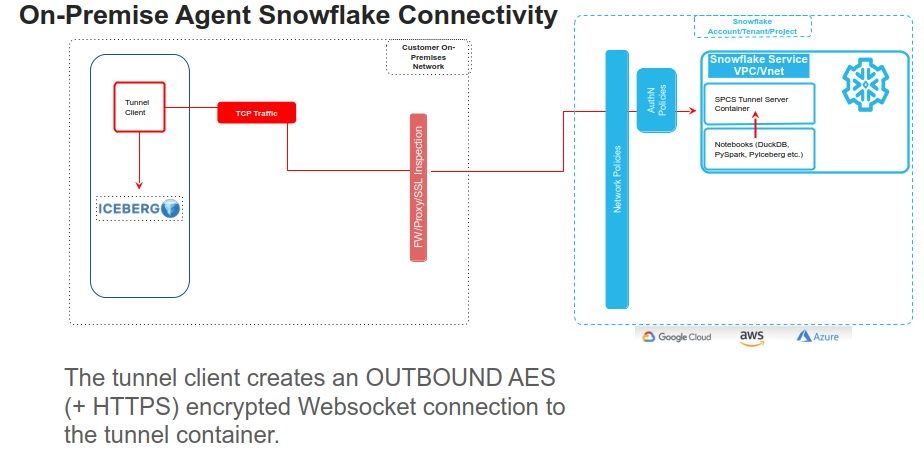
The architecture in this post inverts that relationship. The on-premise side always initiates the connection. A small Python agent running in your data centre or private cloud opens an outbound WebSocket to a Snowflake Container Services (SPCS) endpoint — exactly the same way your browser opens a connection to any website. No inbound ports. No VPN. No firewall rules opened in the inbound direction.
Importantly, this tunnel model establishes a direct encrypted connection between the data owner’s infrastructure and Snowflake — it does not require routing traffic through a US hyperscaler network or PrivateLink. Whether your data sits in a European sovereign cloud (OVHcloud, Hetzner, Schwarz Group’s StackIT, Scaleway, etc.) or in a traditional on-premises data centre, the agent connects outbound over a standard WebSocket — giving you full control over the network path your data takes.
When the agent is running, Snowflake can query your on-premise Apache Iceberg tables. When the agent is stopped, Snowflake’s containers sit idle — they have no path to reach your data — by construction.
The data owner controls the switch. Sovereignty is technically enforced at the network level.
What “Enforced by the Network” Actually Means#
This is worth being precise about.
When the on-premise agent is not running:
- There is no TCP connection between Snowflake and your data centre.
- The SPCS containers are still running and can accept WebSocket connections from the agent — but those connections don’t exist.
- If you call
query_iceberg()from Snowflake SQL, it will timeout or error — there is simply no network path to the data. - The ports
localhost:8181(your Lakekeeper catalog) andlocalhost:9000(your object storage) only exist within SPCS when the agent is actively connected.
You can verify this independently. The agent emits structured logs for every connection, every data request, and every disconnect. If the logs show no active sessions, no data is flowing — full transparency from your own infrastructure.
The data owner can:
- Stop the agent during off-hours, weekends, or maintenance windows
- Schedule the agent to run only during specific business hours via a cron job
- Restrict which Snowflake roles and endpoints the agent authenticates to
- Revoke the Programmatic Access Token (PAT) to instantly terminate all access
This means the data owner always has full, technically enforced control over when and how their data is accessed.
Architecture#
┌─────────────────────────────┐
│  On-Premise / Private Cloud │
│                             │
│  ┌──────────┐ ┌──────────┐ │
│  │Lakekeeper│ │  Agent   ─┼──── outbound WSS ────┐
│  │REST :8181│◀│          │ │                      │
│  └──────────┘ └──────────┘ │                      │
│  ┌──────────┐              │                      │
│  │S3-compat.│              │                      │
│  │  :9000   │              │                      │
│  └──────────┘              │                      │
│                             │                      │
│  ← data stays here →       │                      │
└─────────────────────────────┘                      │
                                                     ▼
                              ┌───────────────────────────┐
                              │    Snowflake (SPCS)        │
                              │                           │
                              │  ┌─────────────────────┐  │
                              │  │ tunnel-sidecar :8081 │  │
                              │  │ • PAT authentication │  │
                              │  │ • RSA+AES encryption │  │
                              │  │ • Forwards:          │  │
                              │  │   :8181 → Lakekeeper │  │
                              │  │   :9000 → S3 storage │  │
                              │  └──────────┬──────────┘  │
                              │     localhost│only         │
                              │  ┌──────────▼──────────┐  │
                              │  │ iceberg-agent :8090  │  │
                              │  │ • Iceberg REST proxy │  │
                              │  │ • S3 object proxy    │  │
                              │  │ • DuckDB engine      │  │
                              │  │ • Write to SF tables │  │
                              │  └─────────────────────┘  │
                              │            ▲               │
                              │  SQL / UDFs / Notebooks    │
                              └───────────────────────────┘
                                ↑ only when agent is running
Two containers run in SPCS. Neither of them contains your data or your credentials.
tunnel-sidecar — A generic, Iceberg-agnostic TCP port forwarder. The on-premise agent authenticates to it using a Snowflake Programmatic Access Token, which is exchanged for a short-lived OAuth token scoped to this specific endpoint and role. Once authenticated, the agent and sidecar perform an RSA-2048 key exchange to establish an AES-256 session key. All subsequent traffic — catalog metadata, Parquet data file reads, manifest lists — is encrypted at this layer. The sidecar then opens localhost:8181 and localhost:9000 within the SPCS pod, so the iceberg-agent can reach on-premise services as if they were local.
iceberg-agent — The query execution layer. It proxies Iceberg REST catalog requests, proxies S3-compatible object reads, and runs an embedded DuckDB engine to execute queries against the on-premise tables. It writes results back to Snowflake using the SPCS OAuth token that Snowflake mounts at /snowflake/session/token at runtime — no credentials stored in the image.
The on-premise stack for this demo uses Lakekeeper (an open-source Apache Iceberg REST catalog) and MinIO (an open-source S3-compatible object store). In production you’d replace these with whatever catalog and storage you already run.
Four Query Patterns — Placed on a Sovereignty Spectrum#
Not all use cases have the same sovereignty requirements. This is where the design gets interesting: you can choose, per query, how much data lands in Snowflake.
Pattern 1 — Notebook (DuckDB direct): Maximum sovereignty, zero persistence#
This is the purest expression of the sovereignty model.
In a Snowflake Notebook, DuckDB connects directly to the iceberg-agent’s internal SPCS URL over the cluster’s private network — no public internet, no Snowflake SQL layer. It reads Iceberg catalog metadata and Parquet data files through the tunnel into DuckDB’s in-memory engine. The result is rendered in the notebook and then it’s gone.
import duckdb

# Internal SPCS DNS — traffic never leaves Snowflake's private network
AGENT_URL = "http://websocket-multi-db-service.tunnel-schema.iceberg-tunnel-db.svc.spcs.internal:8090"

con = duckdb.connect(":memory:")
con.execute("INSTALL iceberg; LOAD iceberg; INSTALL httpfs; LOAD httpfs;")

con.execute(f"""
    CREATE SECRET iceberg_s3 (
        TYPE S3, KEY_ID 'admin', SECRET 'password',
        ENDPOINT '{AGENT_URL.replace("http://", "")}',
        USE_SSL false, URL_STYLE 'path'
    );
""")
con.execute("CREATE SECRET iceberg_rest (TYPE ICEBERG, TOKEN 'dummy');")

con.execute(f"""
    ATTACH 'demo' AS demo (
        TYPE ICEBERG,
        ENDPOINT '{AGENT_URL}/catalog/',
        SECRET iceberg_rest
    );
""")

df = con.execute("""
    SELECT product, region, SUM(amount) AS total
    FROM demo.demo.sales
    GROUP BY 1, 2
    ORDER BY 3 DESC
""").fetchdf()
Or with pyiceberg:
from pyiceberg.catalog.rest import RestCatalog

catalog = RestCatalog(name="demo", uri=f"{AGENT_URL}/catalog/", warehouse="demo")
table = catalog.load_table("demo.sales")
df = table.scan().to_pandas()
Sovereignty properties:
- Data never written to any Snowflake table or storage
- No Snowflake result set cache — service function results are never cached; every call re-executes through the tunnel live
- Data gone from Snowflake infrastructure the moment the notebook session ends
- On-premise data owner can independently verify: no active tunnel sessions = no data in Snowflake, ever
- Works for large result sets since DuckDB streams directly into the notebook’s Python runtime
The trade-off: No Snowflake governance. The result is a pandas DataFrame — it doesn’t participate in Snowflake’s RBAC, masking policies, or lineage tracking.
Pattern 2 — Scalar UDF (query_iceberg): Ephemeral but Snowflake-native#
SELECT query_iceberg('SELECT * FROM demo.demo.sales', 'demo');DuckDB executes the query through the tunnel, serialises the result as JSON, and returns it as a Snowflake VARIANT. Nothing is written to Snowflake storage. The data exists only for the duration of the query execution.
Sovereignty properties:
- No data written to Snowflake storage explicitly
- The result passes through Snowflake’s query execution layer as a VARIANT value and may be held in the result cache
The trade-off: Container UDFs in Snowflake are scalar today — they process one row at a time with MAX_BATCH_ROWS = 1. Best suited for targeted, bounded queries where you want SQL syntax but not persistence.
Pattern 3 — Table-sync UDF (query_iceberg_to_table): Persisted, fully governed#
SELECT query_iceberg_to_table(
    'SELECT * FROM demo.demo.sales ORDER BY sale_id',
    'demo',
    'SALES_FROM_ICEBERG'
);

SELECT * FROM SALES_FROM_ICEBERG ORDER BY SALE_ID;
SALE_ID | PRODUCT | AMOUNT | SALE_DATE | REGION
---------+----------+--------+------------+---------
1 | Laptop | 1200 | 2025-01-01 | North
2 | Mouse | 25 | 2025-01-02 | South
3 | Keyboard | 75 | 2025-01-03 | East
...The iceberg-agent executes the query through DuckDB, then connects back to Snowflake using the SPCS OAuth token and creates (or truncates and re-populates) the target table directly. The UDF returns a status object; the rows land in a real Snowflake table.
Sovereignty properties:
- Data is now in Snowflake — this is an explicit, intentional data movement operation
- The data owner controls when this runs — it only happens when the tunnel is up and the UDF is called
- Full Snowflake Horizon governance applies to the synced table
The governance angle: Because SALES_FROM_ICEBERG is a native Snowflake table, you get the complete governance stack:
-- Mask the AMOUNT column for anyone below SYSADMIN
CREATE OR REPLACE MASKING POLICY amount_mask AS (val NUMBER)
  RETURNS NUMBER ->
    CASE
      WHEN CURRENT_ROLE() IN ('ACCOUNTADMIN', 'SYSADMIN', 'DOCKERTEST') THEN val
      ELSE -1
    END;

ALTER TABLE SALES_FROM_ICEBERG
  MODIFY COLUMN AMOUNT
  SET MASKING POLICY amount_mask;
Column-level masking, row access policies, object tags, data classification, lineage tracking, access history — all of it applies. The on-premise data benefits from Snowflake-native governance the moment it crosses the tunnel.
The trade-off: The data now lives in Snowflake. If your requirement is that no copy ever leaves the premises, use Pattern 1 or 2. If your requirement is that data may be accessed for analytics under your explicit authorisation with full governance applied, this pattern is a great fit.
Pattern 4 — Stored Procedure (sync_and_query): Sync + return in one call#
CALL sync_and_query(
    'SELECT * FROM demo.demo.sales ORDER BY sale_id',
    'demo',
    'SALES_FROM_ICEBERG'
);
This chains the table-sync UDF with an immediate SELECT so callers — dashboards, BI tools, Snowflake Tasks — get results back in a single round-trip. Same sovereignty properties as Pattern 3.
Wrap it in a Snowflake Task to schedule automatic syncs:
CREATE TASK sync_sales_daily
  WAREHOUSE = ICEBERG_TUNNEL_WH
  SCHEDULE = 'USING CRON 0 6 * * * Europe/Berlin'
AS
  CALL sync_and_query(
      'SELECT * FROM demo.demo.sales',
      'demo',
      'SALES_FROM_ICEBERG'
  );
The Sovereignty Spectrum at a Glance#
| Pattern | Data in Snowflake? | Result Cached? | SF Governance? | Right for… |
|---|---|---|---|---|
| Notebook (DuckDB/pyiceberg) | Never | Never | No | Hard sovereignty requirements, ephemeral analysis |
query_iceberg() UDF | Result cache | Yes | Partial (RBAC on UDF) | Spot checks, bounded exploratory queries |
query_iceberg_to_table() UDF | Explicitly | Yes | Full Horizon | Analytics, BI, scheduled syncs |
sync_and_query() proc | Explicitly | Yes | Full Horizon | Dashboards, single-call workflows |
The key design point: you choose the trade-off per query, per use case. The architecture doesn’t force you to pick one model for everything.
Joining On-Premise and Cloud Data#
Once data is synced to a Snowflake table — even temporarily — you can join it with anything in Snowflake:
SELECT
    s.sale_id,
    s.product,
    s.amount,
    s.region,
    c.customer_name,
    c.tier
FROM SALES_FROM_ICEBERG s
LEFT JOIN SF_CUSTOMERS c ON s.sale_id = c.customer_id
ORDER BY s.sale_id;
SALE_ID | PRODUCT | AMOUNT | REGION | CUSTOMER_NAME | TIER
---------+----------+--------+---------+---------------+--------
1 | Laptop | 1200 | North | Acme Corp | Gold
2 | Mouse | 25 | South | Globex | Silver
3 | Keyboard | 75 | East | Initech | Gold
4 | Monitor | 350 | West | Umbrella Inc | Bronze
5 | Headset | 120 | Central | Hooli | SilverSF_CUSTOMERS is a native Snowflake table. SALES_FROM_ICEBERG is on-premise data that crossed the tunnel. Snowflake doesn’t know or care which is which — they join the same way. And masking policies apply to both.
Setting It Up#
The setup follows five steps, in order:
prerequisites.sql → build-and-push.sh → service.sql → start agent → setup.sql1. prerequisites.sql (run as ACCOUNTADMIN) — Creates a dedicated role, compute pool, image repository, and an External Access Integration that allows the iceberg-agent to download DuckDB extensions at startup.
2. build-and-push.sh — Builds the tunnel-sidecar and iceberg-agent Docker images for linux/amd64 and pushes them to your Snowflake image registry. The registry URL comes from SHOW IMAGE REPOSITORIES.
3. service.sql — Creates the SPCS service with both containers. The EXTERNAL_ACCESS_INTEGRATIONS clause is required — without it the iceberg-agent cannot reach extensions.duckdb.org and will fail to start.
4. Start the agent — Copy agent/.env.template to agent/.env, fill in the WebSocket endpoint URL (from SHOW ENDPOINTS IN SERVICE), your PAT token, and your account identifier. Run pixi run agent. You should see:
✅ WebSocket connection established
✅ Secure handshake complete via Snowflake Token
📤 Pushed 2 port mappings to tunnel
📡 Listening for forwarding requests...
Here’s the tunnel being established from the on-premise side:
(I am talking about establishing a tunnel to local Postgres database here, that, was for a different demo, but the video applys the same to our Iceberg sample now, so don`t let that confuse you)
Establishing the outbound tunnel from the on-premise agent to Snowflake Container Services
5. setup.sql — Creates the UDFs and stored procedure. Run smoke tests to verify the full path: SELECT query_iceberg('SELECT 1 AS test', 'demo');.
And here’s a live query running through the tunnel — querying on-premise Iceberg tables directly from Snowflake:
Querying on-premise Iceberg tables through the encrypted tunnel from Snowflake
Full code at github.com/sfc-gh-kkeller/iceberg-snowflake-tunnel.
The Bigger Picture: Who Is This For?#
This pattern is worth considering for any organisation where:
Data residency regulations apply — GDPR, DORA, HIPAA, data localisation laws in China, India, Russia, Indonesia, and others. The data never leaves the regulated jurisdiction; only query results (if you choose Pattern 3/4) or query output (Patterns 1/2) cross the boundary.
Private cloud or on-premise investment is significant — Many large enterprises have substantial on-premise infrastructure. The tunnel lets them use Snowflake as the analytics layer while keeping their existing data layer intact.
Competitive or IP sensitivity — Manufacturing process data, trading algorithms, proprietary research. The data owner can leverage Snowflake’s analytics while maintaining exclusive control over where the data resides.
Air-gapped or classified environments — The tunnel agent can run in environments that are outbound-only by design. No inbound firewall exception required, no VPN negotiation with the cloud provider.
Hybrid governance requirements — Some data must stay on-premise, other data can live in Snowflake. The four query patterns let you handle both in the same workflow, with the governance boundary being a deliberate choice.
What’s Next#
A few natural extensions:
Multiple catalogs —
port_mappings.jsonsupports arbitrary port-to-service mappings. Forward multiple Lakekeeper warehouses, different storage endpoints, or entirely different on-premise services through the same WebSocket tunnel.Bidirectional writes — The iceberg-agent can be extended to write Snowflake query results back to the on-premise Iceberg catalog. Push aggregations, anomaly detection results, or ML model predictions back to the data lake — without opening inbound ports.
Snowflake Tasks for scheduled sync — Schedule
sync_and_query()on a cron to keep a Snowflake table fresh with on-premise data, under whatever governance policies you apply to that table.Local AI models through the tunnel — The same tunnel can expose on-premise AI models (LLMs, embeddings, custom ML endpoints) to Snowflake. Snowflake UDFs or notebooks can call local models for inference without the model or its training data ever leaving your infrastructure.
AI agents that span both worlds — Local AI agents can perform on-premise tasks (data preparation, model training, ETL) while seamlessly extending into Snowflake for tasks like querying cloud data, writing results, or orchestrating workflows — all through the same secure tunnel, collaboratively across both environments.
Production hardening — Replace the demo AES key, store the PAT token in a secrets manager, add alerting on tunnel disconnect events, and instrument the agent’s structured logs into your SIEM.
Conclusion#
Data sovereignty is ultimately about who controls access to data and how that control is enforced.
The tunnel pattern in this demo is designed around one idea: the data owner has the absolute guarantee that only they control access — technically enforced at the network layer. When the agent is off, there is simply no TCP connection to the data. Access ends naturally.
Within that constraint, you have flexibility: query ephemerally in a notebook with zero Snowflake persistence, or explicitly sync data into Snowflake tables and apply the full governance stack. The choice is yours, per use case, per query.
The data stays where you put it. Snowflake comes to the data.
