Runnable patterns that keep the most sensitive data under the data owner’s control while Snowflake stays the analytics platform.
The framework on one page: The Data, the Key, or the Switch, the short version to share with your team.
Code: github.com/sfc-gh-kkeller/customer-held-controls-for-data-sovereignty-in-snowflake. The repo also has a white paper (PDF), a slide deck, and a single Snowsight worksheet that walks through every option.
Personal project. These are “art of the possible” examples for inspiration. They are not official Snowflake solutions, not reviewed or endorsed by Snowflake, not supported, and not production-hardened. Review them with your security and legal teams before you adapt anything.
Executive summary#
The business problem. Regulated organisations want one modern analytics platform, but a small share of their data, such as national IDs, bank details, salaries and patient identifiers, carries legal, regulatory or reputational risk that a standard cloud setup cannot fully answer. Often that slice blocks the whole programme: projects stall, data stays in silos, and the value of the rest of the data goes unrealised.
The approach. You don’t have to choose between “everything in the cloud” and “nothing in the cloud”. For the sensitive slice, the organisation keeps one decisive control in its own hands, and the platform does the rest:
- The data. The most sensitive records never leave your premises. The platform reaches them only when you allow it, for a limited time, or never.
- The key. The data sits in the platform encrypted. Your organisation holds the key and decides, query by query and person by person, when it is used.
- The switch. You can cut access instantly, with a time limit and a full audit trail.
What this delivers.
- Analytics on all your data, not just the safe part. Sensitive and non-sensitive data can be analysed together, with the tools your teams already use.
- A clear answer for regulators and boards. “What is still under our control?” gets a concrete, demonstrable answer, not a contractual promise.
- Protection against the main threats. Depending on the pattern, this covers the platform operator, over-privileged administrators, stolen credentials, replayed approvals and legal compulsion against the provider.
- Accountability by design. Access to the most sensitive data needs a named person, a second-factor confirmation and a written reason, and every release is logged.
- Proportionate cost. Controls apply only where the risk is. In the benchmarks, the extra controls cost between a fraction of a second and a few seconds per query.
What it doesn’t do. No pattern stops an authorised person from copying what they are allowed to see. That remains a matter of policy, roles and monitoring. Several patterns also rely on behaviour that is observed but not formally documented, and all of them are reference implementations, not certified products.
The recommendation. Classify the small set of data that truly needs customer-held control. Decide for each class whether the requirement is about where the data is or who holds the key, because those lead to different patterns. Keep native platform controls for everything else. Each pattern below can be demonstrated on your own account within days, which turns an abstract compliance debate into evidence.
The question behind every sovereignty conversation#
Most sovereignty discussions I have end up at the same question, phrased in different ways:
“If we put this in your platform, what is still in our hands?”
For most data, the native platform controls answer it: encryption at rest, Tri-Secret Secure, RBAC, masking and row access policies, private connectivity, regional deployment. But almost every regulated organisation has a small slice of data where the answer has to be stronger. Think national IDs, IBANs, salaries, patient identifiers, or datasets a regulator says may not be stored in a foreign-operated cloud at all.
For that slice, the useful framing is not “trust us” versus “don’t use the cloud”. It is: which thing does the data owner keep?
- The data. It never lives in Snowflake. Snowflake can reach it only when the owner allows it, or never.
- The key. The data lives in Snowflake, encrypted. The owner holds the key and decides when, and for whom, it is released.
- The switch. The owner can cut access instantly, with a time limit and an audit trail.
The repository implements eight patterns along that spectrum, plus homomorphic encryption and a synthetic data generator. Each one is runnable against a real Snowflake account, and each one comes with measured behaviour and benchmarks rather than claims.
The options at a glance#
| # | Option | What the owner keeps | When Snowflake sees plaintext |
|---|---|---|---|
| 1 | On-demand tunnel | the data + the switch | only while the tunnel is open, in query memory |
| 1b | Tunnel from a notebook, own engine | the data + the switch | only in the notebook container’s memory |
| 2 | External key broker + step-up | the key | only during a running query of a stepped-up user |
| 2b | Direct key fetch (EAI) | the key | during queries of users allowed to call the UDF |
| 2c | Approve on your phone | the key | only during the running query the approval is bound to |
| 2d | Remote decrypt | the key, which never enters Snowflake | only the result of an approved query; the key never |
| 3 | Keep it separate (local join) | the data | never |
| 4 | Unlock only in your own app | the key | never |
| ★ | Homomorphic encryption | the key | never; Snowflake computes on ciphertext |
| + | Synthetic data | the real data | never; only an artificial copy is shared |
The demo dataset is the same everywhere: 200 synthetic employees with public columns (department, country, level) and sensitive columns (name, national ID, IBAN, salary, bonus). That makes the options directly comparable: where results were checked, the decrypted salary averages match the plaintext source.
Option 1: the on-demand tunnel#

The sensitive table stays on-premises in an Apache Iceberg lake (Lakekeeper as the REST catalog, RustFS as S3-compatible storage). The on-prem agent opens an outbound-only WebSocket tunnel to a Snowpark Container Services service. No inbound ports are opened.
This builds on my earlier tunnel post, with the controls that turn it into a sovereignty pattern. If you want the tunnel mechanics themselves, two older posts cover the SSH variants: querying an on-premise data lake through a private SSH tunnel and bidirectional SSH tunnels from Snowpark Container Services to your DMZ. The controls added here:
- The switch.
tunnel_ctl.py uprequires a--ttl(maximum 4 hours) and a--reason. It kills the agent at the TTL no matter what.downis the kill switch. Every open and close goes to an audit log. - No result cache. Analysts query through
QUERY_ONPREM(), aVOLATILEwrapper that addsUUID_STRING()to every call. In the cache test, four identical runs (two withUSE_CACHED_RESULT=TRUE) all showed up in the on-prem agent log, so every run went through the tunnel. - Identity and egress. A dedicated
TYPE=SERVICEuser with a role-restricted PAT, a network policy that allows only the on-prem egress IP, and a DuckDB extension rule limited toextensions.duckdb.org.
With the tunnel down, the same view returns no rows: there is simply no path to the data. (The function hands back the agent’s connection error as a value rather than raising a SQL error, so plan alerting on that, not on failed queries.)
pixi run tunnel-up --ttl 15m --reason "HR-2026-114 payroll audit"
# SELECT p.department, AVG(s.salary)
# FROM EMPLOYEES_PUBLIC p JOIN EMPLOYEES_SENSITIVE_LIVE s USING (employee_id) GROUP BY 1;
pixi run tunnel-down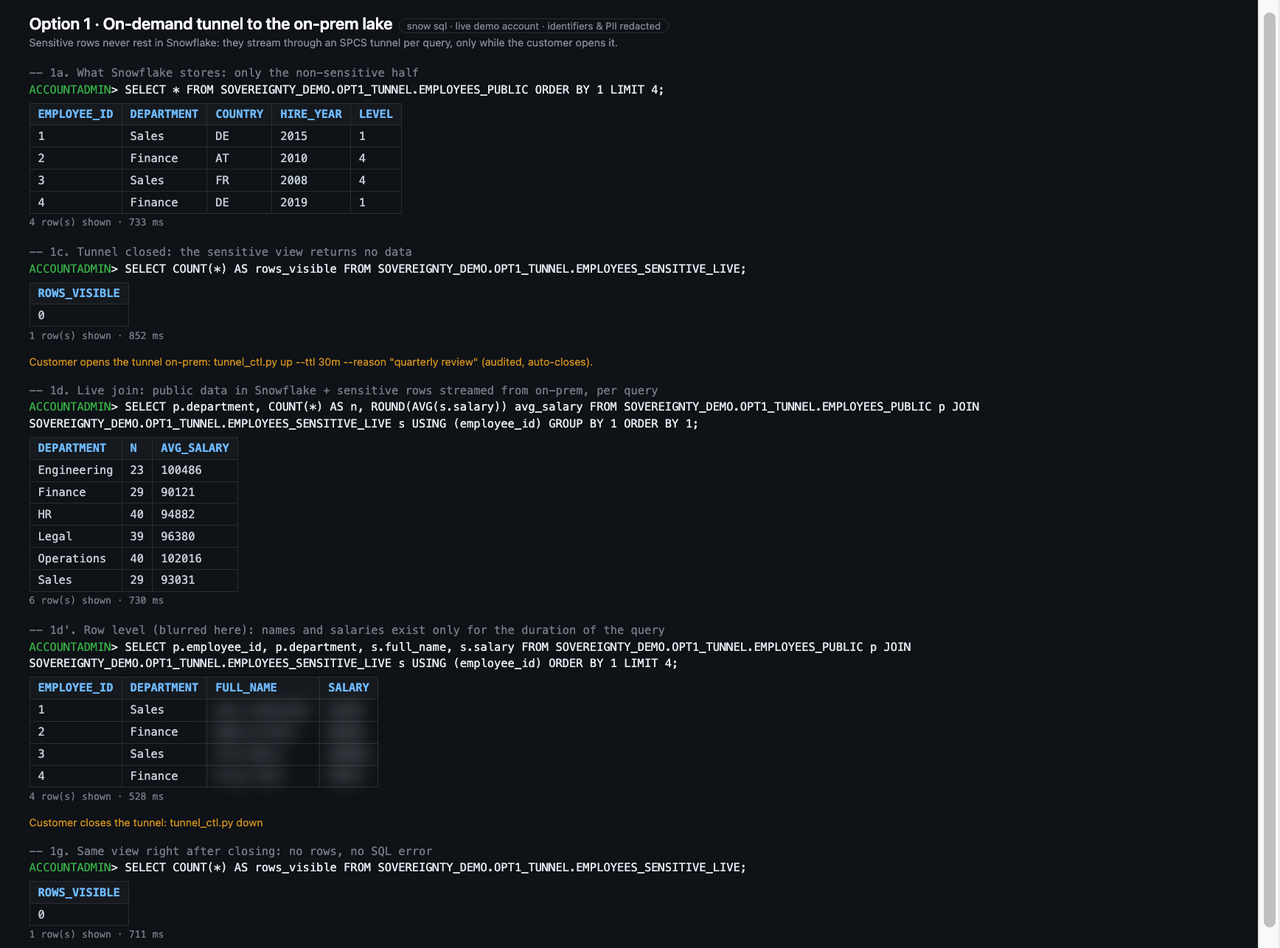
The honest caveat: while the tunnel is open, plaintext is in Snowflake query memory, and the same user can read a past result with RESULT_SCAN for 24 hours.
Option 1b: bypass the query engine entirely#
That caveat is what 1b addresses. A notebook on SPCS (a Snowflake Notebook, or Jupyter or marimo) reads through the tunnel with its own engine, here DuckDB. No SQL runs on the warehouse for the sensitive data, so there is no query result, no result cache and nothing for RESULT_SCAN. The data exists only in the notebook container’s memory.
The trade is real: you give up warehouse compute, elasticity, and Snowflake governance on that data path. Passing the notebook user’s identity through to the on-prem source is also an open gap that the repo documents rather than hides.
Option 2: an external key broker with step-up#
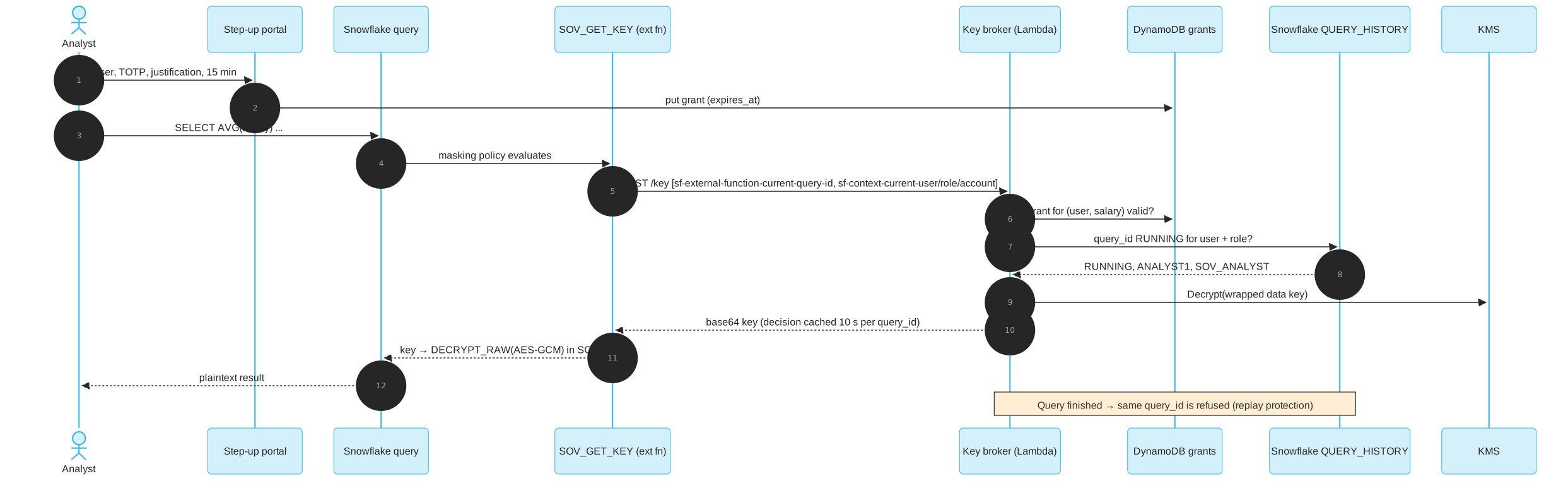
This is the option for columns that must stay in the platform with the full Snowflake experience, but under external key control.
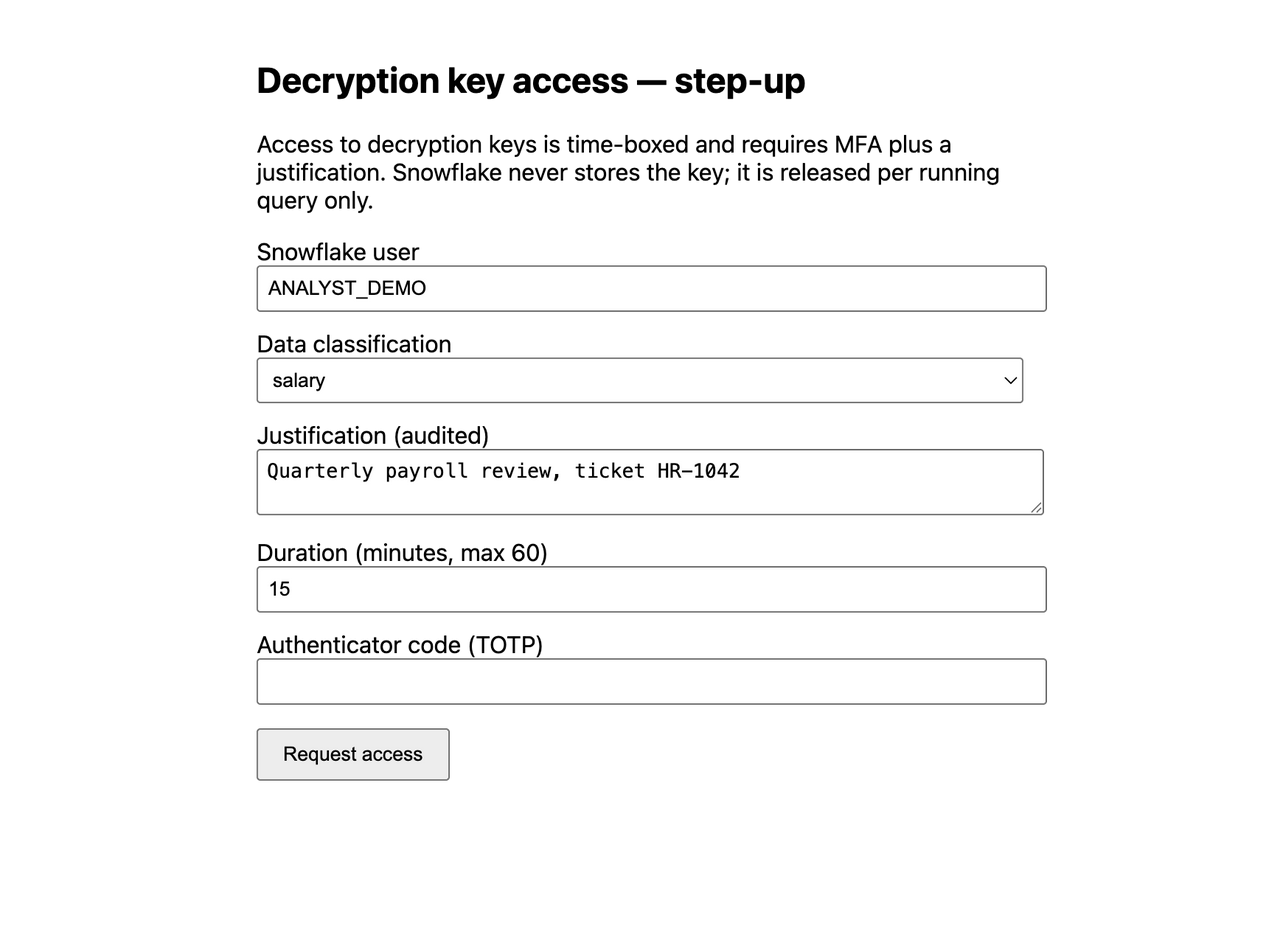
Sensitive columns are encrypted with AES-256-GCM before they reach Snowflake. Snowflake stores ciphertext only. A masking policy calls an external function, SOV_GET_KEY, which reaches a key broker Lambda in the data owner’s AWS account. The broker releases the key only if all three hold:
- The request is IAM-signed by the Snowflake API integration role.
- The user completed a step-up outside Snowflake (a TOTP code plus a written justification) that is still valid.
- A call-back to Snowflake confirms that this exact
query_idisRUNNINGright now, for this user, role and account.
Why an external function and not an External Access UDF? Only external functions get the query ID and the CURRENT_USER, CURRENT_ROLE and CURRENT_ACCOUNT context headers injected by Snowflake. They are not function arguments, so a caller cannot forge them in SQL. Marking the function IMMUTABLE with a constant argument makes the key a per-query constant: one query that decrypted 5 columns × 200 rows caused 2 broker invocations in total, one per classification.
The demo script runs through the personas:
| Step | Result |
|---|---|
| Viewer role | **ENCRYPTED**; the broker is never called |
| Analyst, no step-up | **KEY DENIED** (no_stepup_grant) |
| Analyst after TOTP + justification | plaintext; justification logged |
| Replay of that query ID after it finished | NULL key (query_not_running(SUCCESS)) |
| Grant revoked | **KEY DENIED** again |
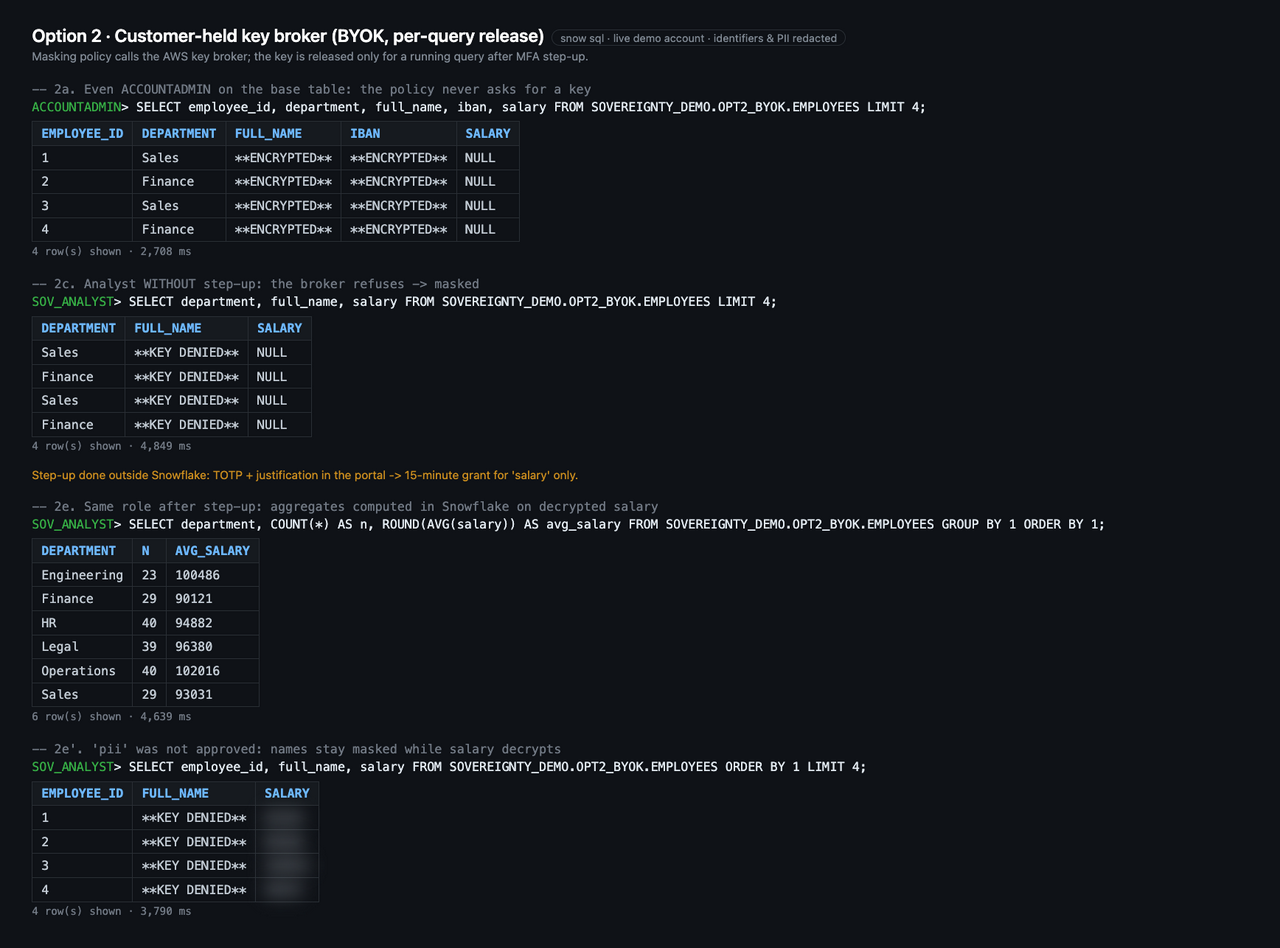
Errors fail closed: a deliberately broken KMS call returned NULL keys, never plaintext. And because queries that call external functions are not served from the result cache, every decrypting query is re-authorised by the broker.
The cost: a decrypting query over 200 rows takes about 4 seconds (p50 on an X-Small warehouse, against 0.1 seconds on plaintext), plus an AWS stack (KMS, Lambda, API Gateway, DynamoDB). It used to be 14.6 seconds: the call-back to QUERY_HISTORY_BY_USER was slow for a busy user until it was limited to the last 10 minutes with END_TIME_RANGE_START. Running queries are still found.
One more limit: external functions are not supported in Dynamic Tables, and a masking policy that returns **KEY DENIED** would store that placeholder as a value in a CREATE TABLE AS. Pipelines need one of the External Access UDF variants below, with a fail-closed mode.
Option 2b: the lightweight variant#

Same ciphertext in Snowflake, far less infrastructure. A Python UDF with an External Access Integration fetches the key directly from the owner’s vault and keeps it in a module-level memo.
The interesting part is how long that memo lives. The repo includes probe UDFs that measure it: the memo lived for one query. One query over 5,000 rows used 8 parallel processes and made 8 key fetches instead of 5,000. On a warm warehouse, the key was not carried over to the next query, session or role.
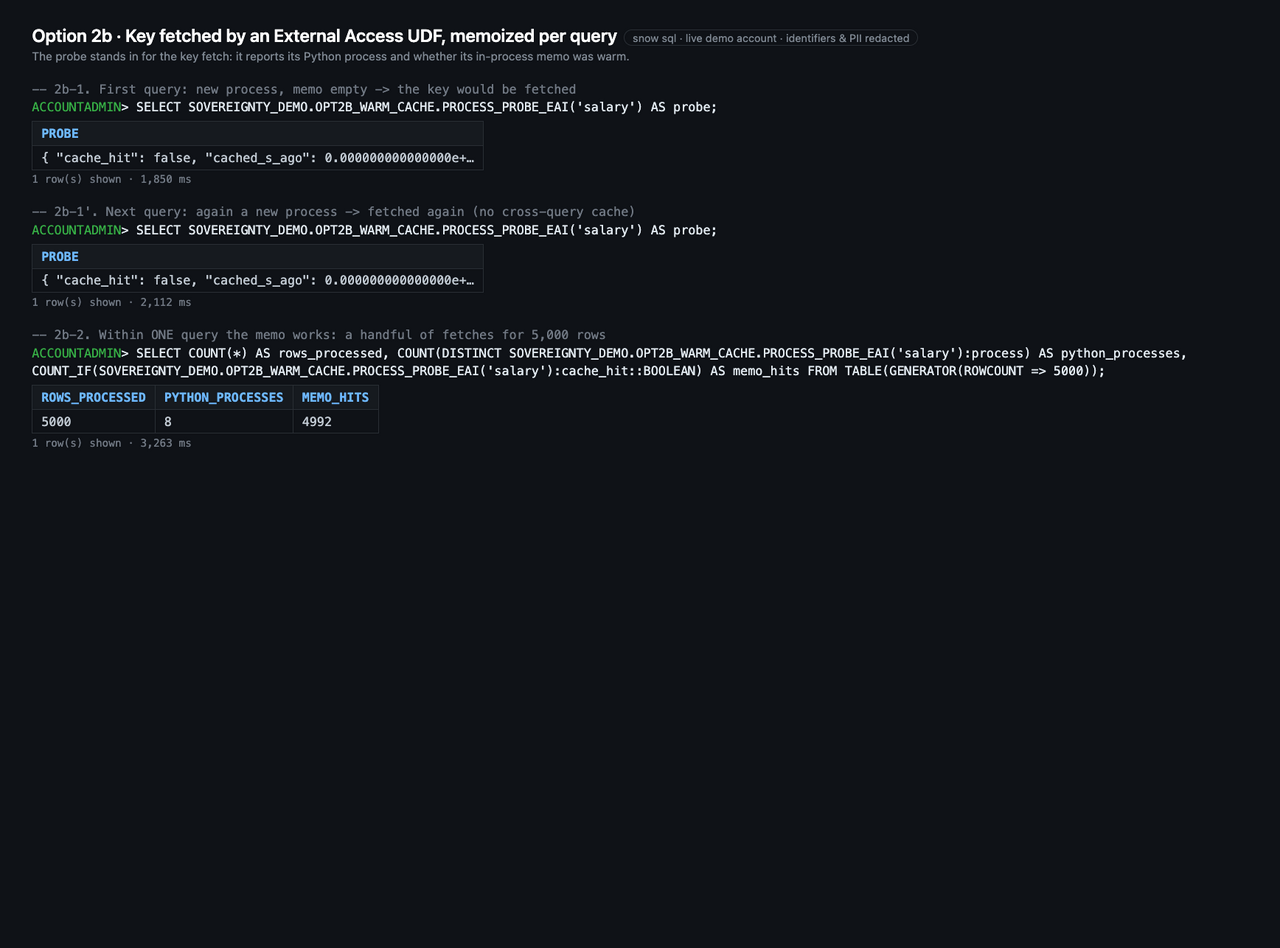
That is observed behaviour, not a documented contract, so the docs recommend designing for neither reuse nor non-reuse (for example, a TTL on the memo keyed by user and role). The bigger trade-off: the vault sees the integration, not the person. There is no step-up or replay protection unless you add it.
Option 2c: approve on your phone#
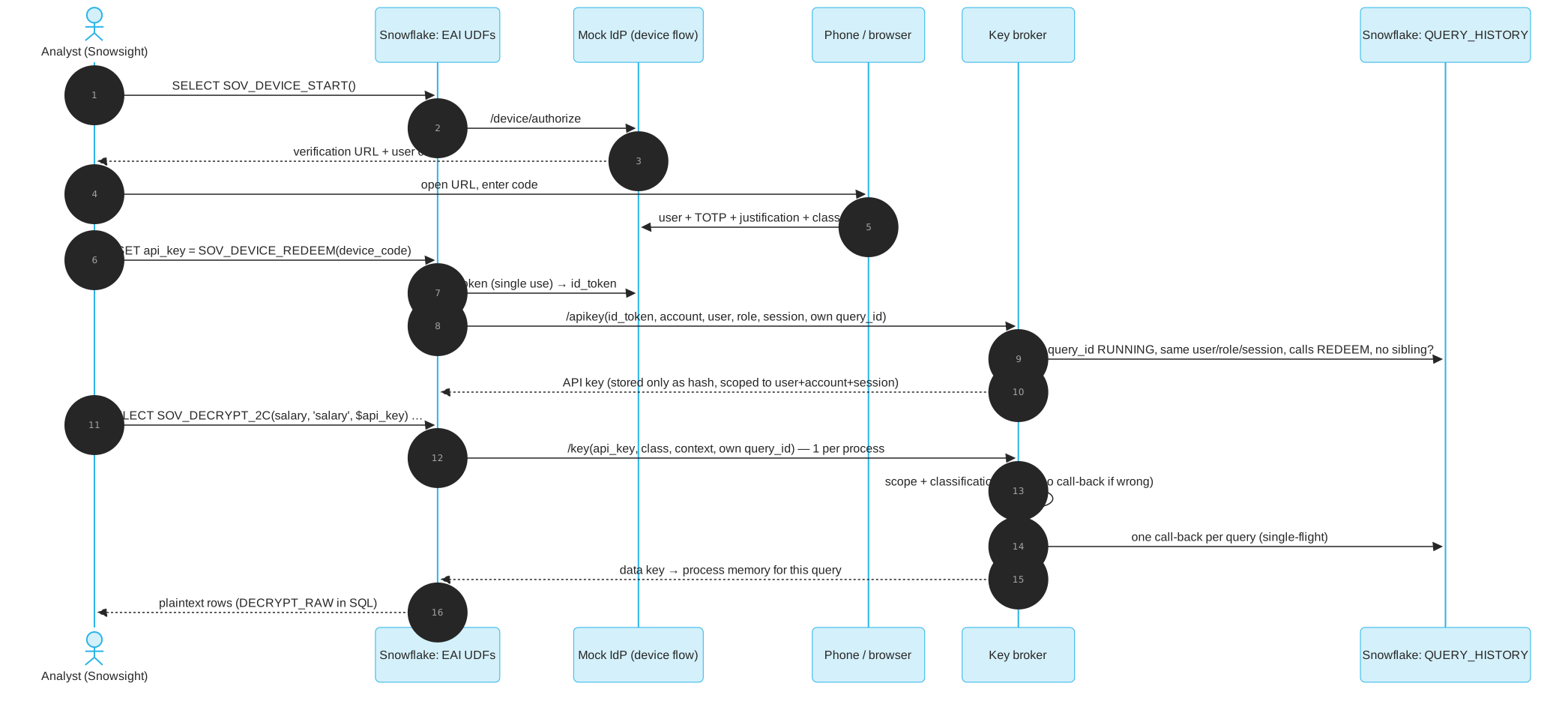
2c sits between the two: Option 2’s controls on Option 2b’s lightweight transport.
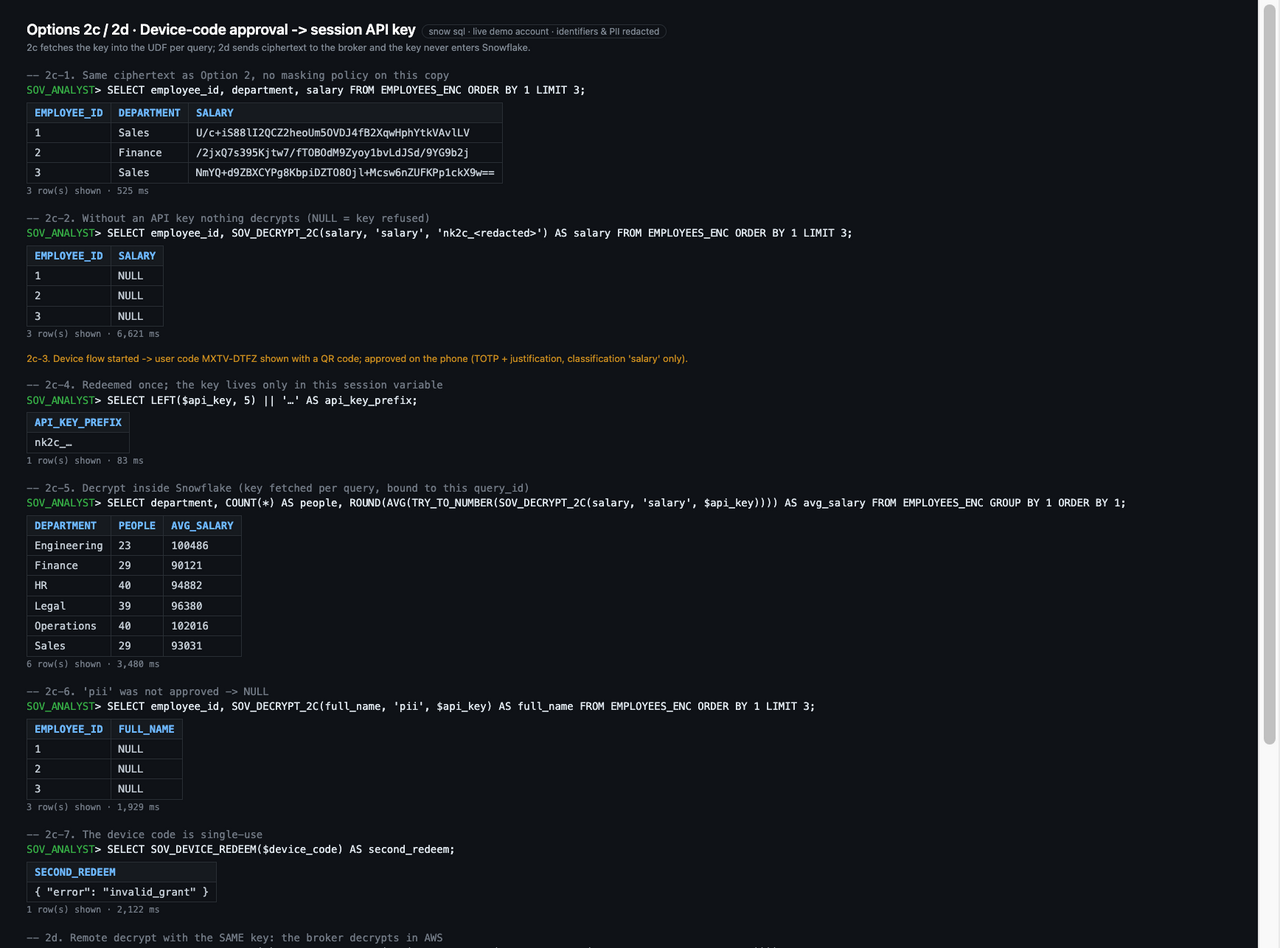
SELECT item, value FROM TABLE(SOV_DEVICE_LOGIN()) ORDER BY seq;  -- device code + ASCII QR in the result grid
-- scan the QR, enter TOTP, pick classes, write a justification, approve
SET api_key = (SELECT SOV_DEVICE_REDEEM($device_code):api_key::STRING);
SELECT department, AVG(TRY_TO_NUMBER(SOV_DECRYPT_2C(salary, 'salary', $api_key)))
FROM EMPLOYEES_ENC GROUP BY 1;
The analyst scans a QR code that is rendered as ASCII art right in the Snowsight result grid, enters a phone code and a reason, and gets an API key scoped to their user, account and session. Every key fetch is bound to the query’s own query ID, which the broker verifies is running, calls the 2c function, and is the only such query in that session.
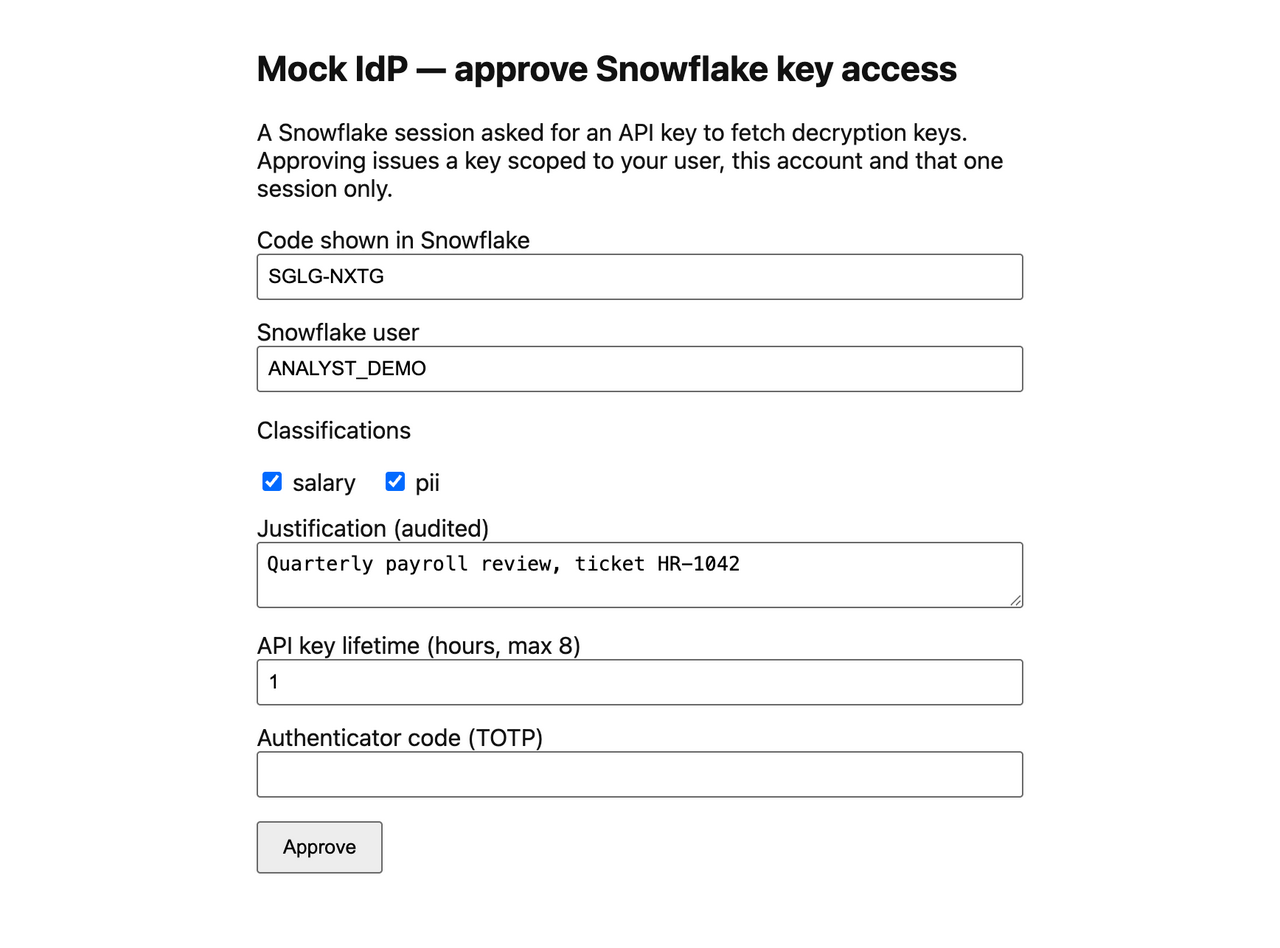
A UDF cannot read its own query ID directly, so two binding methods were benchmarked:
| A: query reads its own ID | B: broker looks up the session | |
|---|---|---|
| Correct binding (10 / 5,000 / 100,000 rows) | 45/45 | 45/45 |
| Back-to-back queries, same key | 15/15 | 8/15 |
| Extra time per query (p50) | +0.2–0.4 s | +0.4–0.9 s |
Method A wins and is the default. The benchmark also found a weakness (a sibling async query in the same session could borrow the binding), which was closed by requiring that no other such query is running. A stolen key used from another session returns NULL; a stolen key replayed with a finished query ID gets a 403.
The binding adds about 0.3 seconds per query, and the whole benchmark query runs in about 2.8 seconds, with per-person approval. The caveat: the self-ID pattern relies on behaviour that is observed but not documented.
Option 2d: the key never enters Snowflake#
In 2b and 2c, the plaintext data key sits in UDF memory while the query runs. For some requirements that is the line: “the key must never be in the platform.” 2d keeps 2c’s approval, API key and query binding, but the broker never hands out the key. A vectorized External Access UDF sends batches of up to 2,000 ciphertext values to the broker, the broker decrypts them in AWS, and only plaintext for this approved query comes back.
-- after the 2c phone approval, in the same session
SELECT department, ROUND(AVG(TRY_TO_NUMBER(SOV_DECRYPT_2D(salary, 'salary', $api_key)))) AS avg_salary
FROM EMPLOYEES_ENC GROUP BY 1;

-- for CREATE TABLE AS and pipelines: raise on denial instead of storing NULL
SELECT SOV_DECRYPT_2D_STRICT(salary, 'salary', $api_key) FROM EMPLOYEES_ENC;
The same shape works for external de-tokenization: send tokens, get values. And the broker now sees every batch it decrypts (row count, failures, query ID and justification), not just a key request.
The strict variant matters more than it looks. A function that returns NULL on denial is fine interactively. But if its result is stored, a denial, an unreachable broker or an unknown key ID becomes a committed NULL, and an incremental Dynamic Table never revisits committed rows.
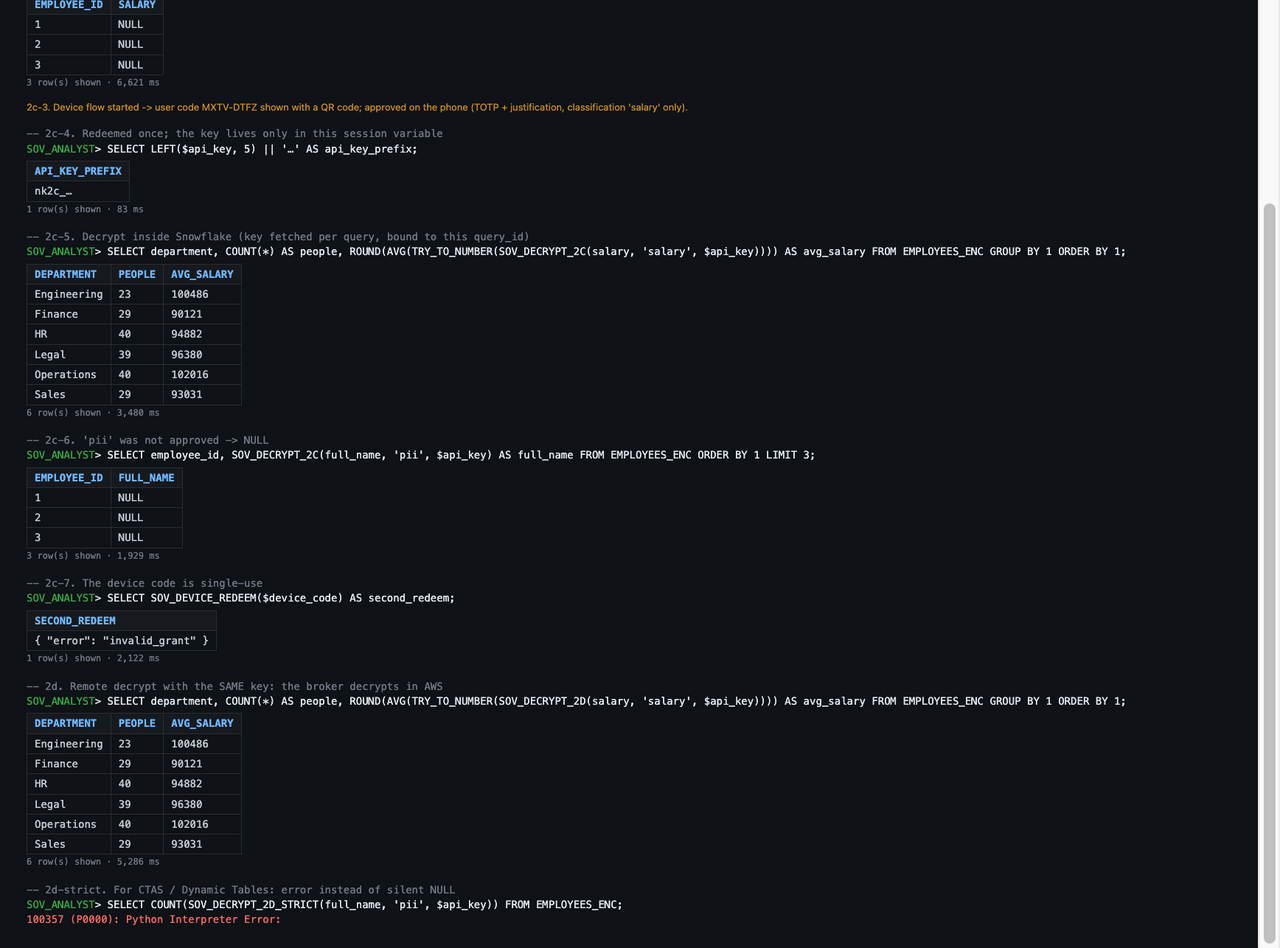
The trade: plaintext crosses the network on the way back (over TLS; outbound PrivateLink would keep it off the public internet), and cost grows with rows. In the benchmark the same aggregate took 4.0 seconds, against 2.9 seconds for 2c on the same data.
Option 3: keep it separate#

The strictest option, and the quickest one to try. Sensitive columns never go to Snowflake. An on-prem notebook pulls the non-sensitive rows from Snowflake, reads the sensitive rows from the local lake, joins them in DuckDB in local memory, and writes back only k-anonymous aggregates (k ≥ 5). Smaller groups are suppressed.
The verification is the point: Snowflake’s own query history for that session shows only SELECT * FROM EMPLOYEES_PUBLIC and the aggregate load. No sensitive value appears in any query, result or stage.
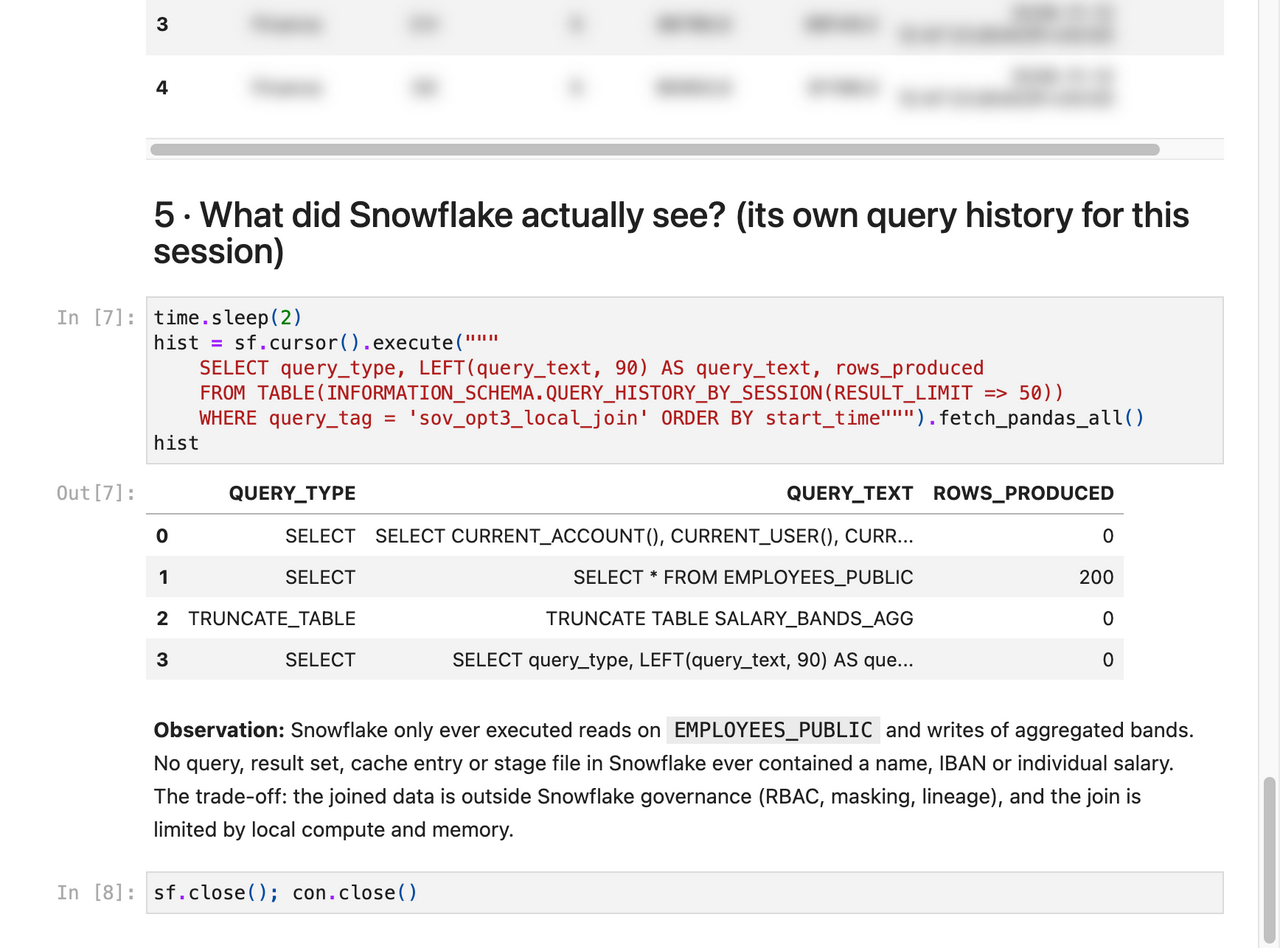
You lose the Snowflake experience for the combined data, and compute is limited to the local host.
Option 4: unlock only in your own app#

Ciphertext lives in Snowflake, but the key lives only in an on-prem Streamlit app behind OIDC. The app pulls ciphertext over ADBC, decrypts in memory, and caches plaintext in a locked-down in-memory DuckDB with a TTL. Snowflake never sees a key, a plaintext value, or a plaintext result.
The app was rewritten for this repo into a multipage app with 31 unit tests. User SQL goes through sqlglot (one read-only statement, no table functions), and DuckDB runs with external access disabled, so read_csv('/etc/hosts') is rejected at both layers.
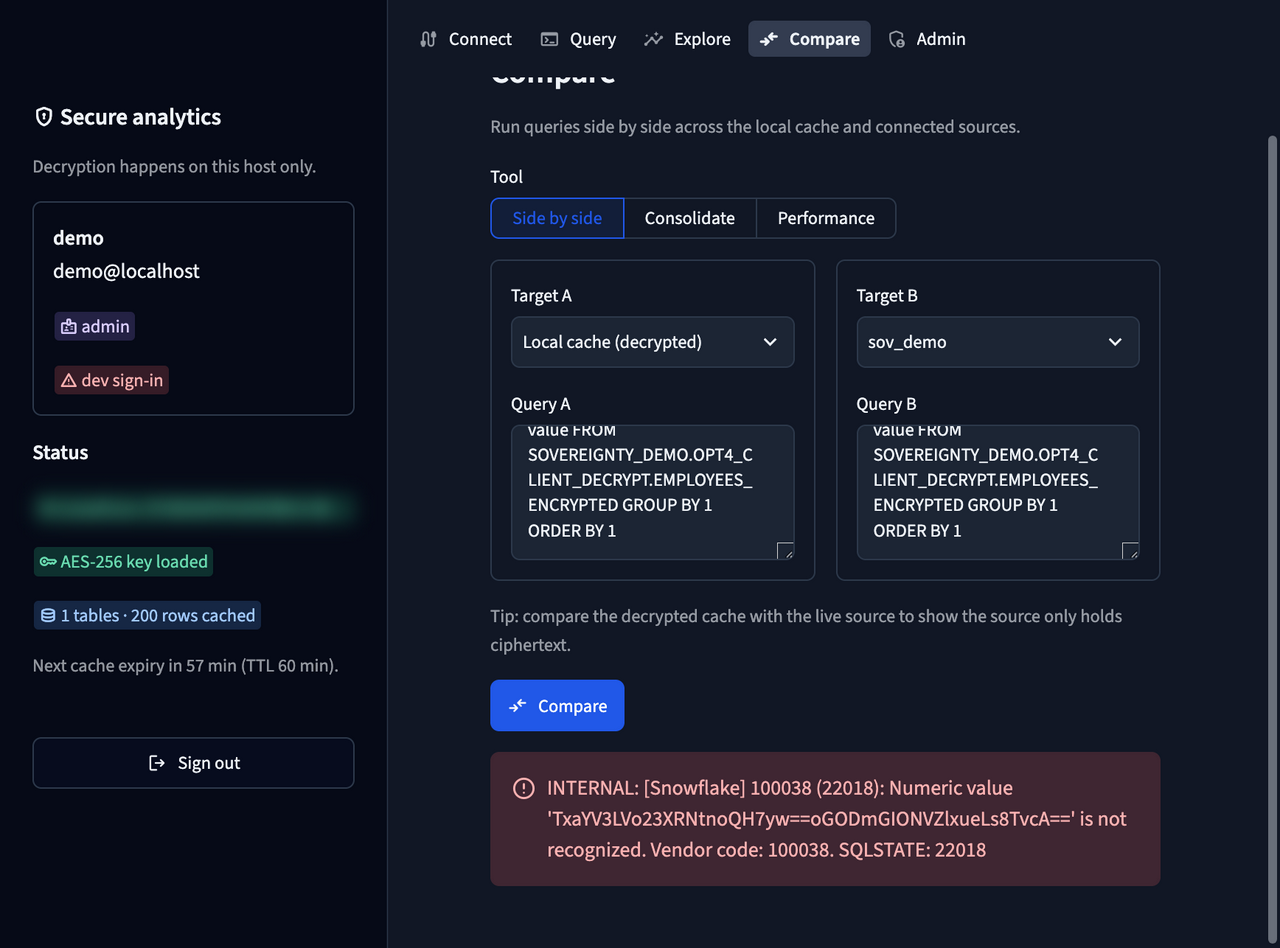
This fits a small, trusted on-prem analyst group. Aggregations on encrypted columns can’t be pushed down, so it suits departmental volumes, not full-table scans.
Bonus: compute without unlocking#

Some columns never need to be seen in Snowflake, only computed on. Salaries are the classic case. With homomorphic encryption (Microsoft SEAL via Pyfhel), Snowflake computes sums, averages, net pay, variance, correlation and even linear model scores on ciphertexts, in Python UDFs and UDAFs on a standard warehouse. Snowflake holds no secret key at all, not even transiently.
| Works on ciphertext | Not possible |
|---|---|
| SUM, COUNT, AVG, GROUP BY on plaintext dimensions | WHERE salary > x, ORDER BY, MIN/MAX |
| net pay = salary + bonus − deductions | joins on encrypted keys |
| variance, correlation, regression (CKKS) | division by an encrypted value |
| linear and polynomial model scoring |
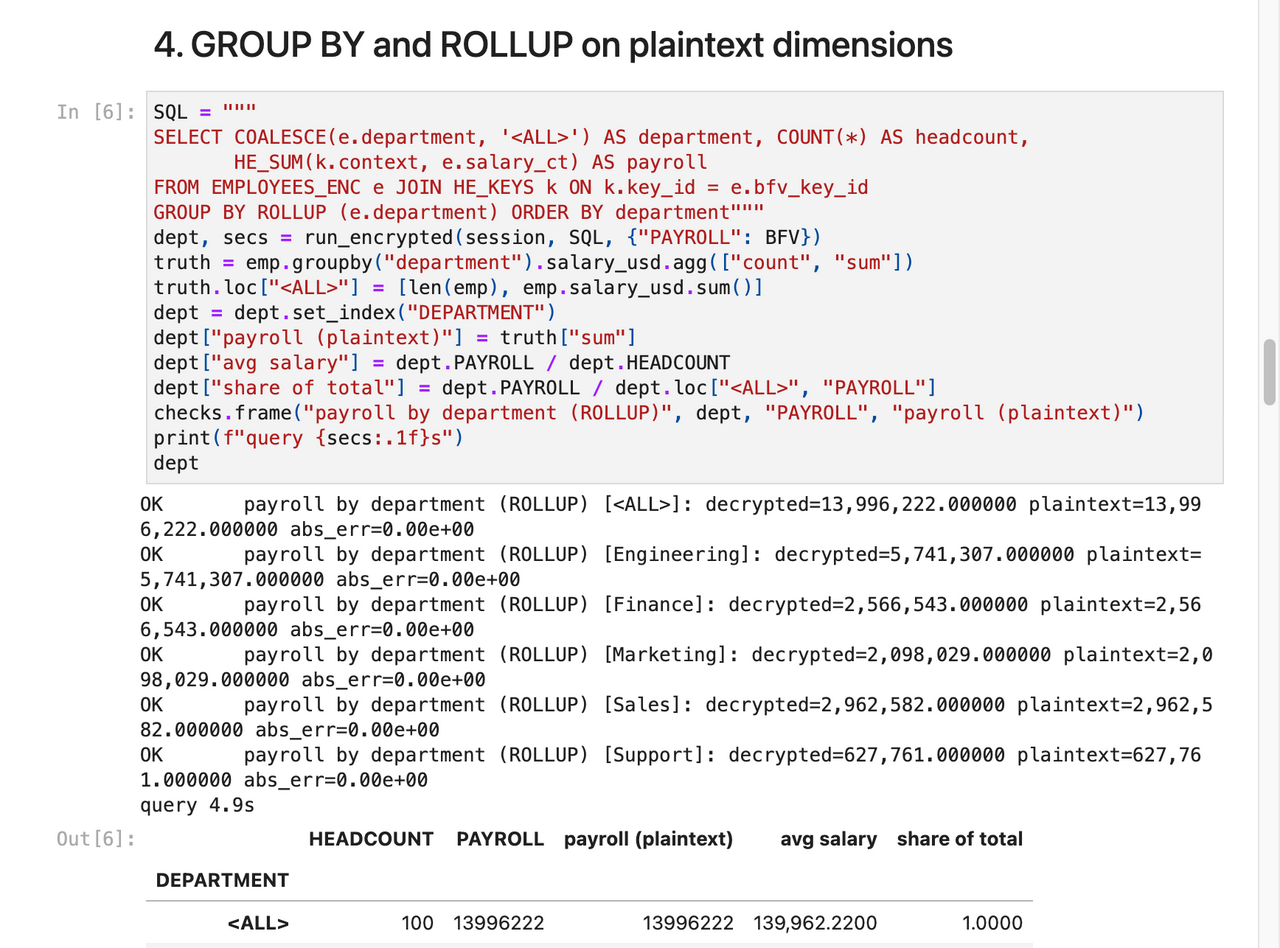
The price is size and speed: about 86 KB per value with BFV and 300 KB with CKKS. Packed (SIMD) mode puts a whole column into one ciphertext. Use it for a few high-value numeric columns, not whole tables. More detail in the dedicated repo.
Plus: synthetic data that keeps the insights#
Sometimes the right answer is to not share the real data at all. The repo includes a plain-SQL segment generator: learn statistics per department × country × level, merge segments smaller than 10 people into their parent, add Laplace noise to every published statistic, then sample new rows from the noisy statistics only.
On 5,000 rows, segment salary averages stayed within about 5% on average (the noise is random, so each run differs a little), the level ↔ salary correlation went from 0.86 to 0.84, and even a three-way effect (Sales × DE × level 5) survived. There were zero exact copies of real rows. Rare groups pay the price by design: a group of 12 people cannot be described in detail without describing the people.
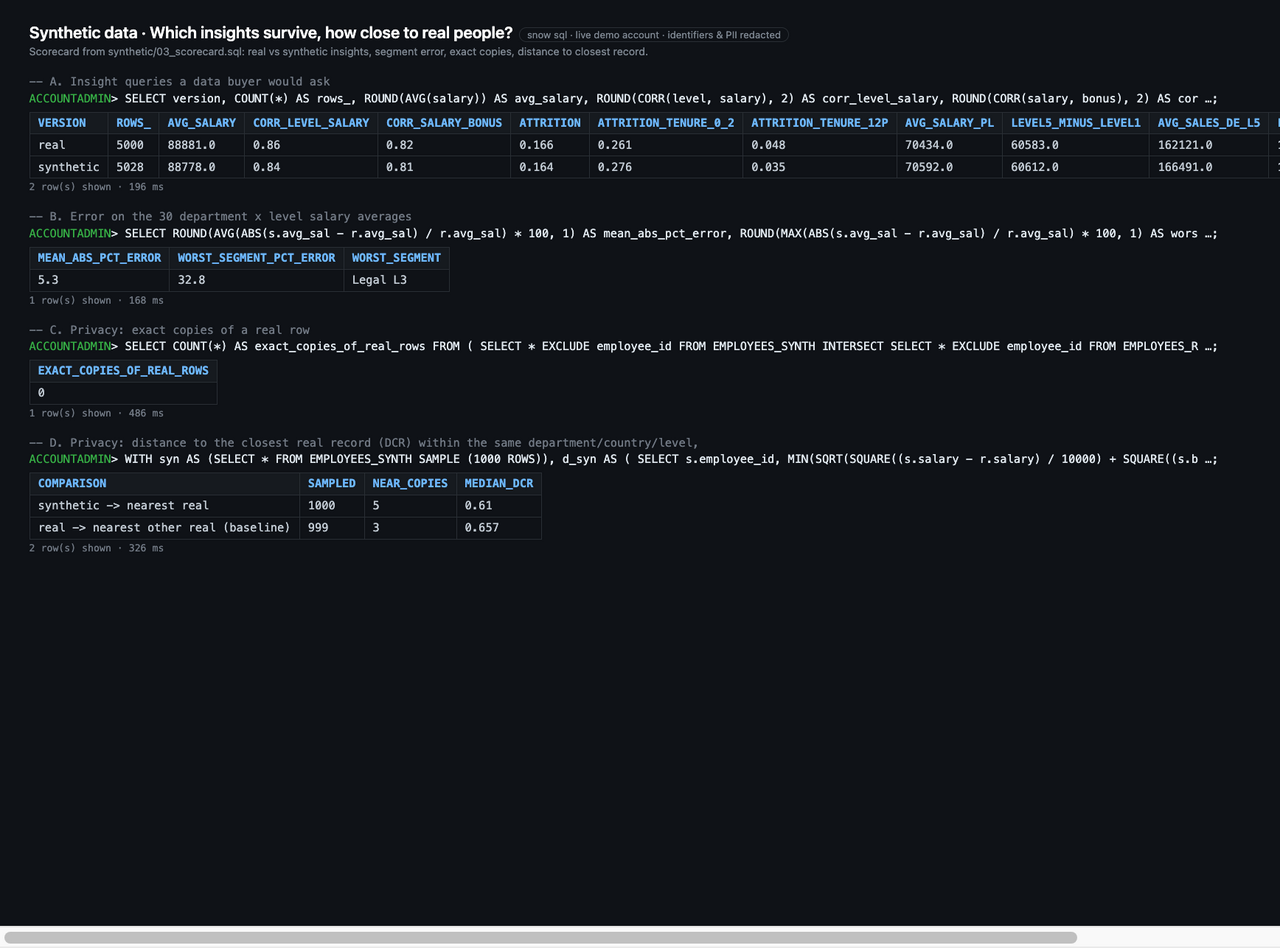
It is not an audited differential-privacy guarantee, and the docs say so. It is a practical tool for test data, partner sharing and data products with a published scorecard.
What it costs in latency#
The repo now benchmarks every option that can run unattended on the same workload: average salary per department over the 200 employees.
| Option | p50 in the demo setup |
|---|---|
| Plaintext baseline | 0.1 s |
| 1 Tunnel (live join) | 0.3 s |
| 1b Notebook + DuckDB through the tunnel | 0.04 s inside the notebook |
| 2 Key broker | 4.1 s |
| 2b EAI key fetch | 2.3 s |
| 2c Phone approval | 2.8 s |
| 2d Remote decrypt | 4.0 s |
| 3 Local join (incl. write-back) | 2.3 s |
| 4 Client decrypt | 0.1 s |
| ★ Homomorphic sum | 2.9 s (packed: 1.5 s) |
These figures come from a single demo account and a laptop as the “on-prem” side, with a few repetitions each. Read them as orders of magnitude, not a sizing guide. Still, the pattern is useful: the customer-held switch costs little, and per-query key control costs seconds, not minutes.
Choosing between them#

Two questions do most of the work:
- May the sensitive data be stored in Snowflake at all, even encrypted? If not, it is Option 1 (users need the Snowflake experience) or Option 3 (they don’t).
- If it may be stored encrypted, do people need to read values, or only compute on them? Arithmetic only points to homomorphic encryption. Reading values inside Snowflake points to Option 2 or 2c, or to 2d if the key itself may never be in the platform. Reading them in an on-prem app points to Option 4.
Before either question, check which requirement you are actually dealing with. Key custody is not data custody. “The key stays with us” (Options 2 to 2d) is a different requirement from “the data stays with us” (Options 1, 3 and 4). Decrypting upstream before loading also keeps the key out of Snowflake, but it puts plaintext in Snowflake from the first table on. Requirements documents often blur the two.
And the options combine. A realistic layering looks like this: native Snowflake controls for the bulk of the data, Option 2, 2c or 2d for identifying columns, homomorphic encryption for salaries, and Option 1 or 3 for the few datasets that may not be stored in the cloud at all.
What none of this solves#
The threat model in the repo is explicit about this, and I want to be too:
- None of the options stops an authorised user from copying what they are allowed to see. Result sets can be exported. Snowflake controls such as
PREVENT_UNLOAD_*, restricted stages and noCREATE TABLEfor analyst roles reduce this; they don’t eliminate it. - Options 1, 2, 2b, 2c and 2d control when and for whom plaintext exists in compute. They don’t make computation blind. Only Option 3, Option 4 and homomorphic encryption keep plaintext out of Snowflake entirely.
- Revocation isn’t instant everywhere. The brokers keep the KMS-unwrapped data key in memory and renew it every 30 minutes (
KEY_CACHE_TTL_S), so a revoked KMS grant takes effect within that window. Revoking the step-up grant is faster: in the Option 2 demo, the next query was denied again. - Some behaviour is observed, not documented: the Option 2b memo lifetime and the self-ID pattern used by Options 2c and 2d. The docs mark these clearly. A design shouldn’t depend on them silently.
- The demos take shortcuts (local TOTP secrets, a mock IdP, a dev sign-in, default lake credentials). Each is marked in the code. Replace them with your enterprise IdP, MFA and a managed vault before anything beyond a demo.
What the options do give you is a concrete answer to “what is still in our hands?”, backed by something you can run, measure and show to an auditor.
Try it#
The fastest start needs no AWS:
git clone https://github.com/sfc-gh-kkeller/customer-held-controls-for-data-sovereignty-in-snowflake.git
cd customer-held-controls-for-data-sovereignty-in-snowflake
export SNOW_CONNECTION=<your connection>
snow sql -c $SNOW_CONNECTION -f setup/00_common.sql

cd opt3-local-join && pixi run setup-snowflake && pixi run lab   # about 5 minutes
The synthetic data scripts take about 2 minutes. Options 2, 2b, 2c and 2d need an AWS account; Option 1 needs Docker and Snowpark Container Services. Once the options you want are set up, snowsight_demo.sql runs through every one of them in a single worksheet. Everything uses Pixi, so each option builds its own environment on the first pixi run.
If you’re working through sovereignty requirements and one of these patterns is close to what you need, or you find a hole in the threat model, I’d like to hear about it.